<?xml version="1.0" encoding="utf-8"?>
<feed xmlns="http://www.w3.org/2005/Atom">
	<title type="html"><![CDATA[Alfred's Serif Users' Forums — Booklet Printing Nightmare]]></title>
	<link rel="self" href="https://punster.me/serif/extern.php?action=feed&amp;tid=1200&amp;type=atom" />
	<updated>2026-06-02T19:07:30Z</updated>
	<generator>PunBB</generator>
	<id>https://punster.me/serif/viewtopic.php?id=1200</id>
		<entry>
			<title type="html"><![CDATA[Re: Booklet Printing Nightmare]]></title>
			<link rel="alternate" href="https://punster.me/serif/viewtopic.php?pid=9783#p9783" />
			<content type="html"><![CDATA[<p>Thinking of this further, I realise that my suggestion won&#039;t work if, as is likely, the text in your book is in a series of linked frames. Deleting pp1-24 would just result in the text starting in p25!</p><p>A solution would be to make a PDF version of the whole book file and use that to make the separate signature files as I suggested. This would also eliminate the need to adjust page numbering in the later signature files.</p><p>HOWEVER, note this WARNING! When you create this PDF file, give it a name different from the original .ppp file. This is a VERY IMPORTANT safeguard. The thing is, if (when) you open the PDF version in PagePlus, it becomes a .ppp file, and if it has the same name as the original, and you Save it from PagePlus, you will overwrite the original - something you must avoid! The PDF version will not have linked frames, so will be impossible to edit!</p><p>Should any future editing be required, use the original .ppp file, and repeat the procedure for making the signatue files.</p>]]></content>
			<author>
				<name><![CDATA[GB]]></name>
				<uri>https://punster.me/serif/profile.php?id=9</uri>
			</author>
			<updated>2026-06-02T19:07:30Z</updated>
			<id>https://punster.me/serif/viewtopic.php?pid=9783#p9783</id>
		</entry>
		<entry>
			<title type="html"><![CDATA[Re: Booklet Printing Nightmare]]></title>
			<link rel="alternate" href="https://punster.me/serif/viewtopic.php?pid=9777#p9777" />
			<content type="html"><![CDATA[<p>I suggest you create a separate file for each signature. First save the complete book as a single file and keep it safe and backed up.</p><p>Create the signatures by deleting the unwanted pages from a copy of the whole book file. Other than signature 1, you will have to use Format/Page Number Format to change the first page number.</p><p>If, for example, you are producing 24 page signatures (to be printed on six sheets), signature 1 will be the whole book file with pages 25-168 deleted.</p><p>Signature 2 will be the whole book file with pages 1-24 and 49-168 deleted, and the first page number changed to 25 using Format/Page Number Format. (Deleting the first 24 pages will have automatically caused p25 to be renumbered 1.)</p><p>You can then print the signatures separately, and the page numbering will be correct.</p>]]></content>
			<author>
				<name><![CDATA[GB]]></name>
				<uri>https://punster.me/serif/profile.php?id=9</uri>
			</author>
			<updated>2026-06-01T19:28:26Z</updated>
			<id>https://punster.me/serif/viewtopic.php?pid=9777#p9777</id>
		</entry>
		<entry>
			<title type="html"><![CDATA[Booklet Printing Nightmare]]></title>
			<link rel="alternate" href="https://punster.me/serif/viewtopic.php?pid=9773#p9773" />
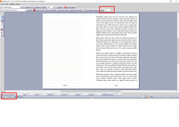
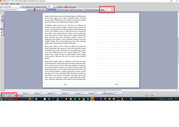
			<content type="html"><![CDATA[<p>UPDATE: The function I was needing is called Complex Signature Pagination, and not even InDesign offers it. But I did find a website that does it for free. It goes beyond imposition. This is definitely complex. </p><p>Here is the link to the Reddit article that led me to the solution. There is some valuable information in it for bookbinders.</p><p><a href="https://www.reddit.com/r/bookbinding/comments/z203kc/comment/ixf886u/">https://www.reddit.com/r/bookbinding/co … t/ixf886u/</a></p><p>Here is the link&nbsp; to the website that I would do the complex signature pagination function, if anyone is in need of this.</p><p><a href="https://momijizukamori.github.io/bookbinder-js/?rotatePage=true&amp;paperSize=LETTER&amp;paperSizeUnit=in&amp;paperRotation90=true&amp;sigOrderMarks=true&amp;pageScaling=centered&amp;pagePositioning=binding_aligned&amp;sigLength=6&amp;customSigLength=0">https://momijizukamori.github.io/bookbi … igLength=0</a></p><br /><br /><p>I am using PagePlus X9. I love this program to the moon and back. However, I am trying to print a book that is 168 pages long. Broken down it is 42 pages 8.5 x 11, 2 pages up, front and back making it a total of 4 numbered pages on each 8.5 x 11 sheet. Because I will be sewing the signatures, I am using the right side booklet option when I set up the document. If I use the book function, I would have to do a &quot;perfect bind&quot; which does not allow me to create a &quot;lay flat&quot; design. But sewing signatures into a text block does. </p><p>My problem is this.</p><p>But when I go to print it, it prints wrong. The front side the page is 168,1 and the backside is 2,167.</p><p>I will be setting up 6 letter size pages in each signature. That should give me pages 1-24. (The paginated numbered pages). But because it is grabbing the back pages of the document, I can&#039;t create signatures for the sewn text block. </p><p>See attached examples. </p><p>I hope someone knows what I am talking about. Can you help?</p><br /><br /><br /><p><a href="https://postimg.cc/zVDPyVyj"><span class="postimg"><img src="https://i.postimg.cc/zVDPyVyj/printing-error00.jpg" alt="https://i.postimg.cc/zVDPyVyj/printing-error00.jpg" /></span></a></p><p><a href="https://postimg.cc/Tp2HKpKt"><span class="postimg"><img src="https://i.postimg.cc/Tp2HKpKt/printing-error01.jpg" alt="https://i.postimg.cc/Tp2HKpKt/printing-error01.jpg" /></span></a></p>]]></content>
			<author>
				<name><![CDATA[Jennymac7064]]></name>
				<uri>https://punster.me/serif/profile.php?id=1005</uri>
			</author>
			<updated>2026-05-31T03:29:18Z</updated>
			<id>https://punster.me/serif/viewtopic.php?pid=9773#p9773</id>
		</entry>
</feed>