<?xml version="1.0" encoding="utf-8"?>
<feed xmlns="http://www.w3.org/2005/Atom">
	<title type="html"><![CDATA[Alfred's Serif Users' Forums — Deselect drawn lines]]></title>
	<link rel="self" href="https://punster.me/serif/extern.php?action=feed&amp;tid=363&amp;type=atom" />
	<updated>2023-01-25T03:34:39Z</updated>
	<generator>PunBB</generator>
	<id>https://punster.me/serif/viewtopic.php?id=363</id>
		<entry>
			<title type="html"><![CDATA[Re: Deselect drawn lines]]></title>
			<link rel="alternate" href="https://punster.me/serif/viewtopic.php?pid=2733#p2733" />
			<content type="html"><![CDATA[<p>Take a look at Help. Under Lines and Shapes there is a lot of information about drawing and editing lines.</p><p>Perhaps you should redraw the main outline as individual lines rather than a single line with bends.</p><p>The background grid might be better placed on a Master Page, and grouped - or use an empty&nbsp; table or a quick Grid.</p>]]></content>
			<author>
				<name><![CDATA[GB]]></name>
				<uri>https://punster.me/serif/profile.php?id=9</uri>
			</author>
			<updated>2023-01-25T03:34:39Z</updated>
			<id>https://punster.me/serif/viewtopic.php?pid=2733#p2733</id>
		</entry>
		<entry>
			<title type="html"><![CDATA[Re: Deselect drawn lines]]></title>
			<link rel="alternate" href="https://punster.me/serif/viewtopic.php?pid=2724#p2724" />
			<content type="html"><![CDATA[<p>That&#039;s very useful. Thanks Vicki.</p>]]></content>
			<author>
				<name><![CDATA[Cryptogram]]></name>
				<uri>https://punster.me/serif/profile.php?id=886</uri>
			</author>
			<updated>2023-01-24T15:56:27Z</updated>
			<id>https://punster.me/serif/viewtopic.php?pid=2724#p2724</id>
		</entry>
		<entry>
			<title type="html"><![CDATA[Re: Deselect drawn lines]]></title>
			<link rel="alternate" href="https://punster.me/serif/viewtopic.php?pid=2716#p2716" />
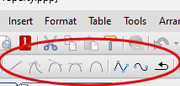
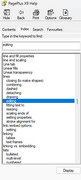
			<content type="html"><![CDATA[<p>Ive just downloaded your file.&nbsp; If you look in the right hand studio panel you should see pages layers and styles tabs.<br />If you select the layer tab then click on its plus sign it will expose all the layers which can be edited.&nbsp; Also some of your lines have a different mode of line shape Hope that is helpful.&nbsp; Vicki<br /><a href="https://postimg.cc/vgRvtgsj"><span class="postimg"><img src="https://i.postimg.cc/vgRvtgsj/2023-01-24-003605.jpg" alt="https://i.postimg.cc/vgRvtgsj/2023-01-24-003605.jpg" /></span></a><br />This may hep as well.</p><p><a href="https://postimg.cc/SXcg57Dq"><span class="postimg"><img src="https://i.postimg.cc/SXcg57Dq/2023-01-24-004244.jpg" alt="https://i.postimg.cc/SXcg57Dq/2023-01-24-004244.jpg" /></span></a></p>]]></content>
			<author>
				<name><![CDATA[Pioneer]]></name>
				<uri>https://punster.me/serif/profile.php?id=3</uri>
			</author>
			<updated>2023-01-24T00:19:16Z</updated>
			<id>https://punster.me/serif/viewtopic.php?pid=2716#p2716</id>
		</entry>
		<entry>
			<title type="html"><![CDATA[Re: Deselect drawn lines]]></title>
			<link rel="alternate" href="https://punster.me/serif/viewtopic.php?pid=2715#p2715" />
			<content type="html"><![CDATA[<p>Thanks Geoff. <br />One problem is that there is no jigsaw logo visible. I have attached the file in case you can offer a solution.</p><p>Better luck this time?????</p>]]></content>
			<author>
				<name><![CDATA[Cryptogram]]></name>
				<uri>https://punster.me/serif/profile.php?id=886</uri>
			</author>
			<updated>2023-01-23T22:13:23Z</updated>
			<id>https://punster.me/serif/viewtopic.php?pid=2715#p2715</id>
		</entry>
		<entry>
			<title type="html"><![CDATA[Re: Deselect drawn lines]]></title>
			<link rel="alternate" href="https://punster.me/serif/viewtopic.php?pid=2714#p2714" />
			<content type="html"><![CDATA[<p>As Alfred has said, there is no attachment. Please try again.</p><p>Meanwhile, what does the hintline (across the bottom of the screen) say, when your map is selected?</p>]]></content>
			<author>
				<name><![CDATA[GB]]></name>
				<uri>https://punster.me/serif/profile.php?id=9</uri>
			</author>
			<updated>2023-01-22T06:19:33Z</updated>
			<id>https://punster.me/serif/viewtopic.php?pid=2714#p2714</id>
		</entry>
		<entry>
			<title type="html"><![CDATA[Re: Deselect drawn lines]]></title>
			<link rel="alternate" href="https://punster.me/serif/viewtopic.php?pid=2713#p2713" />
			<content type="html"><![CDATA[<div class="quotebox"><cite>Cryptogram wrote:</cite><blockquote><p>I have attached the file in case you can offer a solution.</p></blockquote></div><p>There is no file attached. Please edit your post, press the ‘Choose File’ button in the Attachments area, browse to the file and then press the ‘Add file’ button when you return to this forum page.</p>]]></content>
			<author>
				<name><![CDATA[Alfred]]></name>
				<uri>https://punster.me/serif/profile.php?id=2</uri>
			</author>
			<updated>2023-01-21T18:39:39Z</updated>
			<id>https://punster.me/serif/viewtopic.php?pid=2713#p2713</id>
		</entry>
		<entry>
			<title type="html"><![CDATA[Re: Deselect drawn lines]]></title>
			<link rel="alternate" href="https://punster.me/serif/viewtopic.php?pid=2712#p2712" />
			<content type="html"><![CDATA[<p>Thanks Geoff. <br />One problem is that there is no jigsaw logo visible. I have attached the file in case you can offer a solution.</p>]]></content>
			<author>
				<name><![CDATA[Cryptogram]]></name>
				<uri>https://punster.me/serif/profile.php?id=886</uri>
			</author>
			<updated>2023-01-21T14:47:52Z</updated>
			<id>https://punster.me/serif/viewtopic.php?pid=2712#p2712</id>
		</entry>
		<entry>
			<title type="html"><![CDATA[Re: Deselect drawn lines]]></title>
			<link rel="alternate" href="https://punster.me/serif/viewtopic.php?pid=2703#p2703" />
			<content type="html"><![CDATA[<p>That rather depends on how you have drawn it - as a single item (closed curve or just a single line) or separate items grouped together.</p><p>If the latter, just ungroup them, either by clicking the jigsaw button at bottom right of the selection, or from the Arrange menu. Alternatively, you can select individual items within the group from the Layers tab.</p><p>If it&#039;s a closed curve (the hintline will tell you) there are several tools for manipulating it on the context toolbar (which appears when the object is selected).</p><p>If this doesn&#039;t help, perhaps you could attach your map here.</p><p>Geoff</p>]]></content>
			<author>
				<name><![CDATA[GB]]></name>
				<uri>https://punster.me/serif/profile.php?id=9</uri>
			</author>
			<updated>2023-01-18T21:28:39Z</updated>
			<id>https://punster.me/serif/viewtopic.php?pid=2703#p2703</id>
		</entry>
		<entry>
			<title type="html"><![CDATA[Deselect drawn lines]]></title>
			<link rel="alternate" href="https://punster.me/serif/viewtopic.php?pid=2702#p2702" />
			<content type="html"><![CDATA[<p>I have drawn a map of my property using PP. I want to make some alterations. The whole map is selected. How do I deselect it so that I can alter individual lines?</p>]]></content>
			<author>
				<name><![CDATA[Cryptogram]]></name>
				<uri>https://punster.me/serif/profile.php?id=886</uri>
			</author>
			<updated>2023-01-18T20:29:00Z</updated>
			<id>https://punster.me/serif/viewtopic.php?pid=2702#p2702</id>
		</entry>
</feed>