<?xml version="1.0" encoding="utf-8"?>
<feed xmlns="http://www.w3.org/2005/Atom">
	<title type="html"><![CDATA[Alfred's Serif Users' Forums — Select object]]></title>
	<link rel="self" href="https://punster.me/serif/extern.php?action=feed&amp;tid=398&amp;type=atom" />
	<updated>2023-03-10T12:33:13Z</updated>
	<generator>PunBB</generator>
	<id>https://punster.me/serif/viewtopic.php?id=398</id>
		<entry>
			<title type="html"><![CDATA[Re: Select object]]></title>
			<link rel="alternate" href="https://punster.me/serif/viewtopic.php?pid=2970#p2970" />
			<content type="html"><![CDATA[<p>I thought I must be going brain dead because there is no option to do this on one of my computers but there is on the other. So I&#039;m not as daft as I began to think.<br />Many thanks everyone.</p>]]></content>
			<author>
				<name><![CDATA[Cryptogram]]></name>
				<uri>https://punster.me/serif/profile.php?id=886</uri>
			</author>
			<updated>2023-03-10T12:33:13Z</updated>
			<id>https://punster.me/serif/viewtopic.php?pid=2970#p2970</id>
		</entry>
		<entry>
			<title type="html"><![CDATA[Re: Select object]]></title>
			<link rel="alternate" href="https://punster.me/serif/viewtopic.php?pid=2968#p2968" />
			<content type="html"><![CDATA[<p>Export as Picture is on the File drop-down menu.</p>]]></content>
			<author>
				<name><![CDATA[GB]]></name>
				<uri>https://punster.me/serif/profile.php?id=9</uri>
			</author>
			<updated>2023-03-09T22:41:21Z</updated>
			<id>https://punster.me/serif/viewtopic.php?pid=2968#p2968</id>
		</entry>
		<entry>
			<title type="html"><![CDATA[Re: Select object]]></title>
			<link rel="alternate" href="https://punster.me/serif/viewtopic.php?pid=2965#p2965" />
			<content type="html"><![CDATA[<p>Thanks for all your help everyone. I&#039;m now in the position where I can&#039;t find how to export. The &#039;help&#039; tells me to hit the File button but which is it? None of them are titled.</p>]]></content>
			<author>
				<name><![CDATA[Cryptogram]]></name>
				<uri>https://punster.me/serif/profile.php?id=886</uri>
			</author>
			<updated>2023-03-09T16:54:01Z</updated>
			<id>https://punster.me/serif/viewtopic.php?pid=2965#p2965</id>
		</entry>
		<entry>
			<title type="html"><![CDATA[Re: Select object]]></title>
			<link rel="alternate" href="https://punster.me/serif/viewtopic.php?pid=2959#p2959" />
			<content type="html"><![CDATA[<p>Hi Jandanz,</p><p>I agree! I think you will agree that PhotoPlus or similar would be easier, but if such is not available your suggestion would work OK.</p><p>Perhaps another possibility would be not to change what is there already, but to simply add the required text in a separate text frame, over the top of, and hiding, the existing,&nbsp; Depending on the graphic, it could be a problem matching the background if it is not plain.</p>]]></content>
			<author>
				<name><![CDATA[GB]]></name>
				<uri>https://punster.me/serif/profile.php?id=9</uri>
			</author>
			<updated>2023-03-07T19:27:07Z</updated>
			<id>https://punster.me/serif/viewtopic.php?pid=2959#p2959</id>
		</entry>
		<entry>
			<title type="html"><![CDATA[Re: Select object]]></title>
			<link rel="alternate" href="https://punster.me/serif/viewtopic.php?pid=2956#p2956" />
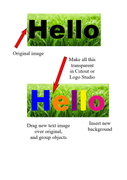
			<content type="html"><![CDATA[<p>It can be done using LogoStudio &amp; Cutout Studio, but it&#039;s rather fiddly!&nbsp; You would need to type your new text into a text box, then convert it to an image. It’s quite a learning curve!</p><p>See sample.<br /><a href="https://postimg.cc/8fkzpNYQ"><span class="postimg"><img src="https://i.postimg.cc/8fkzpNYQ/hello-trial.png" alt="https://i.postimg.cc/8fkzpNYQ/hello-trial.png" /></span></a><br />Hope it works for you.</p>]]></content>
			<author>
				<name><![CDATA[Jandanz]]></name>
				<uri>https://punster.me/serif/profile.php?id=732</uri>
			</author>
			<updated>2023-03-07T06:23:44Z</updated>
			<id>https://punster.me/serif/viewtopic.php?pid=2956#p2956</id>
		</entry>
		<entry>
			<title type="html"><![CDATA[Re: Select object]]></title>
			<link rel="alternate" href="https://punster.me/serif/viewtopic.php?pid=2955#p2955" />
			<content type="html"><![CDATA[<p>If the text is not actual text, but just a picture of text, the only way to change it is in a photo editing program such as PhotoPlus, or perhaps doing as Jandanz suggests.</p>]]></content>
			<author>
				<name><![CDATA[GB]]></name>
				<uri>https://punster.me/serif/profile.php?id=9</uri>
			</author>
			<updated>2023-03-06T23:08:33Z</updated>
			<id>https://punster.me/serif/viewtopic.php?pid=2955#p2955</id>
		</entry>
		<entry>
			<title type="html"><![CDATA[Re: Select object]]></title>
			<link rel="alternate" href="https://punster.me/serif/viewtopic.php?pid=2954#p2954" />
			<content type="html"><![CDATA[<p>What I actually wanted to do was change the colour of some text. This text is not &#039;proper&#039; text. It is part of the general graphic.&nbsp; I assumed I could put a selection frame round it and change bits of it. But all that happens is I move the whole graphic. Using the lasso tool doesn&#039;t get me anywhere.</p>]]></content>
			<author>
				<name><![CDATA[Cryptogram]]></name>
				<uri>https://punster.me/serif/profile.php?id=886</uri>
			</author>
			<updated>2023-03-06T16:12:04Z</updated>
			<id>https://punster.me/serif/viewtopic.php?pid=2954#p2954</id>
		</entry>
		<entry>
			<title type="html"><![CDATA[Re: Select object]]></title>
			<link rel="alternate" href="https://punster.me/serif/viewtopic.php?pid=2946#p2946" />
			<content type="html"><![CDATA[<p>Select the image. In PhotoLab select Crop and Straighten Tool.<br />Crop the area you require…&gt; OK<br />To proceed further if required, use Cutout Studio to create the Object you want.…&gt; OK<br />Save to Assets or Export as Picture<br />Hope that works for you…</p>]]></content>
			<author>
				<name><![CDATA[Jandanz]]></name>
				<uri>https://punster.me/serif/profile.php?id=732</uri>
			</author>
			<updated>2023-03-05T03:12:14Z</updated>
			<id>https://punster.me/serif/viewtopic.php?pid=2946#p2946</id>
		</entry>
		<entry>
			<title type="html"><![CDATA[Re: Select object]]></title>
			<link rel="alternate" href="https://punster.me/serif/viewtopic.php?pid=2945#p2945" />
			<content type="html"><![CDATA[<p>If you open the Layers tab all the items on the page (and paste board) are listed. You can select any one by clicking on it there</p><p>You will get the Move cursor when the object is selected. What is the object are you attempting to select?</p>]]></content>
			<author>
				<name><![CDATA[GB]]></name>
				<uri>https://punster.me/serif/profile.php?id=9</uri>
			</author>
			<updated>2023-03-05T00:36:59Z</updated>
			<id>https://punster.me/serif/viewtopic.php?pid=2945#p2945</id>
		</entry>
		<entry>
			<title type="html"><![CDATA[Re: Select object]]></title>
			<link rel="alternate" href="https://punster.me/serif/viewtopic.php?pid=2941#p2941" />
			<content type="html"><![CDATA[<p>There is no group of combined images, as you have suggested. It&#039;s just one image. And I&#039;m not sure what you mean by selecting using the layers tab.</p>]]></content>
			<author>
				<name><![CDATA[Cryptogram]]></name>
				<uri>https://punster.me/serif/profile.php?id=886</uri>
			</author>
			<updated>2023-03-04T14:27:45Z</updated>
			<id>https://punster.me/serif/viewtopic.php?pid=2941#p2941</id>
		</entry>
		<entry>
			<title type="html"><![CDATA[Re: Select object]]></title>
			<link rel="alternate" href="https://punster.me/serif/viewtopic.php?pid=2935#p2935" />
			<content type="html"><![CDATA[<p>I would guess that you are trying to select an object that is part of a group. Ungroup the group first - by clicking the joined-up jigsaw button at bottom right of the selected group, or from the Arrange menu </p><p>Or you can select an object that is in a group from the Layers tab.</p><p>Geoff</p>]]></content>
			<author>
				<name><![CDATA[GB]]></name>
				<uri>https://punster.me/serif/profile.php?id=9</uri>
			</author>
			<updated>2023-03-04T04:39:26Z</updated>
			<id>https://punster.me/serif/viewtopic.php?pid=2935#p2935</id>
		</entry>
		<entry>
			<title type="html"><![CDATA[Select object]]></title>
			<link rel="alternate" href="https://punster.me/serif/viewtopic.php?pid=2934#p2934" />
			<content type="html"><![CDATA[<p>I want to select an object so that I can play around with it but if I click the pointer or the lasso tool all that happens is I get a plus-shaped cursor that moves the whole image. How do I select just a part of it?</p>]]></content>
			<author>
				<name><![CDATA[Cryptogram]]></name>
				<uri>https://punster.me/serif/profile.php?id=886</uri>
			</author>
			<updated>2023-03-03T22:30:45Z</updated>
			<id>https://punster.me/serif/viewtopic.php?pid=2934#p2934</id>
		</entry>
</feed>
