<?xml version="1.0" encoding="utf-8"?>
<feed xmlns="http://www.w3.org/2005/Atom">
	<title type="html"><![CDATA[Alfred's Serif Users' Forums — How do you Format a Column in the Table Tool]]></title>
	<link rel="self" href="https://punster.me/serif/extern.php?action=feed&amp;tid=410&amp;type=atom" />
	<updated>2023-03-31T21:02:05Z</updated>
	<generator>PunBB</generator>
	<id>https://punster.me/serif/viewtopic.php?id=410</id>
		<entry>
			<title type="html"><![CDATA[Re: How do you Format a Column in the Table Tool]]></title>
			<link rel="alternate" href="https://punster.me/serif/viewtopic.php?pid=3035#p3035" />
			<content type="html"><![CDATA[<p>Thankyou for that. Have used PagePlus ages but not seen or had to use that icon before.</p><p>Still learning, thankyou.</p><p>George</p>]]></content>
			<author>
				<name><![CDATA[George]]></name>
				<uri>https://punster.me/serif/profile.php?id=828</uri>
			</author>
			<updated>2023-03-31T21:02:05Z</updated>
			<id>https://punster.me/serif/viewtopic.php?pid=3035#p3035</id>
		</entry>
		<entry>
			<title type="html"><![CDATA[Re: How do you Format a Column in the Table Tool]]></title>
			<link rel="alternate" href="https://punster.me/serif/viewtopic.php?pid=3018#p3018" />
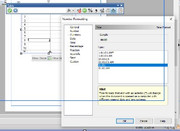
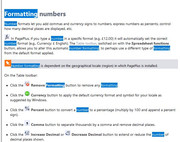
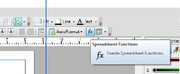
			<content type="html"><![CDATA[<p>To get to the dialogue I showed, with the table selected, click the fx button on the top toolbar.</p><p><a href="https://postimg.cc/VSGK49P4"><span class="postimg"><img src="https://i.postimg.cc/VSGK49P4/noformat1.jpg" alt="https://i.postimg.cc/VSGK49P4/noformat1.jpg" /></span></a></p><p>The Table toolbar will appear. Click the Number Format button on it.</p><br /><p><a href="https://postimg.cc/xkJmDLb6"><span class="postimg"><img src="https://i.postimg.cc/xkJmDLb6/noformat2.jpg" alt="https://i.postimg.cc/xkJmDLb6/noformat2.jpg" /></span></a></p><p>Can you do all your formatting in Excel, then Copy/Paste the whole Excel sheet into PagePlus? That will generate a PP Table automatically.</p>]]></content>
			<author>
				<name><![CDATA[GB]]></name>
				<uri>https://punster.me/serif/profile.php?id=9</uri>
			</author>
			<updated>2023-03-29T20:54:41Z</updated>
			<id>https://punster.me/serif/viewtopic.php?pid=3018#p3018</id>
		</entry>
		<entry>
			<title type="html"><![CDATA[Re: How do you Format a Column in the Table Tool]]></title>
			<link rel="alternate" href="https://punster.me/serif/viewtopic.php?pid=3017#p3017" />
			<content type="html"><![CDATA[<p>Thankyou. Continual experimenting has finally got my time column sorted, although more by luck than judgement methinks. </p><p>However whilst looking at your reply image and then looking at ‘Help’, I still cannot see how one gets to the screen that you have shown to be able to edit. I think I am still in the Excel mindsight where one just does a right click on a column and then can change the format.</p><p>All this though has also made me wonder whether there is actually any subtle difference between all the, what looks like nearly 50 tables one can select? Is it just cosmetic? Apart from the Calendar Tool I have not, up to now, needed to look at these Tools so am curious.&nbsp; </p><br /><p><a href="https://postimg.cc/z3v4SPZB"><span class="postimg"><img src="https://i.postimg.cc/z3v4SPZB/PP-02.jpg" alt="https://i.postimg.cc/z3v4SPZB/PP-02.jpg" /></span></a></p>]]></content>
			<author>
				<name><![CDATA[George]]></name>
				<uri>https://punster.me/serif/profile.php?id=828</uri>
			</author>
			<updated>2023-03-29T06:50:32Z</updated>
			<id>https://punster.me/serif/viewtopic.php?pid=3017#p3017</id>
		</entry>
		<entry>
			<title type="html"><![CDATA[Re: How do you Format a Column in the Table Tool]]></title>
			<link rel="alternate" href="https://punster.me/serif/viewtopic.php?pid=3016#p3016" />
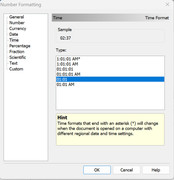
			<content type="html"><![CDATA[<p>I do not think you can have a leading zero in number formatting, but the time format is available<br /><a href="https://postimg.cc/YL1K3mF1"><span class="postimg"><img src="https://i.postimg.cc/YL1K3mF1/Publication1.jpg" alt="https://i.postimg.cc/YL1K3mF1/Publication1.jpg" /></span></a><br />You can have a leading zero if you enter the number as text. To do this just add &#039; before the number, eg &#039;01.</p>]]></content>
			<author>
				<name><![CDATA[GB]]></name>
				<uri>https://punster.me/serif/profile.php?id=9</uri>
			</author>
			<updated>2023-03-29T00:52:24Z</updated>
			<id>https://punster.me/serif/viewtopic.php?pid=3016#p3016</id>
		</entry>
		<entry>
			<title type="html"><![CDATA[How do you Format a Column in the Table Tool]]></title>
			<link rel="alternate" href="https://punster.me/serif/viewtopic.php?pid=3015#p3015" />
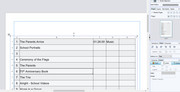
			<content type="html"><![CDATA[<p>How does one format columns within a Table in Page Plus X7?</p><p>I’ve tried ‘right-clicking’ columns, looking at the Manual &amp; the Help tab, but still cannot find the answer. Must admit that whilst I annually use the Calendar Tool, I rarely, if ever, the Table Tool. Hence my issue.</p><p>In this case quite basic. In column ‘A’, I want the first nine numbers in this column to have a ‘0’ before the1,2,3 etc. In column ‘C’, I want to get rid of the last ‘00’. This column represents the time, in minutes and seconds.&nbsp; &nbsp;</p><p>I have also looked on Youtube but cannot find a Tutorial on using the Table Tool. </p><p>George</p><p>PS - Hopefully there should be a screenshot attached</p><br /><br /><p><a href="https://postimg.cc/hQ7Nkyrq"><span class="postimg"><img src="https://i.postimg.cc/hQ7Nkyrq/Page-Plus.jpg" alt="https://i.postimg.cc/hQ7Nkyrq/Page-Plus.jpg" /></span></a></p>]]></content>
			<author>
				<name><![CDATA[George]]></name>
				<uri>https://punster.me/serif/profile.php?id=828</uri>
			</author>
			<updated>2023-03-28T20:48:05Z</updated>
			<id>https://punster.me/serif/viewtopic.php?pid=3015#p3015</id>
		</entry>
</feed>