<?xml version="1.0" encoding="utf-8"?>
<feed xmlns="http://www.w3.org/2005/Atom">
	<title type="html"><![CDATA[Alfred's Serif Users' Forums — Repositioning picture in a frame]]></title>
	<link rel="self" href="https://punster.me/serif/extern.php?action=feed&amp;tid=557&amp;type=atom" />
	<updated>2024-02-05T13:46:29Z</updated>
	<generator>PunBB</generator>
	<id>https://punster.me/serif/viewtopic.php?id=557</id>
		<entry>
			<title type="html"><![CDATA[Re: Repositioning picture in a frame]]></title>
			<link rel="alternate" href="https://punster.me/serif/viewtopic.php?pid=4196#p4196" />
			<content type="html"><![CDATA[<div class="quotebox"><cite>Pilotlon wrote:</cite><blockquote><p>Back on track.&nbsp; That worked a treat, Karen. Thanks again.</p><br /><p><a href="https://postimg.cc/t7Z6GGd7"><span class="postimg"><img src="https://i.postimg.cc/t7Z6GGd7/Yvonne-Christmas.jpg" alt="https://i.postimg.cc/t7Z6GGd7/Yvonne-Christmas.jpg" /></span></a></p></blockquote></div><p>You&#039;re welcome, Lon. <span class="postimg"><img src="https://punster.me/images/biggrin.gif" alt="https://punster.me/images/biggrin.gif" /></span></p><p>Another beautiful page. <span class="postimg"><img src="https://punster.me/images/proposetoast.gif" alt="https://punster.me/images/proposetoast.gif" /></span></p>]]></content>
			<author>
				<name><![CDATA[KarenPL]]></name>
				<uri>https://punster.me/serif/profile.php?id=6</uri>
			</author>
			<updated>2024-02-05T13:46:29Z</updated>
			<id>https://punster.me/serif/viewtopic.php?pid=4196#p4196</id>
		</entry>
		<entry>
			<title type="html"><![CDATA[Re: Repositioning picture in a frame]]></title>
			<link rel="alternate" href="https://punster.me/serif/viewtopic.php?pid=4195#p4195" />
			<content type="html"><![CDATA[<p>Back on track.&nbsp; That worked a treat, Karen. Thanks </p><p><strong>EDIT:</strong>&nbsp; Not quire sure what I was doing prior. If I click on &quot;Select cropped items&quot; now, it does indeed allow me to manipulate the image.</p><br /><p><a href="https://postimg.cc/t7Z6GGd7"><span class="postimg"><img src="https://i.postimg.cc/t7Z6GGd7/Yvonne-Christmas.jpg" alt="https://i.postimg.cc/t7Z6GGd7/Yvonne-Christmas.jpg" /></span></a></p>]]></content>
			<author>
				<name><![CDATA[Pilotlon]]></name>
				<uri>https://punster.me/serif/profile.php?id=1004</uri>
			</author>
			<updated>2024-02-05T13:40:10Z</updated>
			<id>https://punster.me/serif/viewtopic.php?pid=4195#p4195</id>
		</entry>
		<entry>
			<title type="html"><![CDATA[Re: Repositioning picture in a frame]]></title>
			<link rel="alternate" href="https://punster.me/serif/viewtopic.php?pid=4194#p4194" />
			<content type="html"><![CDATA[<div class="quotebox"><cite>Alfred wrote:</cite><blockquote><p>Doesn’t the ‘Select Cropped Item(s)’ thingy [technical term™] do the same job? <span class="postimg"><img src="https://punster.me/images/unsure.gif" alt="https://punster.me/images/unsure.gif" /></span></p></blockquote></div><p>I&#039;ve just had a go while I&#039;ve got CA open, and yes, when I click on &quot;select cropped items&quot; it does let me enlarge/move the photo. Trust me to always find the more convoluted way to play. <span class="postimg"><img src="https://punster.me/images/tongue.gif" alt="https://punster.me/images/tongue.gif" /></span></p><div class="quotebox"><cite>Pilotlon wrote:</cite><blockquote><p>I thought that &quot;select cropped items&quot; would do it also. But, I must be then missing one more step, as I continue to get only the frame selected.</p><p>Hiya, Karen!!</p></blockquote></div><p>Hiya, Lon! <span class="postimg"><img src="https://punster.me/images/thumbup.gif" alt="https://punster.me/images/thumbup.gif" /></span></p>]]></content>
			<author>
				<name><![CDATA[KarenPL]]></name>
				<uri>https://punster.me/serif/profile.php?id=6</uri>
			</author>
			<updated>2024-02-05T13:22:20Z</updated>
			<id>https://punster.me/serif/viewtopic.php?pid=4194#p4194</id>
		</entry>
		<entry>
			<title type="html"><![CDATA[Re: Repositioning picture in a frame]]></title>
			<link rel="alternate" href="https://punster.me/serif/viewtopic.php?pid=4192#p4192" />
			<content type="html"><![CDATA[<p>I thought that &quot;select cropped items&quot; would do it also. But, I must be then missing one more step, as I continue to get only the frame selected.</p><p>Hiya, Karen!!</p><br /><p><strong>EDIT </strong> Going to layers did the trick. Gosh, so much I&#039;ve forgotten.&nbsp; All&#039;s well.&nbsp; Thanks, Karen.</p>]]></content>
			<author>
				<name><![CDATA[Pilotlon]]></name>
				<uri>https://punster.me/serif/profile.php?id=1004</uri>
			</author>
			<updated>2024-02-05T12:59:02Z</updated>
			<id>https://punster.me/serif/viewtopic.php?pid=4192#p4192</id>
		</entry>
		<entry>
			<title type="html"><![CDATA[Re: Repositioning picture in a frame]]></title>
			<link rel="alternate" href="https://punster.me/serif/viewtopic.php?pid=4191#p4191" />
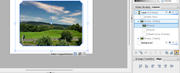
			<content type="html"><![CDATA[<div class="quotebox"><cite>KarenPL wrote:</cite><blockquote><p>I click on the frame/picture and then usually go to the Layers Tab, click on the little arrow to the right of the frame/image I want to play with so it opens the item into its component parts, and then click on the Picture. </p><br /><br /><p><a href="https://postimg.cc/wRgjYwG0"><span class="postimg"><img src="https://i.postimg.cc/wRgjYwG0/Screenshot-2024-02-05-124522.png" alt="https://i.postimg.cc/wRgjYwG0/Screenshot-2024-02-05-124522.png" /></span></a></p></blockquote></div><br /><p>Doesn’t the ‘Select Cropped Item(s)’ thingy [technical term™] do the same job? <span class="postimg"><img src="https://punster.me/images/unsure.gif" alt="https://punster.me/images/unsure.gif" /></span></p>]]></content>
			<author>
				<name><![CDATA[Alfred]]></name>
				<uri>https://punster.me/serif/profile.php?id=2</uri>
			</author>
			<updated>2024-02-05T12:56:54Z</updated>
			<id>https://punster.me/serif/viewtopic.php?pid=4191#p4191</id>
		</entry>
		<entry>
			<title type="html"><![CDATA[Re: Repositioning picture in a frame]]></title>
			<link rel="alternate" href="https://punster.me/serif/viewtopic.php?pid=4189#p4189" />
			<content type="html"><![CDATA[<p>I click on the frame/picture and then usually go to the Layers Tab, click on the little arrow to the right of the frame/image I want to play with so it opens the item into its component parts, and then click on the Picture. </p><br /><br /><p><a href="https://postimg.cc/wRgjYwG0"><span class="postimg"><img src="https://i.postimg.cc/wRgjYwG0/Screenshot-2024-02-05-124522.png" alt="https://i.postimg.cc/wRgjYwG0/Screenshot-2024-02-05-124522.png" /></span></a></p>]]></content>
			<author>
				<name><![CDATA[KarenPL]]></name>
				<uri>https://punster.me/serif/profile.php?id=6</uri>
			</author>
			<updated>2024-02-05T12:46:47Z</updated>
			<id>https://punster.me/serif/viewtopic.php?pid=4189#p4189</id>
		</entry>
		<entry>
			<title type="html"><![CDATA[Repositioning picture in a frame]]></title>
			<link rel="alternate" href="https://punster.me/serif/viewtopic.php?pid=4187#p4187" />
			<content type="html"><![CDATA[<p>I may be misremembering, but once a picture is dropped in a frame, isn&#039;t there a way to reposition the picture within the frame....fine tuning it?&nbsp; When I double-click the picture-populated frame, I get the frame selected, and not the image within it. So, I can manipulate the frame size, position, and rotation....no problem. However, I can&#039;t seem to get the image selected, to further manipulate it.</p>]]></content>
			<author>
				<name><![CDATA[Pilotlon]]></name>
				<uri>https://punster.me/serif/profile.php?id=1004</uri>
			</author>
			<updated>2024-02-05T12:24:52Z</updated>
			<id>https://punster.me/serif/viewtopic.php?pid=4187#p4187</id>
		</entry>
</feed>