<?xml version="1.0" encoding="utf-8"?>
<feed xmlns="http://www.w3.org/2005/Atom">
	<title type="html"><![CDATA[Alfred's Serif Users' Forums — Page/File name]]></title>
	<link rel="self" href="https://punster.me/serif/extern.php?action=feed&amp;tid=633&amp;type=atom" />
	<updated>2024-04-26T04:49:52Z</updated>
	<generator>PunBB</generator>
	<id>https://punster.me/serif/viewtopic.php?id=633</id>
		<entry>
			<title type="html"><![CDATA[Re: Page/File name]]></title>
			<link rel="alternate" href="https://punster.me/serif/viewtopic.php?pid=4891#p4891" />
			<content type="html"><![CDATA[<p>GB, Thank you for your comments.<br />It&#039;s not the file name that is the problem.&nbsp; When a new document is created, PagePlus appears to assign it an internal name &quot;Publication1&quot;.&nbsp; I can save it to a file with any name but the internal name stays the same. I want to know how to change the internal name.<br />I am saving it as a PDF because I want other people to be able to view it.</p>]]></content>
			<author>
				<name><![CDATA[melliff]]></name>
				<uri>https://punster.me/serif/profile.php?id=993</uri>
			</author>
			<updated>2024-04-26T04:49:52Z</updated>
			<id>https://punster.me/serif/viewtopic.php?pid=4891#p4891</id>
		</entry>
		<entry>
			<title type="html"><![CDATA[Re: Page/File name]]></title>
			<link rel="alternate" href="https://punster.me/serif/viewtopic.php?pid=4878#p4878" />
			<content type="html"><![CDATA[<p>You can change file names in File Explorer. But why don&#039;t you give it the name you want when you first save it? When you click Save on a new document you get a dialogue box that allows to name the file.</p><p>If you only save it as a PDF, future editing will be more difficult. It is better to keep a .ppp version.</p>]]></content>
			<author>
				<name><![CDATA[GB]]></name>
				<uri>https://punster.me/serif/profile.php?id=9</uri>
			</author>
			<updated>2024-04-25T18:44:25Z</updated>
			<id>https://punster.me/serif/viewtopic.php?pid=4878#p4878</id>
		</entry>
		<entry>
			<title type="html"><![CDATA[Re: Page/File name]]></title>
			<link rel="alternate" href="https://punster.me/serif/viewtopic.php?pid=4872#p4872" />
			<content type="html"><![CDATA[<p>Sorry, it lost the attchment. I&#039;ll try the image option:</p><br /><p><a href="https://postimg.cc/XX32vSBY"><span class="postimg"><img src="https://i.postimg.cc/XX32vSBY/Image1.jpg" alt="https://i.postimg.cc/XX32vSBY/Image1.jpg" /></span></a></p>]]></content>
			<author>
				<name><![CDATA[melliff]]></name>
				<uri>https://punster.me/serif/profile.php?id=993</uri>
			</author>
			<updated>2024-04-25T12:36:22Z</updated>
			<id>https://punster.me/serif/viewtopic.php?pid=4872#p4872</id>
		</entry>
		<entry>
			<title type="html"><![CDATA[Re: Page/File name]]></title>
			<link rel="alternate" href="https://punster.me/serif/viewtopic.php?pid=4871#p4871" />
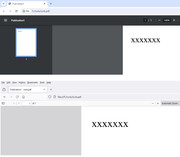
			<content type="html"><![CDATA[<p>Jordanz, thank you for your response.</p><p>I am using PPX9.&nbsp; I have attached a file containing the pdf displayed in Chrome foillowed by Firefox. You can see the original Pageplus name in the tabs, but the file is called &quot;Junk.pdf&quot;.</p>]]></content>
			<author>
				<name><![CDATA[melliff]]></name>
				<uri>https://punster.me/serif/profile.php?id=993</uri>
			</author>
			<updated>2024-04-25T12:33:49Z</updated>
			<id>https://punster.me/serif/viewtopic.php?pid=4871#p4871</id>
		</entry>
		<entry>
			<title type="html"><![CDATA[Re: Page/File name]]></title>
			<link rel="alternate" href="https://punster.me/serif/viewtopic.php?pid=4870#p4870" />
			<content type="html"><![CDATA[<p>Which browser &amp; which version of PagePlus are you using? I changed the filename of the pdf file exported from PPX9, and opened it in Google Chrome, and all I see is the new filename.</p>]]></content>
			<author>
				<name><![CDATA[Jandanz]]></name>
				<uri>https://punster.me/serif/profile.php?id=732</uri>
			</author>
			<updated>2024-04-25T10:20:49Z</updated>
			<id>https://punster.me/serif/viewtopic.php?pid=4870#p4870</id>
		</entry>
		<entry>
			<title type="html"><![CDATA[Page/File name]]></title>
			<link rel="alternate" href="https://punster.me/serif/viewtopic.php?pid=4869#p4869" />
			<content type="html"><![CDATA[<p>When I create a new publication, the page is identified in the top line (or in a tab) as &quot;Publication1&quot;.&nbsp; If I export the page as a pdf the default filename is &quot;Publication 1&quot;. I can change the filename to something else eg &quot;Junk&quot;.&nbsp; The saved file will be Junk.pdf.&nbsp; If I open the file with a web browser, the tab at the top of the browser has the name &quot;Publication1 - Junk.pdf&quot;.</p><p>How do I change the default name (&quot;Publication1&quot;) in Pageplus to something else?.&nbsp; I have tried properties but this not not seem to work.</p>]]></content>
			<author>
				<name><![CDATA[melliff]]></name>
				<uri>https://punster.me/serif/profile.php?id=993</uri>
			</author>
			<updated>2024-04-25T08:04:51Z</updated>
			<id>https://punster.me/serif/viewtopic.php?pid=4869#p4869</id>
		</entry>
</feed>
