<?xml version="1.0" encoding="utf-8"?>
<feed xmlns="http://www.w3.org/2005/Atom">
	<title type="html"><![CDATA[Alfred's Serif Users' Forums — Embed videos not playing]]></title>
	<link rel="self" href="https://punster.me/serif/extern.php?action=feed&amp;tid=677&amp;type=atom" />
	<updated>2024-06-07T05:58:34Z</updated>
	<generator>PunBB</generator>
	<id>https://punster.me/serif/viewtopic.php?id=677</id>
		<entry>
			<title type="html"><![CDATA[Re: Embed videos not playing]]></title>
			<link rel="alternate" href="https://punster.me/serif/viewtopic.php?pid=5203#p5203" />
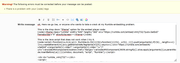
			<content type="html"><![CDATA[<p>The first part</p><div class="codebox"><pre><code>{code}&lt;iframe class= ... &lt;/iframe&gt;{/code}</code></pre></div><p>is OK, but for the JavaScript you have</p><div class="codebox"><pre><code>{code&lt;script&gt; ...</code></pre></div><p>instead of</p><div class="codebox"><pre><code>{code}&lt;script&gt; ...</code></pre></div>]]></content>
			<author>
				<name><![CDATA[Alfred]]></name>
				<uri>https://punster.me/serif/profile.php?id=2</uri>
			</author>
			<updated>2024-06-07T05:58:34Z</updated>
			<id>https://punster.me/serif/viewtopic.php?pid=5203#p5203</id>
		</entry>
		<entry>
			<title type="html"><![CDATA[Re: Embed videos not playing]]></title>
			<link rel="alternate" href="https://punster.me/serif/viewtopic.php?pid=5202#p5202" />
			<content type="html"><![CDATA[<p>I tried your suggestions Alfred, but got this warning message:</p><p><a href="https://postimg.cc/vDfsBgkf"><span class="postimg"><img src="https://i.postimg.cc/vDfsBgkf/I-tried-your-suggestion-Alfred-but-still-got-error-message.png" alt="https://i.postimg.cc/vDfsBgkf/I-tried-your-suggestion-Alfred-but-still-got-error-message.png" /></span></a></p>]]></content>
			<author>
				<name><![CDATA[Danzil]]></name>
				<uri>https://punster.me/serif/profile.php?id=870</uri>
			</author>
			<updated>2024-06-06T23:42:29Z</updated>
			<id>https://punster.me/serif/viewtopic.php?pid=5202#p5202</id>
		</entry>
		<entry>
			<title type="html"><![CDATA[Re: Embed videos not playing]]></title>
			<link rel="alternate" href="https://punster.me/serif/viewtopic.php?pid=5199#p5199" />
			<content type="html"><![CDATA[<div class="quotebox"><cite>Danzil wrote:</cite><blockquote><p>Sorry Alfred, I saved the *.txt&nbsp; file in a folder but when I go to the folder to try to attach in here it is not visible in the folder. is there another way I am supposed to access it to attach it here?</p></blockquote></div><p>I don’t know what would have caused that. Try the ‘code’ thing again.</p>]]></content>
			<author>
				<name><![CDATA[Alfred]]></name>
				<uri>https://punster.me/serif/profile.php?id=2</uri>
			</author>
			<updated>2024-06-06T13:39:08Z</updated>
			<id>https://punster.me/serif/viewtopic.php?pid=5199#p5199</id>
		</entry>
		<entry>
			<title type="html"><![CDATA[Re: Embed videos not playing]]></title>
			<link rel="alternate" href="https://punster.me/serif/viewtopic.php?pid=5198#p5198" />
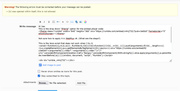
			<content type="html"><![CDATA[<div class="quotebox"><cite>Danzil wrote:</cite><blockquote><p>Hi Alfred: I tried again. both preview and submit gets the warning. see attachment. I pressed submit a second time but it still gave the warning. <br /><a href="https://postimg.cc/G4PmMkzX"><span class="postimg"><img src="https://i.postimg.cc/G4PmMkzX/error-warning-issue-serif-Alfred.png" alt="https://i.postimg.cc/G4PmMkzX/error-warning-issue-serif-Alfred.png" /></span></a></p></blockquote></div><p>The warning is triggered by the ‘r{b}’ references appearing without any indication that they shouldn’t be treated as BBCode. You need to select the HTML and JavaScript and then press the ‘&lt;&gt;’ button on the toolbar so that the selected text becomes enclosed by ‘{code}’ and ‘{/code}’ tags. (I had to replace the square brackets with curly brackets here so that they wouldn’t get messed up.)</p><div class="quotebox"><cite>Danzil wrote:</cite><blockquote><p>This forum is a major blessing. You deserve an award!</p></blockquote></div><p>You’re too kind, Dan!!</p>]]></content>
			<author>
				<name><![CDATA[Alfred]]></name>
				<uri>https://punster.me/serif/profile.php?id=2</uri>
			</author>
			<updated>2024-06-06T13:36:57Z</updated>
			<id>https://punster.me/serif/viewtopic.php?pid=5198#p5198</id>
		</entry>
		<entry>
			<title type="html"><![CDATA[Re: Embed videos not playing]]></title>
			<link rel="alternate" href="https://punster.me/serif/viewtopic.php?pid=5195#p5195" />
			<content type="html"><![CDATA[<p>Sorry Alfred, I saved the *.txt&nbsp; file in a folder but when I go to the folder to try to attach in here it is not visible in the folder. is there another way I am supposed to access it to attach it here?</p>]]></content>
			<author>
				<name><![CDATA[Danzil]]></name>
				<uri>https://punster.me/serif/profile.php?id=870</uri>
			</author>
			<updated>2024-06-06T13:12:47Z</updated>
			<id>https://punster.me/serif/viewtopic.php?pid=5195#p5195</id>
		</entry>
		<entry>
			<title type="html"><![CDATA[Re: Embed videos not playing]]></title>
			<link rel="alternate" href="https://punster.me/serif/viewtopic.php?pid=5194#p5194" />
			<content type="html"><![CDATA[<p>Hi Alfred: I tried again. both preview and submit gets the warning. see attachment. I pressed submit a second time but it still gave the warning. <br /><a href="https://postimg.cc/G4PmMkzX"><span class="postimg"><img src="https://i.postimg.cc/G4PmMkzX/error-warning-issue-serif-Alfred.png" alt="https://i.postimg.cc/G4PmMkzX/error-warning-issue-serif-Alfred.png" /></span></a></p><p>I will try again using your note pad option. Thanks much Alfred.</p><p>This forum is a major blessing. You deserve an award!</p>]]></content>
			<author>
				<name><![CDATA[Danzil]]></name>
				<uri>https://punster.me/serif/profile.php?id=870</uri>
			</author>
			<updated>2024-06-06T12:57:56Z</updated>
			<id>https://punster.me/serif/viewtopic.php?pid=5194#p5194</id>
		</entry>
		<entry>
			<title type="html"><![CDATA[Re: Embed videos not playing]]></title>
			<link rel="alternate" href="https://punster.me/serif/viewtopic.php?pid=5187#p5187" />
			<content type="html"><![CDATA[<div class="quotebox"><cite>Danzil wrote:</cite><blockquote><p>I got this error message:<br />&quot;Warning! The following errors must be corrected before your message can be posted:<br />&quot;b&quot; was opened within itself, this is not allowed&quot;</p></blockquote></div><p>I suspect that you somehow managed to include ‘bold’ markup twice, with one pair of tags nested inside the other. When the forum software detected this, it should (according to a quick experiment here) have removed the extra tags, in which case pressing ‘Submit reply’ or ‘Preview reply’ a second time would have worked OK.</p><p>If you want to try again with an attachment, please use text instead of a screenshot (so that Joe or anyone else trying to help you can copy the text to work with it). Paste the code into a text editor such as Notepad or <a href="https://notepad-plus-plus.org">Notepad++</a>, save it and then attach the <strong>*.txt</strong> file here.</p>]]></content>
			<author>
				<name><![CDATA[Alfred]]></name>
				<uri>https://punster.me/serif/profile.php?id=2</uri>
			</author>
			<updated>2024-06-06T08:17:51Z</updated>
			<id>https://punster.me/serif/viewtopic.php?pid=5187#p5187</id>
		</entry>
		<entry>
			<title type="html"><![CDATA[Re: Embed videos not playing]]></title>
			<link rel="alternate" href="https://punster.me/serif/viewtopic.php?pid=5186#p5186" />
			<content type="html"><![CDATA[<p>Hi Joe:<br />I tried to post a reply including the codes you requested, but I got this error message:<br />&quot;Warning! The following errors must be corrected before your message can be posted:<br />&quot;b&quot; was opened within itself, this is not allowed&quot;</p><p>Even when I tried to add the codes as attachments of screen shots I get the error and it won&#039;t post for some reason.</p>]]></content>
			<author>
				<name><![CDATA[Danzil]]></name>
				<uri>https://punster.me/serif/profile.php?id=870</uri>
			</author>
			<updated>2024-06-05T23:34:22Z</updated>
			<id>https://punster.me/serif/viewtopic.php?pid=5186#p5186</id>
		</entry>
		<entry>
			<title type="html"><![CDATA[Re: Embed videos not playing]]></title>
			<link rel="alternate" href="https://punster.me/serif/viewtopic.php?pid=5180#p5180" />
			<content type="html"><![CDATA[<p>If they work without changing to public, and you don&#039;t want them being public that&#039;s great. I got this originally from a user post but I found this. <a href="https://www.rumbleplayer.com/developers/player-embedding-options.html">https://www.rumbleplayer.com/developers … tions.html</a></p><div class="quotebox"><blockquote><p>There is a drop down &quot;Iframe&quot; option for &quot;embed player&quot;, (is that different from the Iframe option Below the embed player option?)</p></blockquote></div><p>Without knowing what the dropdown code is I don&#039;t know. Why not post it on here (paste it on here, highlight it all and click on the &lt;&gt; button above the message box). You can block out your video reference.</p><p>I&#039;ve been using webplus 8, version 7 was a bit of a &#039;unfinished&#039; release and that may be why the javascript is not working (other than you didn&#039;t copy the whole script). Everything works fine in version 8</p><p>Joe</p>]]></content>
			<author>
				<name><![CDATA[Joe]]></name>
				<uri>https://punster.me/serif/profile.php?id=10</uri>
			</author>
			<updated>2024-06-05T12:47:59Z</updated>
			<id>https://punster.me/serif/viewtopic.php?pid=5180#p5180</id>
		</entry>
		<entry>
			<title type="html"><![CDATA[Re: Embed videos not playing]]></title>
			<link rel="alternate" href="https://punster.me/serif/viewtopic.php?pid=5178#p5178" />
			<content type="html"><![CDATA[<p>Thanks Joe, Follow up question, you said make sure the video is &quot;public&quot;. But I thought I can set it as &quot;unlisted&quot; and that way it can only be viewed via the link.&nbsp; I want it to be viewable only on my site page via the embed link from rumble. If I choose &quot;Public&quot; won&#039;t it be accessible to anyone on rumble if they search for the title? (I don&#039;t want that, but If I have to set it as public for the embed to work I will).<br />By the way, your Iframe instructions worked perfectly with my unlisted setting.&nbsp; <strong>However, most of my rumble videos are set to Private, and when I try to change the settings to &quot;unlisted&quot; it won&#039;t let me. I put the dot in the unlisted box and click save, and nothing happens, when I exit and go back to the video editing, settings, the dot is back on the private setting. not sure what is going on with that, but I need to know so I can change that setting.</strong></p><p><strong>Also, when I try to embed using the &quot;Embed Player- javaScript&quot; option, it shows the video screen but the video time shows 0:00 and it won&#039;t play. </strong> (my original issue which you gave me an alternative for, but I just thought I would ask how to get the Embed Player JavaScript to work if possible).</p><p>There is a drop down &quot;Iframe&quot; option for &quot;embed player&quot;, (is that different from the Iframe option Below the embed player option?)<br />If so, Do I follow the same steps as I did with Iframe? (using document frame) or is there another way that I have to insert the &quot;Iframe embed Player&quot; option?<br />thanks. You all a are amazing, Please let me know how I can do more to help with this Serif family here. THIS IS A MUCH NEEDED FORUM FOR THE SERIF FAMILY.</p>]]></content>
			<author>
				<name><![CDATA[Danzil]]></name>
				<uri>https://punster.me/serif/profile.php?id=870</uri>
			</author>
			<updated>2024-06-04T02:31:29Z</updated>
			<id>https://punster.me/serif/viewtopic.php?pid=5178#p5178</id>
		</entry>
		<entry>
			<title type="html"><![CDATA[Re: Embed videos not playing]]></title>
			<link rel="alternate" href="https://punster.me/serif/viewtopic.php?pid=5146#p5146" />
			<content type="html"><![CDATA[<p>Firstly, make sure your video is public.</p><p>You have two options from Rumble to Embed your video. Use whichever you want. Click the embed button and you will be given two options<br />1. Embedable player<br />2. Iframe</p><p>For no. 1 copy the script and in Webplus do Insert &gt; HTML Fragment &gt; click on the page &gt; click Paste to Body &gt; OK.<br />Resize the fragment to the size you want your video.</p><p>For no. 2&nbsp; copy the iframe URL and in Webplus do Insert &gt; Document Frame &gt; click Contents tab &gt; click Internet page &gt; paste over http with the URL you just copied &gt; OK &gt; Click on page &gt; resize the frame to the size you want your video.</p><p>Joe</p>]]></content>
			<author>
				<name><![CDATA[Joe]]></name>
				<uri>https://punster.me/serif/profile.php?id=10</uri>
			</author>
			<updated>2024-05-29T17:48:37Z</updated>
			<id>https://punster.me/serif/viewtopic.php?pid=5146#p5146</id>
		</entry>
		<entry>
			<title type="html"><![CDATA[Embed videos not playing]]></title>
			<link rel="alternate" href="https://punster.me/serif/viewtopic.php?pid=5126#p5126" />
			<content type="html"><![CDATA[<p>Hey Serif family. Got a strange issue using WebPlus x8 embed tool. For some reason the embeded Rumble.com video is showing on my web page as 0:00 and will not play. Is it because the embed tool on Web Plus is outdated? (Can&#039;t be because my other Rumble.com embeded videos are working fine).<br />Not sure what to do. Is there another way I can embed my Rumble.com videos in my WebPlus x8 page?&nbsp; <br />Note I only tried the embed by the using the Webplus x8 previews. Not sure if that makes a difference.<br />I don&#039;t want to publish until I am sure it is working.<br />Thanks so much.</p>]]></content>
			<author>
				<name><![CDATA[Danzil]]></name>
				<uri>https://punster.me/serif/profile.php?id=870</uri>
			</author>
			<updated>2024-05-26T23:54:33Z</updated>
			<id>https://punster.me/serif/viewtopic.php?pid=5126#p5126</id>
		</entry>
</feed>