<?xml version="1.0" encoding="utf-8"?>
<feed xmlns="http://www.w3.org/2005/Atom">
	<title type="html"><![CDATA[Alfred's Serif Users' Forums — iframe alignment problem with calendar in WebPlus X7]]></title>
	<link rel="self" href="https://punster.me/serif/extern.php?action=feed&amp;tid=683&amp;type=atom" />
	<updated>2024-06-06T15:47:54Z</updated>
	<generator>PunBB</generator>
	<id>https://punster.me/serif/viewtopic.php?id=683</id>
		<entry>
			<title type="html"><![CDATA[Re: iframe alignment problem with calendar in WebPlus X7]]></title>
			<link rel="alternate" href="https://punster.me/serif/viewtopic.php?pid=5201#p5201" />
			<content type="html"><![CDATA[<p>Great. Glad you found the problem and fixed it.</p><p>Joe</p>]]></content>
			<author>
				<name><![CDATA[Joe]]></name>
				<uri>https://punster.me/serif/profile.php?id=10</uri>
			</author>
			<updated>2024-06-06T15:47:54Z</updated>
			<id>https://punster.me/serif/viewtopic.php?pid=5201#p5201</id>
		</entry>
		<entry>
			<title type="html"><![CDATA[Re: iframe alignment problem with calendar in WebPlus X7]]></title>
			<link rel="alternate" href="https://punster.me/serif/viewtopic.php?pid=5185#p5185" />
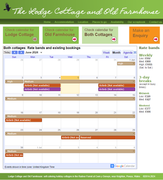
			<content type="html"><![CDATA[<p>(Thanks for your suggestion, Joe. I did try that without success.) But I think I know the problem now. The code I was using in the iframe tool was already itself an iframe generated by Google. When I deleted the iframe and used the HTML fragment tool to insert the code, it displayed correctly, like this:</p><p><a href="https://postimg.cc/yDy4QG66"><span class="postimg"><img src="https://i.postimg.cc/yDy4QG66/calendar-success.png" alt="https://i.postimg.cc/yDy4QG66/calendar-success.png" /></span></a></p>]]></content>
			<author>
				<name><![CDATA[Syl]]></name>
				<uri>https://punster.me/serif/profile.php?id=1043</uri>
			</author>
			<updated>2024-06-05T21:37:56Z</updated>
			<id>https://punster.me/serif/viewtopic.php?pid=5185#p5185</id>
		</entry>
		<entry>
			<title type="html"><![CDATA[Re: iframe alignment problem with calendar in WebPlus X7]]></title>
			<link rel="alternate" href="https://punster.me/serif/viewtopic.php?pid=5172#p5172" />
			<content type="html"><![CDATA[<p>What happens if you reduce the size of the iframe? Does the top position stay the same?</p>]]></content>
			<author>
				<name><![CDATA[Joe]]></name>
				<uri>https://punster.me/serif/profile.php?id=10</uri>
			</author>
			<updated>2024-06-03T17:01:08Z</updated>
			<id>https://punster.me/serif/viewtopic.php?pid=5172#p5172</id>
		</entry>
		<entry>
			<title type="html"><![CDATA[iframe alignment problem with calendar in WebPlus X7]]></title>
			<link rel="alternate" href="https://punster.me/serif/viewtopic.php?pid=5166#p5166" />
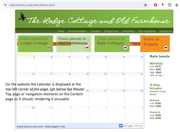
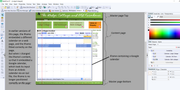
			<content type="html"><![CDATA[<p>I&#039;m trying to update a cottage website by replacing an obsolete calendar (to show booking dates) with one that works. For the now-obsolete calendar, I used an iframe linked to a calendar on another website, which displayed in the right position on the page. Now I have changed the iframe link to use an embeddable Google calendar, which draws its data from an ical link from an Airbnb calendar. Although the iframe now displays the calendar I want, the frame is no longer properly aligned, so the calendar is unreadable (see attached images).<br />I&#039;m&nbsp; baffled. Could anyone suggest why this problem arises, and how I can fix or work around it?<br /><a href="https://postimg.cc/xNnSY9Zk"><span class="postimg"><img src="https://i.postimg.cc/xNnSY9Zk/Calendar-page-as-a-web-page.png" alt="https://i.postimg.cc/xNnSY9Zk/Calendar-page-as-a-web-page.png" /></span></a><br /><a href="https://postimg.cc/kDmVDK3S"><span class="postimg"><img src="https://i.postimg.cc/kDmVDK3S/Calendar-page-in-Web-Plus-X7.png" alt="https://i.postimg.cc/kDmVDK3S/Calendar-page-in-Web-Plus-X7.png" /></span></a></p>]]></content>
			<author>
				<name><![CDATA[Syl]]></name>
				<uri>https://punster.me/serif/profile.php?id=1043</uri>
			</author>
			<updated>2024-06-02T16:18:50Z</updated>
			<id>https://punster.me/serif/viewtopic.php?pid=5166#p5166</id>
		</entry>
</feed>