<?xml version="1.0" encoding="utf-8"?>
<feed xmlns="http://www.w3.org/2005/Atom">
	<title type="html"><![CDATA[Alfred's Serif Users' Forums — How to send a PDF booklet to someone]]></title>
	<link rel="self" href="https://punster.me/serif/extern.php?action=feed&amp;tid=702&amp;type=atom" />
	<updated>2024-10-21T13:54:32Z</updated>
	<generator>PunBB</generator>
	<id>https://punster.me/serif/viewtopic.php?id=702</id>
		<entry>
			<title type="html"><![CDATA[Re: How to send a PDF booklet to someone]]></title>
			<link rel="alternate" href="https://punster.me/serif/viewtopic.php?pid=5855#p5855" />
			<content type="html"><![CDATA[<p>Hi Alfred,<br />Sorry been away so long and late in on this topic- extremely busy with my football club!<br />But, as you say: &#039;easier said than done&#039;. Apart from PP product keys being scarce, does anyone really send PPP files by &#039;ordinary&#039; email?<br />My 32-page PPP publications come out at around 65mb - crammed with articles, graphics and images; where I doubt I could email that size of file. Converting to PDF reduces the file to around 12mb which is easily emailed, so Bookworm&#039;s idea of giving his friend a copy of PP may not work anyway if the files are too large to email?</p>]]></content>
			<author>
				<name><![CDATA[Sandy]]></name>
				<uri>https://punster.me/serif/profile.php?id=1010</uri>
			</author>
			<updated>2024-10-21T13:54:32Z</updated>
			<id>https://punster.me/serif/viewtopic.php?pid=5855#p5855</id>
		</entry>
		<entry>
			<title type="html"><![CDATA[Re: How to send a PDF booklet to someone]]></title>
			<link rel="alternate" href="https://punster.me/serif/viewtopic.php?pid=5355#p5355" />
			<content type="html"><![CDATA[<div class="quotebox"><cite>Bookworm wrote:</cite><blockquote><p>Solved. I hadnt saved the PDF properly so had&nbsp; just sent the copied PagePlus document again.</p></blockquote></div><p>Good to hear. Thanks for the update!</p><div class="quotebox"><cite>Bookworm wrote:</cite><blockquote><p>I think I`ll simply buy my friend a copy of PagePlus if he wants more of my publications.</p></blockquote></div><p>Much easier said than done these days! PP product keys (any version) are very thin on the ground now.</p>]]></content>
			<author>
				<name><![CDATA[Alfred]]></name>
				<uri>https://punster.me/serif/profile.php?id=2</uri>
			</author>
			<updated>2024-07-19T06:09:02Z</updated>
			<id>https://punster.me/serif/viewtopic.php?pid=5355#p5355</id>
		</entry>
		<entry>
			<title type="html"><![CDATA[Re: How to send a PDF booklet to someone]]></title>
			<link rel="alternate" href="https://punster.me/serif/viewtopic.php?pid=5353#p5353" />
			<content type="html"><![CDATA[<p>Solved. I hadnt saved the PDF properly so had&nbsp; just sent the copied PagePlus document again. Thanks for all your help I`ve sent the PDF, it has a lot of images so we`ll see what happens as I havnt had a reply from the recipient yet. I`ve learnt a lot, thanks to every one. I think I`ll simply buy my friend a copy of PagePlus if he wants more of my publications.</p>]]></content>
			<author>
				<name><![CDATA[Bookworm]]></name>
				<uri>https://punster.me/serif/profile.php?id=736</uri>
			</author>
			<updated>2024-07-19T00:26:53Z</updated>
			<id>https://punster.me/serif/viewtopic.php?pid=5353#p5353</id>
		</entry>
		<entry>
			<title type="html"><![CDATA[Re: How to send a PDF booklet to someone]]></title>
			<link rel="alternate" href="https://punster.me/serif/viewtopic.php?pid=5352#p5352" />
			<content type="html"><![CDATA[<p>As Alfred says, the PDF file will already be saved. It will be in the same folder as you have the .ppp version, probably Documents.<br />If you right-click the .pdf version you will get the option to open it in Adobe Reader. If you do open it in PagePlus&nbsp; do not &quot;Save&quot; it without changing the name, or your original .ppp version will be overwritten and lost.</p>]]></content>
			<author>
				<name><![CDATA[GB]]></name>
				<uri>https://punster.me/serif/profile.php?id=9</uri>
			</author>
			<updated>2024-07-18T23:23:34Z</updated>
			<id>https://punster.me/serif/viewtopic.php?pid=5352#p5352</id>
		</entry>
		<entry>
			<title type="html"><![CDATA[Re: How to send a PDF booklet to someone]]></title>
			<link rel="alternate" href="https://punster.me/serif/viewtopic.php?pid=5351#p5351" />
			<content type="html"><![CDATA[<div class="quotebox"><cite>Bookworm wrote:</cite><blockquote><p>Ok, Ive made the PDF and it opens in my PDF reader. How do I save this to my documents as a PDF ( the one I tried to save only opens in my PagePlus and not in a PDF reader ) and how do I sent this PDF to someone in an email . Sorry for my persistance and thanks for your help again.</p></blockquote></div><p>When you create and save the pdf file from PagePlus, make sure that you are saving it to a recognisable folder. (See note below)&nbsp; You should then be able to locate it easily to attach to an email. I am puzzled that you say it only opens in PagePlus. When I &#039;Publish&#039; a pdf file in PP, it automatically opens in Acrobat.</p><p>With regard to file size for sending, you should consider whether you need to have high quality images in the finished result. If you don&#039;t then you can drastically reduce the file size by adjusting the &#039;Compression&#039; when exporting as pdf. I have just done a trial with a file of my own. With &#039;Downsample Image&#039; set to 300 and best quality - which is what is needed for professional quality print - the pdf file is 33MB . With &#039;Downsample&#039; set to 96 and low quality, the same PagePlus file results in a pdf file of just 798KB. On screen, in Acrobat viewer, it is hard to tell which is the high and which the low quality image.</p><p>Note:<br />I &#039;lost&#039; a couple of pdf file just a couple of days ago because I hade inadvertently saved them to a hidden folder, and then couldn&#039;t find them. This happened because I had just created a new pdf publication profile, which gets created in just such a hidden folder. When I the clicked the &#039;Publish&#039; button to create the pdf file itself, by default the &#039;Save&#039; window opens the last used folder, in this case the hidden one of course, and as I failed to observe this, I had no means of retrieving the pdf files.</p>]]></content>
			<author>
				<name><![CDATA[AlanM-R]]></name>
				<uri>https://punster.me/serif/profile.php?id=1054</uri>
			</author>
			<updated>2024-07-18T23:18:47Z</updated>
			<id>https://punster.me/serif/viewtopic.php?pid=5351#p5351</id>
		</entry>
		<entry>
			<title type="html"><![CDATA[Re: How to send a PDF booklet to someone]]></title>
			<link rel="alternate" href="https://punster.me/serif/viewtopic.php?pid=5347#p5347" />
			<content type="html"><![CDATA[<div class="quotebox"><cite>Bookworm wrote:</cite><blockquote><p>Ok, Ive made the PDF and it opens in my PDF reader. How do I save this to my documents as a PDF ( the one I tried to save only opens in my PagePlus and not in a PDF reader ) and how do I sent this PDF to someone in an email . Sorry for my persistance and thanks for your help again.</p></blockquote></div><p>When you ‘Publish As PDF’ from PagePlus, a PDF file is created and then — unless you’ve told it not to be — it’s displayed in your PDF reader, so it’s already saved at that point and you therefore shouldn’t need to save it again. Depending on your email program, you’ll have an attachments link or button (with its function often represented by a paperclip) and clicking on that will allow you to browse to the PDF file to attach it to the email when you’re composing or editing it.</p><p>One thing I strongly recommend is that you configure Windows File Explorer to show file extensions. Windows hides known extensions by default, which means that it isn’t always obvious, for example, whether a file shown in Explorer as ‘mybooklet’ is actually ‘mybooklet.ppp’ or ‘mybooklet.pdf’. A potentially huge source of confusion which is best avoided.</p><p><a href="https://www.howtogeek.com/205086/beginner-how-to-make-windows-show-file-extensions/">How to Make Windows Show File Extensions</a></p>]]></content>
			<author>
				<name><![CDATA[Alfred]]></name>
				<uri>https://punster.me/serif/profile.php?id=2</uri>
			</author>
			<updated>2024-07-18T19:47:56Z</updated>
			<id>https://punster.me/serif/viewtopic.php?pid=5347#p5347</id>
		</entry>
		<entry>
			<title type="html"><![CDATA[Re: How to send a PDF booklet to someone]]></title>
			<link rel="alternate" href="https://punster.me/serif/viewtopic.php?pid=5343#p5343" />
			<content type="html"><![CDATA[<p>Ok, Ive made the PDF and it opens in my PDF reader. How do I save this to my documents as a PDF ( the one I tried to save only opens in my PagePlus and not in a PDF reader ) and how do I sent this PDF to someone in an email . Sorry for my persistance and thanks for your help again.</p>]]></content>
			<author>
				<name><![CDATA[Bookworm]]></name>
				<uri>https://punster.me/serif/profile.php?id=736</uri>
			</author>
			<updated>2024-07-18T15:54:40Z</updated>
			<id>https://punster.me/serif/viewtopic.php?pid=5343#p5343</id>
		</entry>
		<entry>
			<title type="html"><![CDATA[Re: How to send a PDF booklet to someone]]></title>
			<link rel="alternate" href="https://punster.me/serif/viewtopic.php?pid=5342#p5342" />
			<content type="html"><![CDATA[<p>Hi GB thanks for that. I`m afraid I do need spoon fed for some things .&nbsp; I did as you said and saved it in my documents and will try and sent to the recipient.</p>]]></content>
			<author>
				<name><![CDATA[Bookworm]]></name>
				<uri>https://punster.me/serif/profile.php?id=736</uri>
			</author>
			<updated>2024-07-18T15:27:43Z</updated>
			<id>https://punster.me/serif/viewtopic.php?pid=5342#p5342</id>
		</entry>
		<entry>
			<title type="html"><![CDATA[Re: How to send a PDF booklet to someone]]></title>
			<link rel="alternate" href="https://punster.me/serif/viewtopic.php?pid=5333#p5333" />
			<content type="html"><![CDATA[<p>I don&#039;t know what you are doing, but try this.</p><p>Open your .ppp file<br />On the File menu select Publish As<br />Select PDF on the list that appears<br />On the dialogue that appears, I suggest you select PDF/X-1a as Profile<br />Leave Preview PDF file checked<br />Under Options select Impose Pages (if that is what you want)<br />Under Prepress uncheck the items you do not require (all of them if you just want the PDF to be read)<br />Click Publish</p><p>You will get a file with the same name as your .ppp file, but the extension will be .pdf, and it will automatically open in your PDF reader (Acrobat Reader?)</p>]]></content>
			<author>
				<name><![CDATA[GB]]></name>
				<uri>https://punster.me/serif/profile.php?id=9</uri>
			</author>
			<updated>2024-07-17T05:22:04Z</updated>
			<id>https://punster.me/serif/viewtopic.php?pid=5333#p5333</id>
		</entry>
		<entry>
			<title type="html"><![CDATA[Re: How to send a PDF booklet to someone]]></title>
			<link rel="alternate" href="https://punster.me/serif/viewtopic.php?pid=5332#p5332" />
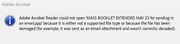
			<content type="html"><![CDATA[<p>Thanks Alfred. On doing that with both the original PagePlus document and the one I published as a PDF I got the same message from adobe of the file is not supported or sent in an email that has not been decoded what ever that means. <br /><a href="https://postimg.cc/Q9d9fr8G"><span class="postimg"><img src="https://i.postimg.cc/Q9d9fr8G/Screenshot-2024-07-17-044915.png" alt="https://i.postimg.cc/Q9d9fr8G/Screenshot-2024-07-17-044915.png" /></span></a></p>]]></content>
			<author>
				<name><![CDATA[Bookworm]]></name>
				<uri>https://punster.me/serif/profile.php?id=736</uri>
			</author>
			<updated>2024-07-17T03:56:13Z</updated>
			<id>https://punster.me/serif/viewtopic.php?pid=5332#p5332</id>
		</entry>
		<entry>
			<title type="html"><![CDATA[Re: How to send a PDF booklet to someone]]></title>
			<link rel="alternate" href="https://punster.me/serif/viewtopic.php?pid=5318#p5318" />
			<content type="html"><![CDATA[<div class="quotebox"><cite>Bookworm wrote:</cite><blockquote><p>I made a copy of the document with a different name and saved that as a PDF, save that to my documents and linked that in the email . When i click on it myself it opens in page plus . The recipient is using Adobe reader i believe.</p></blockquote></div><p>If you left-click, it will open in whatever application is associated with its file type. If you right-click, you should get a context menu whose options include ‘Open With…’ (from where you can choose to open it in Adobe Reader or any other PDF viewer installed on your system).</p>]]></content>
			<author>
				<name><![CDATA[Alfred]]></name>
				<uri>https://punster.me/serif/profile.php?id=2</uri>
			</author>
			<updated>2024-07-14T17:31:19Z</updated>
			<id>https://punster.me/serif/viewtopic.php?pid=5318#p5318</id>
		</entry>
		<entry>
			<title type="html"><![CDATA[Re: How to send a PDF booklet to someone]]></title>
			<link rel="alternate" href="https://punster.me/serif/viewtopic.php?pid=5316#p5316" />
			<content type="html"><![CDATA[<p>I made a copy of the document with a different name and saved that as a PDF, save that to my documents and linked that in the email . When i click on it myself it opens in page plus . The recipient is using Adobe reader i believe.</p>]]></content>
			<author>
				<name><![CDATA[Bookworm]]></name>
				<uri>https://punster.me/serif/profile.php?id=736</uri>
			</author>
			<updated>2024-07-14T12:30:41Z</updated>
			<id>https://punster.me/serif/viewtopic.php?pid=5316#p5316</id>
		</entry>
		<entry>
			<title type="html"><![CDATA[Re: How to send a PDF booklet to someone]]></title>
			<link rel="alternate" href="https://punster.me/serif/viewtopic.php?pid=5297#p5297" />
			<content type="html"><![CDATA[<p>Perhaps the problem is the recipient&#039;s PDF reader. Have you checked the PDF version yourself using Adobe Reader? Or even just PagePlus? NOTE: If you do open it in PagePlus do not &quot;save&quot; it without changing the name, or the original .PPP file will be overwritten. </p><p>I have done exactly what 2ndtonunn has reported, with no problems at all.</p>]]></content>
			<author>
				<name><![CDATA[GB]]></name>
				<uri>https://punster.me/serif/profile.php?id=9</uri>
			</author>
			<updated>2024-07-11T18:05:27Z</updated>
			<id>https://punster.me/serif/viewtopic.php?pid=5297#p5297</id>
		</entry>
		<entry>
			<title type="html"><![CDATA[Re: How to send a PDF booklet to someone]]></title>
			<link rel="alternate" href="https://punster.me/serif/viewtopic.php?pid=5296#p5296" />
			<content type="html"><![CDATA[<p>I produce a 48 page monthly publication in Pageplus which I have to email in PDF format to the printers. In Pageplus I use the Red &#039;publish as pdf &#039; tab in the tool bar then from the dropdown list select the options I require. Beware that some of the options can produce very large files which cannot be sent directly by email.<br />I would suggest using the default settings to begin with, select publish, then select the file name and where you want it saved.<br />Just attach the saved file to your email and away you go.</p>]]></content>
			<author>
				<name><![CDATA[2ndtonunn]]></name>
				<uri>https://punster.me/serif/profile.php?id=962</uri>
			</author>
			<updated>2024-07-11T16:50:27Z</updated>
			<id>https://punster.me/serif/viewtopic.php?pid=5296#p5296</id>
		</entry>
		<entry>
			<title type="html"><![CDATA[How to send a PDF booklet to someone]]></title>
			<link rel="alternate" href="https://punster.me/serif/viewtopic.php?pid=5294#p5294" />
			<content type="html"><![CDATA[<p>I made a booklet in PagePlus and have been asked to email a PDF of it to someone who does not have PagePLus so they could open it in a PDF reader . I published it to PDF, saved it in documents&nbsp; and then linked that in&nbsp; the email but the person said that what they received did not seem to be in PDF format. So how do I make and send a PDF document that can be read in a PDF reader ?</p>]]></content>
			<author>
				<name><![CDATA[Bookworm]]></name>
				<uri>https://punster.me/serif/profile.php?id=736</uri>
			</author>
			<updated>2024-07-11T15:25:57Z</updated>
			<id>https://punster.me/serif/viewtopic.php?pid=5294#p5294</id>
		</entry>
</feed>
