<?xml version="1.0" encoding="utf-8"?>
<feed xmlns="http://www.w3.org/2005/Atom">
	<title type="html"><![CDATA[Alfred's Serif Users' Forums — ADDING a video as background on master page]]></title>
	<link rel="self" href="https://punster.me/serif/extern.php?action=feed&amp;tid=716&amp;type=atom" />
	<updated>2024-11-25T12:21:41Z</updated>
	<generator>PunBB</generator>
	<id>https://punster.me/serif/viewtopic.php?id=716</id>
		<entry>
			<title type="html"><![CDATA[Re: ADDING a video as background on master page]]></title>
			<link rel="alternate" href="https://punster.me/serif/viewtopic.php?pid=6141#p6141" />
			<content type="html"><![CDATA[<div class="quotebox"><cite>Danzil wrote:</cite><blockquote><p>If I can only do this by putting it on each page separately, that would slow down my site.</p></blockquote></div><p>If you had to put the code on each page separately (which, as Joe points out, the Master Page areas save you from having to do) it would only slow down your editing of the site. The published HTML code would be the same, so it will run just as fast whichever way you do it.</p>]]></content>
			<author>
				<name><![CDATA[Alfred]]></name>
				<uri>https://punster.me/serif/profile.php?id=2</uri>
			</author>
			<updated>2024-11-25T12:21:41Z</updated>
			<id>https://punster.me/serif/viewtopic.php?pid=6141#p6141</id>
		</entry>
		<entry>
			<title type="html"><![CDATA[Re: ADDING a video as background on master page]]></title>
			<link rel="alternate" href="https://punster.me/serif/viewtopic.php?pid=6139#p6139" />
			<content type="html"><![CDATA[<div class="quotebox"><cite>Danzil wrote:</cite><blockquote><p>&quot;It sounds like you are trying to access &quot;HTML Source&quot; on the Master page which will show it as inactive. You need to access it on a normal page not the master. then follow the instructions/video&quot;</p><p>THANKS YOU SOOOO MUCH. That makes since. Will Follow through now.<br />Last Question on this:<br />I just need to know if this means that I will have to do so for each page of my site to have the animation on the background of all pages?<br />My desire is to have one animation on the background of all of my site pages. If I can only do this by putting it on each page separately, that would slow down my site. So if that is the case, is there some kind of plug in that I can use to install the animation on my master page so that it shows on all pages? My master page size is 1024 x 3000.</p></blockquote></div><p>No you don&#039;t need to do it on every page. Read the instructions. You paste the code in each segment i.e </p><div class="codebox"><pre><code>&lt;--Master A body Start--&gt;, &lt;--Master B body start--&gt;</code></pre></div><p>View the source code of each page of the demo file to see it in action.</p>]]></content>
			<author>
				<name><![CDATA[Joe]]></name>
				<uri>https://punster.me/serif/profile.php?id=10</uri>
			</author>
			<updated>2024-11-25T11:06:15Z</updated>
			<id>https://punster.me/serif/viewtopic.php?pid=6139#p6139</id>
		</entry>
		<entry>
			<title type="html"><![CDATA[Re: ADDING a video as background on master page]]></title>
			<link rel="alternate" href="https://punster.me/serif/viewtopic.php?pid=6138#p6138" />
			<content type="html"><![CDATA[<p>&quot;It sounds like you are trying to access &quot;HTML Source&quot; on the Master page which will show it as inactive. You need to access it on a normal page not the master. then follow the instructions/video&quot;</p><p>THANKS YOU SOOOO MUCH. That makes since. Will Follow through now.<br />Last Question on this:<br />I just need to know if this means that I will have to do so for each page of my site to have the animation on the background of all pages?<br />My desire is to have one animation on the background of all of my site pages. If I can only do this by putting it on each page separately, that would slow down my site. So if that is the case, is there some kind of plug in that I can use to install the animation on my master page so that it shows on all pages? My master page size is 1024 x 3000.</p>]]></content>
			<author>
				<name><![CDATA[Danzil]]></name>
				<uri>https://punster.me/serif/profile.php?id=870</uri>
			</author>
			<updated>2024-11-25T07:23:32Z</updated>
			<id>https://punster.me/serif/viewtopic.php?pid=6138#p6138</id>
		</entry>
		<entry>
			<title type="html"><![CDATA[Re: ADDING a video as background on master page]]></title>
			<link rel="alternate" href="https://punster.me/serif/viewtopic.php?pid=6132#p6132" />
			<content type="html"><![CDATA[<div class="quotebox"><cite>Danzil wrote:</cite><blockquote><p>I know you all are busy and probably tired of me. But I just need an answer to the below question. Or if you can refer me to someone who may be able to assist me, that would be fine. Thanks</p><p>The &quot;HTML Source&quot; is still inactive when I use right click &quot;View&quot; drop down. I don&#039;t know why or how to access &#039;HTML Source&quot; to proceed. When I try to access the HTML Source by left clicking &quot;View&quot; the &quot;Page HTML Source&quot; is also not active. I need to know why, and if there is a way to access &quot;HTML Source&quot; to proceed. Or if there is another way to proceed.</p></blockquote></div><p>It sounds like you are trying to access &quot;HTML Source&quot; on the Master page which will show it as inactive. You need to access it on a normal page not the master. then follow the instructions/video.</p>]]></content>
			<author>
				<name><![CDATA[Joe]]></name>
				<uri>https://punster.me/serif/profile.php?id=10</uri>
			</author>
			<updated>2024-11-23T17:52:33Z</updated>
			<id>https://punster.me/serif/viewtopic.php?pid=6132#p6132</id>
		</entry>
		<entry>
			<title type="html"><![CDATA[Re: ADDING a video as background on master page]]></title>
			<link rel="alternate" href="https://punster.me/serif/viewtopic.php?pid=6124#p6124" />
			<content type="html"><![CDATA[<div class="quotebox"><cite>Danzil wrote:</cite><blockquote><p>I know you all are busy and probably tired of me. But I just need an answer to the below question. Or if you can refer me to someone who may be able to assist me, that would be fine. Thanks</p><p>The &quot;HTML Source&quot; is still inactive when I use right click &quot;View&quot; drop down. I don&#039;t know why or how to access &#039;HTML Source&quot; to proceed. When I try to access the HTML Source by left clicking &quot;View&quot; the &quot;Page HTML Source&quot; is also not active. I need to know why, and if there is a way to access &quot;HTML Source&quot; to proceed. Or if there is another way to proceed.</p></blockquote></div><p>Alt+S should give you the html source view.</p>]]></content>
			<author>
				<name><![CDATA[pberk]]></name>
				<uri>https://punster.me/serif/profile.php?id=735</uri>
			</author>
			<updated>2024-11-21T18:47:57Z</updated>
			<id>https://punster.me/serif/viewtopic.php?pid=6124#p6124</id>
		</entry>
		<entry>
			<title type="html"><![CDATA[Re: ADDING a video as background on master page]]></title>
			<link rel="alternate" href="https://punster.me/serif/viewtopic.php?pid=6123#p6123" />
			<content type="html"><![CDATA[<p>I know you all are busy and probably tired of me. But I just need an answer to the below question. Or if you can refer me to someone who may be able to assist me, that would be fine. Thanks</p><p>The &quot;HTML Source&quot; is still inactive when I use right click &quot;View&quot; drop down. I don&#039;t know why or how to access &#039;HTML Source&quot; to proceed. When I try to access the HTML Source by left clicking &quot;View&quot; the &quot;Page HTML Source&quot; is also not active. I need to know why, and if there is a way to access &quot;HTML Source&quot; to proceed. Or if there is another way to proceed.</p>]]></content>
			<author>
				<name><![CDATA[Danzil]]></name>
				<uri>https://punster.me/serif/profile.php?id=870</uri>
			</author>
			<updated>2024-11-21T14:49:17Z</updated>
			<id>https://punster.me/serif/viewtopic.php?pid=6123#p6123</id>
		</entry>
		<entry>
			<title type="html"><![CDATA[Re: ADDING a video as background on master page]]></title>
			<link rel="alternate" href="https://punster.me/serif/viewtopic.php?pid=5931#p5931" />
			<content type="html"><![CDATA[<p>Right click off the page on the background area.</p><p>Joe</p>]]></content>
			<author>
				<name><![CDATA[Joe]]></name>
				<uri>https://punster.me/serif/profile.php?id=10</uri>
			</author>
			<updated>2024-10-27T08:37:39Z</updated>
			<id>https://punster.me/serif/viewtopic.php?pid=5931#p5931</id>
		</entry>
		<entry>
			<title type="html"><![CDATA[Re: ADDING a video as background on master page]]></title>
			<link rel="alternate" href="https://punster.me/serif/viewtopic.php?pid=5930#p5930" />
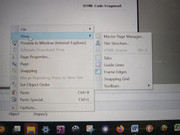
			<content type="html"><![CDATA[<p>The video is amazing. I just have one issue. The HTML Source is still inactive when I use &quot;View&quot; drop down. I don&#039;t know why or how to access HTML Source to proceed. When I try to access the HTML Source by left clicking &quot;View&quot; the &quot;Page HTML Source&quot; is also not active. I need to know why and if there is a way to access HTML Source to proceed. Or if there is another way to proceed.<br /><a href="https://postimg.cc/jLSHCk9g"><span class="postimg"><img src="https://i.postimg.cc/jLSHCk9g/HTML-SORUCE-ISSUE.jpg" alt="https://i.postimg.cc/jLSHCk9g/HTML-SORUCE-ISSUE.jpg" /></span></a></p>]]></content>
			<author>
				<name><![CDATA[Danzil]]></name>
				<uri>https://punster.me/serif/profile.php?id=870</uri>
			</author>
			<updated>2024-10-27T00:21:59Z</updated>
			<id>https://punster.me/serif/viewtopic.php?pid=5930#p5930</id>
		</entry>
		<entry>
			<title type="html"><![CDATA[Re: ADDING a video as background on master page]]></title>
			<link rel="alternate" href="https://punster.me/serif/viewtopic.php?pid=5903#p5903" />
			<content type="html"><![CDATA[<div class="quotebox"><cite>tomH wrote:</cite><blockquote><p>This has been painful to follow so, following Joe&#039;s instructions, I made a 1:38 minute tutorial <a href="https://youtu.be/VgxKFrgcK2Y">https://youtu.be/VgxKFrgcK2Y</a> that follows all of the steps in his procedure. Hope it helps.</p></blockquote></div><p>Well done Tom.</p><p>Joe</p>]]></content>
			<author>
				<name><![CDATA[Joe]]></name>
				<uri>https://punster.me/serif/profile.php?id=10</uri>
			</author>
			<updated>2024-10-25T09:04:45Z</updated>
			<id>https://punster.me/serif/viewtopic.php?pid=5903#p5903</id>
		</entry>
		<entry>
			<title type="html"><![CDATA[Re: ADDING a video as background on master page]]></title>
			<link rel="alternate" href="https://punster.me/serif/viewtopic.php?pid=5901#p5901" />
			<content type="html"><![CDATA[<p>Thanks so much TomH, and Alfred and Joe. I will follow the video.</p>]]></content>
			<author>
				<name><![CDATA[Danzil]]></name>
				<uri>https://punster.me/serif/profile.php?id=870</uri>
			</author>
			<updated>2024-10-25T01:31:57Z</updated>
			<id>https://punster.me/serif/viewtopic.php?pid=5901#p5901</id>
		</entry>
		<entry>
			<title type="html"><![CDATA[Re: ADDING a video as background on master page]]></title>
			<link rel="alternate" href="https://punster.me/serif/viewtopic.php?pid=5899#p5899" />
			<content type="html"><![CDATA[<p>This has been painful to follow so, following Joe&#039;s instructions, I made a 1:38 minute tutorial <a href="https://youtu.be/VgxKFrgcK2Y">https://youtu.be/VgxKFrgcK2Y</a> that follows all of the steps in his procedure. Hope it helps.</p>]]></content>
			<author>
				<name><![CDATA[tomH]]></name>
				<uri>https://punster.me/serif/profile.php?id=7</uri>
			</author>
			<updated>2024-10-24T21:30:18Z</updated>
			<id>https://punster.me/serif/viewtopic.php?pid=5899#p5899</id>
		</entry>
		<entry>
			<title type="html"><![CDATA[Re: ADDING a video as background on master page]]></title>
			<link rel="alternate" href="https://punster.me/serif/viewtopic.php?pid=5892#p5892" />
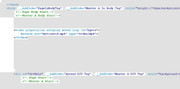
			<content type="html"><![CDATA[<p>Hi Joe and Alfred: Thank you for your patience.</p><p>You provided me with the code but I could not follow the instructions because HTML Source is not active it’s greyed out. <br />I said:<br />“I have the code provided, you said copy it and right-click the page, go to view and then HTML SOURCE. But Html Source is greyed out so I can proceed to past the code there.</p><p>You said “HTML source - yes much of it is greyed out but you add code to the white areas as in &#039;page body start&#039; (white background, green text). Do you see that or is that greyed out?”</p><p>Sorry, I don’t understand, how do I add the code to the white area-page body? Now sure what this means.<br />Are you saying instead of dong “view, HTML Source”, that I should copy the code and then go to &quot;insert&quot;, &quot;HTML Fragment&quot; and then click in the white area of the master page for the HTML Source dialog box to open? I can to that, but there are two sections there, Header&nbsp; and body. In which do I past the code. in which do I paste it?</p><p>You also said:<br />“To this end I renamed your file to motionvid.mp4 and loaded it into the attached file. I pasted the HTML code fragment to the master page, and the video code fragment to &lt;!--Master A Body Start--&gt;”<br />I don’t understand what this means, I know how to paste html code in master page, but I don’t understand- “and the video code fragment to&nbsp; &lt;!--Master A Body Start--&gt;” Are you saying that the Motionvid.mp4 should be placed in the body section of the HTML Source dialogue? </p><p>You said:<br />“In the demo file source do you see what is in the image below? To do that in your file follow the instructions to copy and then to paste place your cursor at the right tip of the green arrow but in the white area and hit enter a couple of times. Click in the space you have just made, right click, paste.”</p><p>If you are referring to the HTML Source dialogue box, there are 4 right arrow, see attachment<br />Which do I paste to?<br />When you are as smart as you guys on this, it is easy to assume someone like me understands your communication but I confess I am not there yet. Please forgive me.</p><br /><br /><br /><p><a href="https://postimg.cc/SJd1ytmb"><span class="postimg"><img src="https://i.postimg.cc/SJd1ytmb/DM-HTML-SOURCE-DIALOGUE.jpg" alt="https://i.postimg.cc/SJd1ytmb/DM-HTML-SOURCE-DIALOGUE.jpg" /></span></a></p>]]></content>
			<author>
				<name><![CDATA[Danzil]]></name>
				<uri>https://punster.me/serif/profile.php?id=870</uri>
			</author>
			<updated>2024-10-24T15:13:42Z</updated>
			<id>https://punster.me/serif/viewtopic.php?pid=5892#p5892</id>
		</entry>
		<entry>
			<title type="html"><![CDATA[Re: ADDING a video as background on master page]]></title>
			<link rel="alternate" href="https://punster.me/serif/viewtopic.php?pid=5882#p5882" />
			<content type="html"><![CDATA[<div class="quotebox"><cite>Joe wrote:</cite><blockquote><p>Please answer the questions when I ask them which may save a lot of to and fro. In the demo file source do you see what is in the image below? To do that in your file follow the instructions to copy and then to paste place your cursor at the right tip of the green arrow but in the white area and hit enter a couple of times. Click in the space you have just made, right click, paste.</p></blockquote></div><p>If you only see white circles (instead of white round-ended rectangles with code in them) then you’ll need to click in the ‘Show Default Text’ button.</p>]]></content>
			<author>
				<name><![CDATA[Alfred]]></name>
				<uri>https://punster.me/serif/profile.php?id=2</uri>
			</author>
			<updated>2024-10-24T10:13:03Z</updated>
			<id>https://punster.me/serif/viewtopic.php?pid=5882#p5882</id>
		</entry>
		<entry>
			<title type="html"><![CDATA[Re: ADDING a video as background on master page]]></title>
			<link rel="alternate" href="https://punster.me/serif/viewtopic.php?pid=5879#p5879" />
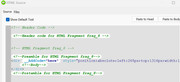
			<content type="html"><![CDATA[<div class="quotebox"><blockquote><p>I asked : &#039;page body start&#039; (white background, green text). Do you see that or is that greyed out?”</p></blockquote></div><p>Please answer the questions when I ask them which may save a lot of to and fro. In the demo file source do you see what is in the image below? To do that in your file follow the instructions to copy and then to paste place your cursor at the right tip of the green arrow but in the white area and hit enter a couple of times. Click in the space you have just made, right click, paste.</p> <br /><p><a href="https://postimg.cc/1nC0kf90"><span class="postimg"><img src="https://i.postimg.cc/1nC0kf90/html.jpg" alt="https://i.postimg.cc/1nC0kf90/html.jpg" /></span></a></p>]]></content>
			<author>
				<name><![CDATA[Joe]]></name>
				<uri>https://punster.me/serif/profile.php?id=10</uri>
			</author>
			<updated>2024-10-24T09:03:34Z</updated>
			<id>https://punster.me/serif/viewtopic.php?pid=5879#p5879</id>
		</entry>
		<entry>
			<title type="html"><![CDATA[Re: ADDING a video as background on master page]]></title>
			<link rel="alternate" href="https://punster.me/serif/viewtopic.php?pid=5868#p5868" />
			<content type="html"><![CDATA[<p>Thanks Joe:<br />I would like to try option 1, I just need instructions for “dummies” as they say.<br />I have the code provided, you said copy it and right click the page, go to view and then HTML SOURCE. But Html Source is greyed out so I can proceed to past the code there.<br />You said “HTML source - yes much of it is greyed out but you add code to the white areas as in &#039;page body start&#039; (white background, green text). Do you see that or is that greyed out?”<br />Sorry, I don’t understand how do I add the code to the white area-page body? Now sure what this means.</p>]]></content>
			<author>
				<name><![CDATA[Danzil]]></name>
				<uri>https://punster.me/serif/profile.php?id=870</uri>
			</author>
			<updated>2024-10-23T14:33:58Z</updated>
			<id>https://punster.me/serif/viewtopic.php?pid=5868#p5868</id>
		</entry>
</feed>