<?xml version="1.0" encoding="utf-8"?>
<feed xmlns="http://www.w3.org/2005/Atom">
	<title type="html"><![CDATA[Alfred's Serif Users' Forums — Color change in print; in-gamut vs. out-of-gamut colors]]></title>
	<link rel="self" href="https://punster.me/serif/extern.php?action=feed&amp;tid=790&amp;type=atom" />
	<updated>2024-12-07T05:01:53Z</updated>
	<generator>PunBB</generator>
	<id>https://punster.me/serif/viewtopic.php?id=790</id>
		<entry>
			<title type="html"><![CDATA[Re: Color change in print; in-gamut vs. out-of-gamut colors]]></title>
			<link rel="alternate" href="https://punster.me/serif/viewtopic.php?pid=6182#p6182" />
			<content type="html"><![CDATA[<p>I`m not sure if this is helpful or nor but when i print from my printer the colours I see on screen and what is actually printed are never the same&nbsp; . I took snap shots of all the pallet colours in PagePlus X9 and printed them off as a reference.</p>]]></content>
			<author>
				<name><![CDATA[Bookworm]]></name>
				<uri>https://punster.me/serif/profile.php?id=736</uri>
			</author>
			<updated>2024-12-07T05:01:53Z</updated>
			<id>https://punster.me/serif/viewtopic.php?pid=6182#p6182</id>
		</entry>
		<entry>
			<title type="html"><![CDATA[Color change in print; in-gamut vs. out-of-gamut colors]]></title>
			<link rel="alternate" href="https://punster.me/serif/viewtopic.php?pid=5940#p5940" />
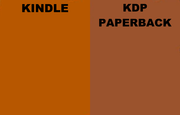
			<content type="html"><![CDATA[<p>I&#039;ve published 10 Kindle books using PagePlus for the covers, and all is well there. I just started doing print editions of them and have done 3 paperbacks. In all cases, the cover has turned out darker than expected, and maybe a little color-shifted too. Two of the paperbacks are live and I can see the difference just by clicking back and forth between the Kindle edition and the paperback edition on their Amazon page. They look the same in PagePlus.</p><p>The third one isn&#039;t live yet, but like the first two I have a proof copy, and like the proof copies for the first two it is too dark.</p><p>The covers have to be submitted to Kindle Direct Publishing in CMYK, and I make sure to set to CMYK in PagePlus when creating the cover file to submit.</p><p>I asked about this issue on the KDP forum, and learned about gamut. Apparently the colors I have chosen were out of gamut for print.</p><p>If I understand correctly, there&#039;s no science for choosing the in-gamut print color which appears closest to an out-of-gamut screen color, which is why the software chooses something unsatisfying. Apparently only our eyeballs can make a satisfactory choice.</p><p>After reading about this and watching some Youtube videos, I understand that Adobe helps with this by giving you a color picker for print that only offers in-gamut colors. So you can eyeball what looks closest to the out-of-gamut color.</p><p>Is there anything PagePlus can do to help me choose the right color?</p><p>BTW I&#039;m using PagePlus X9. Some of the Kindle covers were created in earlier versions but I&#039;m using X9 for the paperbacks.</p><p>Here&#039;s an example of the difference. It&#039;s a children&#039;s book about foxes, and I found a color on the web that was said to be the color of fox fur. That worked fine for the Kindle edition, but the KDP paperback is brown:</p><p><a href="https://postimg.cc/zLgmXtn6"><span class="postimg"><img src="https://i.postimg.cc/zLgmXtn6/Compare-cover-color-Kindle-vs-KDP-Paperback.png" alt="https://i.postimg.cc/zLgmXtn6/Compare-cover-color-Kindle-vs-KDP-Paperback.png" /></span></a></p>]]></content>
			<author>
				<name><![CDATA[GregL65]]></name>
				<uri>https://punster.me/serif/profile.php?id=1083</uri>
			</author>
			<updated>2024-10-29T05:21:28Z</updated>
			<id>https://punster.me/serif/viewtopic.php?pid=5940#p5940</id>
		</entry>
</feed>