<?xml version="1.0" encoding="utf-8"?>
<feed xmlns="http://www.w3.org/2005/Atom">
	<title type="html"><![CDATA[Alfred's Serif Users' Forums — Vertical words]]></title>
	<link rel="self" href="https://punster.me/serif/extern.php?action=feed&amp;tid=869&amp;type=atom" />
	<updated>2025-02-02T02:13:44Z</updated>
	<generator>PunBB</generator>
	<id>https://punster.me/serif/viewtopic.php?id=869</id>
		<entry>
			<title type="html"><![CDATA[Re: Vertical words]]></title>
			<link rel="alternate" href="https://punster.me/serif/viewtopic.php?pid=6483#p6483" />
			<content type="html"><![CDATA[<p>Ah yes - that’s where I should have been.<br />Thanks for solving that.</p>]]></content>
			<author>
				<name><![CDATA[Jandanz]]></name>
				<uri>https://punster.me/serif/profile.php?id=732</uri>
			</author>
			<updated>2025-02-02T02:13:44Z</updated>
			<id>https://punster.me/serif/viewtopic.php?pid=6483#p6483</id>
		</entry>
		<entry>
			<title type="html"><![CDATA[Re: Vertical words]]></title>
			<link rel="alternate" href="https://punster.me/serif/viewtopic.php?pid=6482#p6482" />
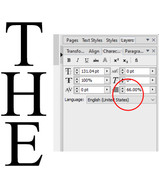
			<content type="html"><![CDATA[<div class="quotebox"><blockquote><p>both methods you have described leave too much space between the vertical characters</p></blockquote></div><p>That can be solved by adjusting the line spacing thus:</p><p><a href="https://postimg.cc/GBWjSH2W"><span class="postimg"><img src="https://i.postimg.cc/GBWjSH2W/Publication1.jpg" alt="https://i.postimg.cc/GBWjSH2W/Publication1.jpg" /></span></a></p><p>For a short word, what you have done may be quickest.</p>]]></content>
			<author>
				<name><![CDATA[GB]]></name>
				<uri>https://punster.me/serif/profile.php?id=9</uri>
			</author>
			<updated>2025-02-01T22:04:08Z</updated>
			<id>https://punster.me/serif/viewtopic.php?pid=6482#p6482</id>
		</entry>
		<entry>
			<title type="html"><![CDATA[Re: Vertical words]]></title>
			<link rel="alternate" href="https://punster.me/serif/viewtopic.php?pid=6481#p6481" />
			<content type="html"><![CDATA[<p>Thanks for the input. Unfortunately both methods you have described leave too much space between the vertical characters.<br />As I’ve only had to do this for the three letters ‘THE’, I’ve found it easier to just create 3 text boxes close together vertically and put a centered letter in each one.</p>]]></content>
			<author>
				<name><![CDATA[Jandanz]]></name>
				<uri>https://punster.me/serif/profile.php?id=732</uri>
			</author>
			<updated>2025-02-01T20:16:16Z</updated>
			<id>https://punster.me/serif/viewtopic.php?pid=6481#p6481</id>
		</entry>
		<entry>
			<title type="html"><![CDATA[Re: Vertical words]]></title>
			<link rel="alternate" href="https://punster.me/serif/viewtopic.php?pid=6480#p6480" />
			<content type="html"><![CDATA[<p>Two ways:</p><p>1. If you are using a text frame, reduce its width so the letters arrange themselves vertically. Make the text centre-aligned. This may not work if the text contains wide characters such as w&#039;s, unless you are using a fixed width font like Courier New.</p><p>2. When typing the characters add a line break after each one. Shift+Enter adds a line break. This works in both frame and artistic text. Again, use centre-alignment for the text.</p><p>You could, of course, use method 1 initially, the use method 2 only where necessary if two letters appear side-by-side.</p><p>There is no option for &quot;Vertical Words&quot;, but Line Spacing can be done from both the Paragraph and the Character tabs, or in Format/Paragraph dialogue.</p>]]></content>
			<author>
				<name><![CDATA[GB]]></name>
				<uri>https://punster.me/serif/profile.php?id=9</uri>
			</author>
			<updated>2025-02-01T02:05:11Z</updated>
			<id>https://punster.me/serif/viewtopic.php?pid=6480#p6480</id>
		</entry>
		<entry>
			<title type="html"><![CDATA[Vertical words]]></title>
			<link rel="alternate" href="https://punster.me/serif/viewtopic.php?pid=6479#p6479" />
			<content type="html"><![CDATA[<p>I am lost, trying to place a vertical word in PPX9.<br />It’s just ‘THE’ in a newsletter. I can place it a text box and swing it round 90° but that’s not it. And I could place each letter in its own box and align together vertically, still fiddly.<br />I can’t find ‘line spacing’ anywhere, or vertical words.<br />Would appreciate some advice thanks.</p>]]></content>
			<author>
				<name><![CDATA[Jandanz]]></name>
				<uri>https://punster.me/serif/profile.php?id=732</uri>
			</author>
			<updated>2025-02-01T00:03:29Z</updated>
			<id>https://punster.me/serif/viewtopic.php?pid=6479#p6479</id>
		</entry>
</feed>