<?xml version="1.0" encoding="utf-8"?>
<feed xmlns="http://www.w3.org/2005/Atom">
	<title type="html"><![CDATA[Alfred's Serif Users' Forums — Unable to publish updates to website from WebPlus X8]]></title>
	<link rel="self" href="https://punster.me/serif/extern.php?action=feed&amp;tid=892&amp;type=atom" />
	<updated>2025-04-26T16:57:10Z</updated>
	<generator>PunBB</generator>
	<id>https://punster.me/serif/viewtopic.php?id=892</id>
		<entry>
			<title type="html"><![CDATA[Re: Unable to publish updates to website from WebPlus X8]]></title>
			<link rel="alternate" href="https://punster.me/serif/viewtopic.php?pid=6856#p6856" />
			<content type="html"><![CDATA[<p>I&#039;m still a bit clumsy with it, what worked before, now doesn&#039;t. I still have to take the time to see the correct functioning of Filezilla.<br />I would like to delete everything, clean up in the file manager of my host, but I don&#039;t dare. I don&#039;t know what should and shouldn&#039;t remain.</p>]]></content>
			<author>
				<name><![CDATA[PhilipJGr]]></name>
				<uri>https://punster.me/serif/profile.php?id=1034</uri>
			</author>
			<updated>2025-04-26T16:57:10Z</updated>
			<id>https://punster.me/serif/viewtopic.php?pid=6856#p6856</id>
		</entry>
		<entry>
			<title type="html"><![CDATA[Re: Unable to publish updates to website from WebPlus X8]]></title>
			<link rel="alternate" href="https://punster.me/serif/viewtopic.php?pid=6847#p6847" />
			<content type="html"><![CDATA[<div class="quotebox"><cite>PhilipJGr wrote:</cite><blockquote><p>I am a layman in this. But with your explanation and a bit of searching I succeeded. Copied the entire wpimages folder. That was faster than searching for a few photos. I am happy with it and thanks for the explanation. I have become a bit wiser :-)</p></blockquote></div><p>Glad you have learned a new way to upload Webplus. Keep coming back to the forum because if anyone else has the same issue, you can provide them with more specific answers than I provided to you.</p><p>Joe</p>]]></content>
			<author>
				<name><![CDATA[Joe]]></name>
				<uri>https://punster.me/serif/profile.php?id=10</uri>
			</author>
			<updated>2025-04-26T15:14:32Z</updated>
			<id>https://punster.me/serif/viewtopic.php?pid=6847#p6847</id>
		</entry>
		<entry>
			<title type="html"><![CDATA[Re: Unable to publish updates to website from WebPlus X8]]></title>
			<link rel="alternate" href="https://punster.me/serif/viewtopic.php?pid=6843#p6843" />
			<content type="html"><![CDATA[<p>I am a layman in this. But with your explanation and a bit of searching I succeeded. Copied the entire wpimages folder. That was faster than searching for a few photos. I am happy with it and thanks for the explanation. I have become a bit wiser :-)</p>]]></content>
			<author>
				<name><![CDATA[PhilipJGr]]></name>
				<uri>https://punster.me/serif/profile.php?id=1034</uri>
			</author>
			<updated>2025-04-26T09:20:16Z</updated>
			<id>https://punster.me/serif/viewtopic.php?pid=6843#p6843</id>
		</entry>
		<entry>
			<title type="html"><![CDATA[Re: Unable to publish updates to website from WebPlus X8]]></title>
			<link rel="alternate" href="https://punster.me/serif/viewtopic.php?pid=6841#p6841" />
			<content type="html"><![CDATA[<div class="quotebox"><cite>PhilipJGr wrote:</cite><blockquote><p> Only a few photos that should be on it are still missing, but I still have to figure that out. But the basics work, I am happy with this. Greetings, Philip</p></blockquote></div><p>This may be due to you not publishing all pages to disk folder. Your photos will be in the <strong>wpimages</strong> folder, in a folder you have created, or in the root folder.</p><p>Joe</p>]]></content>
			<author>
				<name><![CDATA[Joe]]></name>
				<uri>https://punster.me/serif/profile.php?id=10</uri>
			</author>
			<updated>2025-04-26T08:14:36Z</updated>
			<id>https://punster.me/serif/viewtopic.php?pid=6841#p6841</id>
		</entry>
		<entry>
			<title type="html"><![CDATA[Re: Unable to publish updates to website from WebPlus X8]]></title>
			<link rel="alternate" href="https://punster.me/serif/viewtopic.php?pid=6840#p6840" />
			<content type="html"><![CDATA[<p>It works, thanks! The pages I only wanted to change (not the entire site) I have uploaded to the host. Only a few photos that should be on it are still missing, but I still have to figure that out. But the basics work, I am happy with this. Greetings, Philip</p>]]></content>
			<author>
				<name><![CDATA[PhilipJGr]]></name>
				<uri>https://punster.me/serif/profile.php?id=1034</uri>
			</author>
			<updated>2025-04-26T08:04:51Z</updated>
			<id>https://punster.me/serif/viewtopic.php?pid=6840#p6840</id>
		</entry>
		<entry>
			<title type="html"><![CDATA[Re: Unable to publish updates to website from WebPlus X8]]></title>
			<link rel="alternate" href="https://punster.me/serif/viewtopic.php?pid=6837#p6837" />
			<content type="html"><![CDATA[<p>In Webplus with your website loaded goto: </p><p>File &gt; Publish Site &gt; Publish to disk Folder<br />In the popup chose<strong> location</strong> and<strong> folder</strong> name, or leave the<strong> folder</strong> as suggested.<br />Check the <strong>Publish all pages</strong> box<br />Click OK - If you have kept the suggested folder you will be asked if you want it to be created.</p><p>On the left hand side in FileZilla if you click on the folder you just created, all the files of your website will be there.</p><p>As I have said previously, I have not used FileZilla. However, now that you have all your files, check out Youtube tutorials on how to transfer files to your host.</p><p>Joe</p>]]></content>
			<author>
				<name><![CDATA[Joe]]></name>
				<uri>https://punster.me/serif/profile.php?id=10</uri>
			</author>
			<updated>2025-04-26T07:02:53Z</updated>
			<id>https://punster.me/serif/viewtopic.php?pid=6837#p6837</id>
		</entry>
		<entry>
			<title type="html"><![CDATA[Re: Unable to publish updates to website from WebPlus X8]]></title>
			<link rel="alternate" href="https://punster.me/serif/viewtopic.php?pid=6815#p6815" />
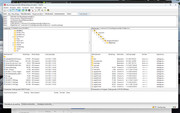
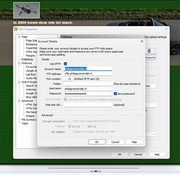
			<content type="html"><![CDATA[<p>I also can&#039;t log in via WebPlus X8, with FileZilla I can. But how do I get my customized website via FileZilla on my website. I see various folders, left on my PC and right at my host.</p><p><a href="https://postimg.cc/dD28DXvV"><span class="postimg"><img src="https://i.postimg.cc/dD28DXvV/File-Zilla.jpg" alt="https://i.postimg.cc/dD28DXvV/File-Zilla.jpg" /></span></a></p><p><a href="https://postimg.cc/4nYpQdzn"><span class="postimg"><img src="https://i.postimg.cc/4nYpQdzn/Account-instelling.jpg" alt="https://i.postimg.cc/4nYpQdzn/Account-instelling.jpg" /></span></a></p><p><a href="https://postimg.cc/7CBTg8hg"><span class="postimg"><img src="https://i.postimg.cc/7CBTg8hg/Foutmelding.jpg" alt="https://i.postimg.cc/7CBTg8hg/Foutmelding.jpg" /></span></a></p><p><a href="https://postimg.cc/hJ4dzPDD"><span class="postimg"><img src="https://i.postimg.cc/hJ4dzPDD/Instellingen.jpg" alt="https://i.postimg.cc/hJ4dzPDD/Instellingen.jpg" /></span></a></p>]]></content>
			<author>
				<name><![CDATA[PhilipJGr]]></name>
				<uri>https://punster.me/serif/profile.php?id=1034</uri>
			</author>
			<updated>2025-04-24T11:31:30Z</updated>
			<id>https://punster.me/serif/viewtopic.php?pid=6815#p6815</id>
		</entry>
		<entry>
			<title type="html"><![CDATA[Re: Unable to publish updates to website from WebPlus X8]]></title>
			<link rel="alternate" href="https://punster.me/serif/viewtopic.php?pid=6737#p6737" />
			<content type="html"><![CDATA[<p>Hi Gill <br /></p><div class="quotebox"><blockquote><p>WebPlus x 8 does not meet security standards and therefore I am unable to publish new updates to my website.</p></blockquote></div><p>This is not true as I use WebPlus x8 and Ionos as a host and the way to achieve this is to publish to a folder on your local drive and follow the steps below.</p><p>In Ionos control panel create the <strong>webspace folder</strong> from the control panel&nbsp; then go back to your control panel and <strong>select your domain</strong> then use domain and from the popup choose &quot;<strong>connect to webspace</strong>&quot; and then the wizard takes you to the webspace where you <strong>select your folder</strong> and save. Next <strong>create the ftp connection</strong> with password and copy the details to a notepad.<br />Ionos SFTP when created does also allow a download of a Filezilla configuration which can then be opened from Filezilla ( although I have not tried this method personally)&gt;</p><p>Then just as Joe says, use Filezilla to create an SFTP connection using the details from your notepad.</p><p>Navigate the left pane to your new folder you published the site to and once you connect to the server the right pane is the Ionos server which should be the webspace folder you created from the Ionos control panel. Then select all the files in the left pane and click (or right click) and upload.<br />Once completed disconnect from the server (incase of accidental deletion)<br />Voila you have published your site.</p><p>I hope that this helps.</p>]]></content>
			<author>
				<name><![CDATA[KeithH]]></name>
				<uri>https://punster.me/serif/profile.php?id=917</uri>
			</author>
			<updated>2025-04-17T11:41:14Z</updated>
			<id>https://punster.me/serif/viewtopic.php?pid=6737#p6737</id>
		</entry>
		<entry>
			<title type="html"><![CDATA[Re: Unable to publish updates to website from WebPlus X8]]></title>
			<link rel="alternate" href="https://punster.me/serif/viewtopic.php?pid=6735#p6735" />
			<content type="html"><![CDATA[<p>A number of contributors over the years have used FileZilla Client <a href="http://%20https://filezilla-project.org/"> https://filezilla-project.org/</a> to upload their websites and changes. I&#039;ve never used it but I believe that you would need to publish your site or changes to Disk Folder and then load from there to FileZilla.</p><p>Joe</p>]]></content>
			<author>
				<name><![CDATA[Joe]]></name>
				<uri>https://punster.me/serif/profile.php?id=10</uri>
			</author>
			<updated>2025-04-17T09:04:58Z</updated>
			<id>https://punster.me/serif/viewtopic.php?pid=6735#p6735</id>
		</entry>
		<entry>
			<title type="html"><![CDATA[Re: Unable to publish updates to website from WebPlus X8]]></title>
			<link rel="alternate" href="https://punster.me/serif/viewtopic.php?pid=6719#p6719" />
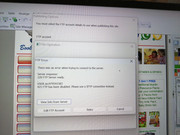
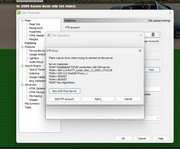
			<content type="html"><![CDATA[<p>Thank you so much Tom for your reply.&nbsp; I changed the setting to SFTP as you showed.&nbsp; I now get a different error message.&nbsp; <br /><a href="https://postimg.cc/cK7HH0SR"><span class="postimg"><img src="https://i.postimg.cc/cK7HH0SR/Image-3-website-error-with-SFTP.jpg" alt="https://i.postimg.cc/cK7HH0SR/Image-3-website-error-with-SFTP.jpg" /></span></a></p><p>If you (or anyone else) have further suggestions to help resolve the issue of not being able to publish changes, I would be hugely grateful.<br />Thank you.</p>]]></content>
			<author>
				<name><![CDATA[Gill]]></name>
				<uri>https://punster.me/serif/profile.php?id=1107</uri>
			</author>
			<updated>2025-04-14T15:33:56Z</updated>
			<id>https://punster.me/serif/viewtopic.php?pid=6719#p6719</id>
		</entry>
		<entry>
			<title type="html"><![CDATA[Re: Unable to publish updates to website from WebPlus X8]]></title>
			<link rel="alternate" href="https://punster.me/serif/viewtopic.php?pid=6671#p6671" />
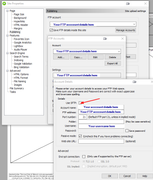
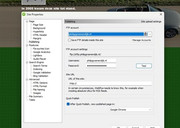
			<content type="html"><![CDATA[<p>Have you tried File&gt;Publish Site&gt;Publish Options which opens the Site Properties dialog&gt;FTP account&gt;Manage Accounts&gt;FTP Accounts&gt;Edit&gt;Details, tick Use SFTP?<br /><a href="https://postimg.cc/14GBfMr5"><span class="postimg"><img src="https://i.postimg.cc/14GBfMr5/webplus-FTP.png" alt="https://i.postimg.cc/14GBfMr5/webplus-FTP.png" /></span></a></p>]]></content>
			<author>
				<name><![CDATA[tomH]]></name>
				<uri>https://punster.me/serif/profile.php?id=7</uri>
			</author>
			<updated>2025-04-03T13:59:09Z</updated>
			<id>https://punster.me/serif/viewtopic.php?pid=6671#p6671</id>
		</entry>
		<entry>
			<title type="html"><![CDATA[Unable to publish updates to website from WebPlus X8]]></title>
			<link rel="alternate" href="https://punster.me/serif/viewtopic.php?pid=6670#p6670" />
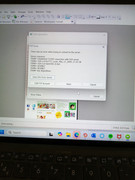
			<content type="html"><![CDATA[<p><a href="https://postimg.cc/GB50gVYg"><span class="postimg"><img src="https://i.postimg.cc/GB50gVYg/Image-1-Webplusx8-not-publishing-error.jpg" alt="https://i.postimg.cc/GB50gVYg/Image-1-Webplusx8-not-publishing-error.jpg" /></span></a></p><p>I am unable to publish changes to my website. The error says &quot; FTP has been disabled. Use a SFTP connection instead.&quot;</p><p>I have spoken with IONOS who is my domain host. They tried a new SFTP connection but say that WebPlus x 8 does not meet security standards and therefore I am unable to publish new updates to my website.&nbsp; &nbsp;</p><p>Is there a solution to this so that I can continue to use WebPlus x 8?&nbsp; </p><br /><p>Thanks <br />Gill</p>]]></content>
			<author>
				<name><![CDATA[Gill]]></name>
				<uri>https://punster.me/serif/profile.php?id=1107</uri>
			</author>
			<updated>2025-04-03T11:55:50Z</updated>
			<id>https://punster.me/serif/viewtopic.php?pid=6670#p6670</id>
		</entry>
</feed>