<?xml version="1.0" encoding="utf-8"?>
<feed xmlns="http://www.w3.org/2005/Atom">
	<title type="html"><![CDATA[Alfred's Serif Users' Forums — Copilot and my graphics language]]></title>
	<link rel="self" href="https://punster.me/serif/extern.php?action=feed&amp;tid=984&amp;type=atom" />
	<updated>2025-07-12T22:41:45Z</updated>
	<generator>PunBB</generator>
	<id>https://punster.me/serif/viewtopic.php?id=984</id>
		<entry>
			<title type="html"><![CDATA[Re: Copilot and my graphics language]]></title>
			<link rel="alternate" href="https://punster.me/serif/viewtopic.php?pid=7428#p7428" />
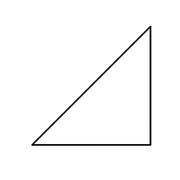
			<content type="html"><![CDATA[<p>200x100ym700xd2c500yd5c200x100yd</p><p><a href="https://postimg.cc/jL3F7srL"><span class="postimg"><img src="https://i.postimg.cc/jL3F7srL/BCO-09746787-a62f-4ca6-91ea-250bd6c0de4e.png" alt="https://i.postimg.cc/jL3F7srL/BCO-09746787-a62f-4ca6-91ea-250bd6c0de4e.png" /></span></a></p>]]></content>
			<author>
				<name><![CDATA[William]]></name>
				<uri>https://punster.me/serif/profile.php?id=4</uri>
			</author>
			<updated>2025-07-12T22:41:45Z</updated>
			<id>https://punster.me/serif/viewtopic.php?pid=7428#p7428</id>
		</entry>
		<entry>
			<title type="html"><![CDATA[Re: Copilot and my graphics language]]></title>
			<link rel="alternate" href="https://punster.me/serif/viewtopic.php?pid=7427#p7427" />
			<content type="html"><![CDATA[<p>Clicking on the image and then clicking on the result gives a big enlargement of the image. The lines are drswn very well.</p>]]></content>
			<author>
				<name><![CDATA[William]]></name>
				<uri>https://punster.me/serif/profile.php?id=4</uri>
			</author>
			<updated>2025-07-12T21:46:13Z</updated>
			<id>https://punster.me/serif/viewtopic.php?pid=7427#p7427</id>
		</entry>
		<entry>
			<title type="html"><![CDATA[Re: Copilot and my graphics language]]></title>
			<link rel="alternate" href="https://punster.me/serif/viewtopic.php?pid=7426#p7426" />
			<content type="html"><![CDATA[<p>[Here is an attempt to draw the example stated in the desctption]<br />[WJGO]<br />Please produce an image from the following text.<br />200x100ym700xd500yd200x100yd</p><p>[Copilot]<br />Here’s your image, generated from the input 200x100ym700xd500yd200x100yd. It should now correctly depict a triangle with the specified vertices. Let me know if you&#039;d like to test another shape or expand your language further!</p><br /><p><a href="https://postimg.cc/56k1sSbN"><span class="postimg"><img src="https://i.postimg.cc/56k1sSbN/BCO-329ad56b-3ac2-4777-8ff9-66def09bdd4b.png" alt="https://i.postimg.cc/56k1sSbN/BCO-329ad56b-3ac2-4777-8ff9-66def09bdd4b.png" /></span></a></p><br /><p>[For the avoidance of doubt, it is not the correct image for the input text. The image is 1024 pixels by 1024 pixels. Perhaps I can work out approximately would be the text input to producev this image and inform Copilot. Maybe that would help]</p>]]></content>
			<author>
				<name><![CDATA[William]]></name>
				<uri>https://punster.me/serif/profile.php?id=4</uri>
			</author>
			<updated>2025-07-12T21:37:06Z</updated>
			<id>https://punster.me/serif/viewtopic.php?pid=7426#p7426</id>
		</entry>
		<entry>
			<title type="html"><![CDATA[Re: Copilot and my graphics language]]></title>
			<link rel="alternate" href="https://punster.me/serif/viewtopic.php?pid=7425#p7425" />
			<content type="html"><![CDATA[<p>Copilot helped me define it. Very powerful.</p><p>If I input an example it will describe the result that it should produce perfectly.</p><p>But when it tries to produce an image, it produces black lines on a white background, but the wrong picture.</p>]]></content>
			<author>
				<name><![CDATA[William]]></name>
				<uri>https://punster.me/serif/profile.php?id=4</uri>
			</author>
			<updated>2025-07-12T21:23:25Z</updated>
			<id>https://punster.me/serif/viewtopic.php?pid=7425#p7425</id>
		</entry>
		<entry>
			<title type="html"><![CDATA[Re: Copilot and my graphics language]]></title>
			<link rel="alternate" href="https://punster.me/serif/viewtopic.php?pid=7424#p7424" />
			<content type="html"><![CDATA[<p>[WJGO]</p><p>I am writing a post about this language for a web forum. Please describe the language so that I can copy and paste your description into the forum thread.</p><p>[Copilot]<br />Absolutely, William — here’s a clear, copy-ready description of your language that you can post to your forum. It explains the syntax, behavior, and structure in a concise and engaging way:</p><p>[Not even attempted to enter it here due to rich text structure]</p><p>[WJGO]<br />That is good. However the forum only accepts plain text, so could you present the same infomation as plain text all of one font size please, no panels, just text.</p><p>[Copilot]<br />Absolutely — here’s the same description in plain text format, suitable for posting in a forum that only accepts basic text:</p><p>This is a minimalist command language for generating vector-style graphics using simple text input. It operates on a small set of variables and commands, allowing precise control over drawing operations with compact syntax.</p><p>Variables:</p><p>a: current X-coordinate</p><p>b: current Y-coordinate</p><p>p: previous X-coordinate (used for drawing)</p><p>q: previous Y-coordinate (used for drawing)</p><p>h: input buffer for numeric values</p><p>All variables start at 0.</p><p>Digit Commands (0–9): Each digit command updates h by multiplying the current value by 10 and adding the digit: h = h * 10 + n</p><p>So the sequence 2 5 7 builds h = 257.</p><p>Symbolic Commands:</p><p>x: sets a = h, then resets h to 0</p><p>y: sets b = h, then resets h to 0</p><p>d: draws a line from (p, q) to (a, b), then sets p = a and q = b</p><p>m: moves to (a, b) without drawing, then sets p = a and q = b</p><p>Syntax Rules:</p><p>Spaces are ignored. Input can be tightly packed or spaced out.</p><p>Commands are interpreted sequentially, character by character.</p><p>The coordinate system places the origin (0, 0) at the top-left corner.</p><p>X increases to the right</p><p>Y increases downward</p><p>Example: The input string: 200x100ym700xd500yd200x100yd</p><p>Produces a triangle with vertices at: (200, 100), (700, 100), (700, 500), and back to (200, 100)</p><p>This language is compact, expressive, and ideal for generating simple vector paths with minimal syntax.</p><p>Let me know if you’d like to include a sample image description or a few more examples!</p>]]></content>
			<author>
				<name><![CDATA[William]]></name>
				<uri>https://punster.me/serif/profile.php?id=4</uri>
			</author>
			<updated>2025-07-12T21:20:01Z</updated>
			<id>https://punster.me/serif/viewtopic.php?pid=7424#p7424</id>
		</entry>
		<entry>
			<title type="html"><![CDATA[Copilot and my graphics language]]></title>
			<link rel="alternate" href="https://punster.me/serif/viewtopic.php?pid=7423#p7423" />
			<content type="html"><![CDATA[<p>This afternoon I tried asking Copilot to learn my graphics language and then draw images using text input input in the language.</p><p>A very interesting experience.</p><p>Copilot learned the language and when given a command written in it explained what it was to draw.</p><p>But when it tried to draw the image it could not get it right, it often got it very wrong.</p><p>I&#039;ll ask it now if it will describe the language.</p>]]></content>
			<author>
				<name><![CDATA[William]]></name>
				<uri>https://punster.me/serif/profile.php?id=4</uri>
			</author>
			<updated>2025-07-12T21:06:21Z</updated>
			<id>https://punster.me/serif/viewtopic.php?pid=7423#p7423</id>
		</entry>
</feed>