Skip to forum content
Alfred's Serif Users' Forums
An independent forum site for members of the Serif software community
You are not logged in. Please login or register.
Active topics Unanswered topics
Tips and Announcements
Automated signup has been disabled for these forums. If you wish to register, please send an email to admin[at]punster[dot]me stating your preferred username.
Embedded images: Click on the  Add image to post link below the message box. Your photo will be uploaded to the postimage website and then shared here via a thumbnail link. Click on the thumbnail for a larger view.
Private messages: There is no pop-up alert for new PMs on these forums, so you need to look out for the PM link (near the top right-hand corner of any forum page) becoming bold.
HAPPY NEW YEAR!
Search options (Page 1 of 2)
Can anyone explain what the Update 3.2.1 was all about?
Alfred wrote:sneil69 wrote:I have found a very tedious bug in 3, which they say they should fix in a "Future Update" which is very frustrating. In fact, it is a regression from 2.6.5.
Super annoying to say the least!
There are several tedious/annoying bugs in the latest version, Sam. Which particular bug is particularly bugging you?
Well, when exporting to PDF, the input box, which allows you to choose which pages to export, does not like "Pasting" and it will ignore the values entered. If you type them, then it works.!!!
I have found a very tedious bug in 3, which they say they should fix in a "Future Update" which is very frustrating. In fact, it is a regression from 2.6.5.
Super annoying to say the least!
Well, I reported a bug with PDFs that were placed on the canvas would print pixelated, and thankfully, it has been fixed. (I did ask several times.)
Ali wrote:The 3.0.2 installer is now available on Check for Updates in the app.
Thank you for the news!
It is interesting to see that some of the bugs I reported have been fixed. (At least I encountered).
Logging a support call is actually very good, I have found.
Should we not have got an email about the gift fonts?
I don't know about you, but I hate Discord with passion.
Also 3:00 PM and the phantom update 3.0.2 has not reached the software itself and it still shows as up to date.
PaulEC wrote:I was very disappointed that only a dark mode is available in v3 as I find it difficult to work with and much prefer the light mode.
I did query this and was told that it would require a lot of work to provide a light mode (so no idea if it will ever be provided or not!). Basically I get the impression that users are expected be so grateful to get the software for free, that they shouldn't complain if they find it difficult to work with due to the lack of available customisation!
I don't think V3 is written from ground up so there is still a chance that it will make it soon. As to why omit such features is beyond me.
Alfred wrote:jeffers wrote:I find it impossible to use with the dark mode however much or little I try to tweak the UI greys etc plus the few other "lack of" and changes mentioned by others.
I’m disappointed that a light mode was never added to the version 1 or version 2 iPad apps, but I’m clinging to the hope that Affinity Studio for iPad will be equipped with a light mode (preferably on release).
I agree with both of you as I find it very hard to work in Dark Mode so have tried to "lighten up" as much as I can:
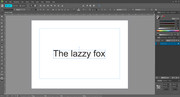
jeffers wrote:I only open it to see if there is an update. I find it impossible to use with the dark mode however much or little I try to tweak the UI greys etc plus the few other "lack of" and changes mentioned by others. Happy to continue with the last Affinity Photo prog until (hopefully) it alters to suit my way of working.
Pretty Much what I am doing.
I do use it for some light duty but nothing major.
Ali wrote:Version 3.0.1 is already out. It was released about one week after launch.
I am expecting there to be a significant update early next year, but don't know if there'll be anything else in the meantime.
I am using 3.0.1 - I am waiting for 3.1.0 (When it reaches)
Same here, a good few bugs which I have reported. To be honest, I am keeping 2.6.5 as I am not happy to use this for full production (At the moment), but I am getting used to it and hoping to switch fully by version 3.1
How is everyone finding the new Affinity so far...?
Worthy Upgrade?
Thank you, Alfred - I don't understand this "re-shuffle" of simple features....! 
Hi guys
Perhaps I have missed this one
But when you add an artboard and go back to document properties, there is no option for Margins in the properties dialogue box.
Is there anywhere else I can set this?

https://ibb.co/qF75MKp7
Cheers
Sam
[Embedded image added by Alfred]
Alfred wrote:sneil69 wrote:Ali wrote:Interesting ... How can you preview an export after it is complete? 
Don't understand your question?
Serif have always called it ‘preview’, but you’re viewing the export after it’s complete, so it isn’t actually ‘pre’ anything!
I See LOL OK - Thank you
Ali wrote:Interesting ... How can you preview an export after it is complete?
Don't understand your question?
walt.farrell wrote:sneil69 wrote:Is it just me or have the following moved or changed 3.01
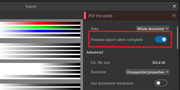
1. Preview PDF after generation
Walt good to have you here and thank you!
Alfred wrote:1. I can’t see an option for that, but you can choose to open the target folder after export (and from there it’s a small step to displaying the result in your favourite PDF viewer).
2. The ‘Move Tool Aspect Constrain’ setting (under ‘Edit > Settings > Tools’) hasn’t changed: ‘Automatic (based on selection)’, ‘Constrain by default’, or ‘Do not constrain by default’. Use the Shift key modifier to swap between default and non-default behaviour.
Thank you Alfred. Appreciate it!
Is it just me or have the following moved or changed 3.01
1. Preview PDF after generation
2. Resize handles are locked in a proportional mode and not free
Ali wrote:I have no idea about the crowns - I shan't be using the AI features.
Welcome Screen to be switched off
Light UI
These are not classed as bugs. They are changes to the app since V2. However, a lot of people are asking for change, many for reasons of accessibility, so I am hopeful that this issue will be addressed at some point.
I am aware of that they are not bugs but they should have never been changed this way.
Ali wrote:OK, well it's only been a week, and something is better than nothing.
Which fixes where you hoping to see? I understand that more fixes are on the way.
Welcome Screen to be switched off
Light UI
Also something I noticed that I am trying the CANVA AI or PRO on 1 month trial and so far it crashed once and it still has the Crown icon on the buttons. Are they to be there all the time or it is because I am on trial?
Thank you Ali - I was looking for the changes and tbh are not what what I was hoping.
Ali wrote:Have you submitted feedback to this effect? I have.
Indeed
Ali wrote:I am not sure which of us you are disagreeing with, sorry.
If me, then I shall be using V3, primarily for DTP projects, but also some photo manipulation (although I have never made any secret of the fact that my primary photo editor is ACDSee Photo Studio Ultimate 2026 because it includes DAM).
I do genuinely hope that Canva will keep its promises and prove those who mistrust them wrong.
I am dsagreeing with JAmedia
Posts found: 1 to 25 of 34