Skip to forum content
Alfred's Serif Users' Forums
An independent forum site for members of the Serif software community
You are not logged in. Please login or register.
Active topics Unanswered topics
Tips and Announcements
Automated signup has been disabled for these forums. If you wish to register, please send an email to admin[at]punster[dot]me stating your preferred username.
Embedded images: Click on the  Add image to post link below the message box. Your photo will be uploaded to the postimage website and then shared here via a thumbnail link. Click on the thumbnail for a larger view.
Private messages: There is no pop-up alert for new PMs on these forums, so you need to look out for the PM link (near the top right-hand corner of any forum page) becoming bold.
HAPPY NEW YEAR!
Search options
Hi Gill
WebPlus x 8 does not meet security standards and therefore I am unable to publish new updates to my website.
This is not true as I use WebPlus x8 and Ionos as a host and the way to achieve this is to publish to a folder on your local drive and follow the steps below.
In Ionos control panel create the webspace folder from the control panel then go back to your control panel and select your domain then use domain and from the popup choose "connect to webspace" and then the wizard takes you to the webspace where you select your folder and save. Next create the ftp connection with password and copy the details to a notepad.
Ionos SFTP when created does also allow a download of a Filezilla configuration which can then be opened from Filezilla ( although I have not tried this method personally)>
Then just as Joe says, use Filezilla to create an SFTP connection using the details from your notepad.
Navigate the left pane to your new folder you published the site to and once you connect to the server the right pane is the Ionos server which should be the webspace folder you created from the Ionos control panel. Then select all the files in the left pane and click (or right click) and upload.
Once completed disconnect from the server (incase of accidental deletion)
Voila you have published your site.
I hope that this helps.
Thank you Alfred for keeping this valuable resource going for us WebPlus diehards.
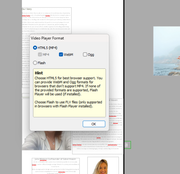
I recently had cause to utilise a webm file in a webpage and it looks like the Serif dev team intended for WebPlus x8 to support
webm and webp files however when trying to import them the process fails.
Was an update to WebPlus x8 ever released that supported WebM files?
Keith
You would need to get the css html code for yourself and add in manually maybe a little research online.
There is another paid option at Serif Addons site here: https://serifaddons.com/mobile-menu-webplus.html
I am in the same position as Baz74 and DerekE and have clients who's website have been created using Webplus x8 and also received an email from our UK based hosting provider stating that they websites using anything less than PhP 8 will need to pay £x per website.
I found that PHP is server side and there should be an option in the hosting control panel to apply which version of Php to use.
Version 8.1 was recommended.
As member states unless the website is using php scripts (such as this forum) there is nothing to do but if hosting providers want to charge for supporting anything less than v8 then just update it in the control panel to avoid charges.
I hope that this helps.
Posts found: 4