Does the disc show up in File Explorer? If so double click on the file listed there as setup.exe.
Geoff
An independent forum site for members of the Serif software community
You are not logged in. Please login or register.
Automated signup has been disabled for these forums. If you wish to register, please send an email to admin[at]punster[dot]me stating your preferred username.
Embedded images: Click on the  Add image to post link below the message box. Your photo will be uploaded to the postimage website and then shared here via a thumbnail link. Click on the thumbnail for a larger view.
Private messages: There is no pop-up alert for new PMs on these forums, so you need to look out for the PM link (near the top right-hand corner of any forum page) becoming bold.
Alfred's Serif Users' Forums → Posts by GB
Does the disc show up in File Explorer? If so double click on the file listed there as setup.exe.
Geoff
Am I doing something wrong, or is it a bug?
Hi Jandanz
Well, it's not a bug!
What you have done is added a line to the text. I assume you want a line around the text frame. Make sure to select the frame itself, not its contents, when you apply the line.
Geoff
I wonder what the metal frame near the end of your video is, or was, used for?
Looks like goal posts to me, with frame work for the net.
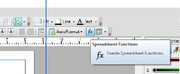
To get to the dialogue I showed, with the table selected, click the fx button on the top toolbar.
The Table toolbar will appear. Click the Number Format button on it.
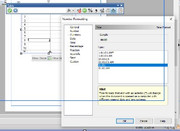
Can you do all your formatting in Excel, then Copy/Paste the whole Excel sheet into PagePlus? That will generate a PP Table automatically.
I do not think you can have a leading zero in number formatting, but the time format is available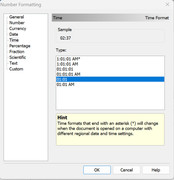
You can have a leading zero if you enter the number as text. To do this just add ' before the number, eg '01.
Was there a way that I could have set this up from the start of this exercise
I do not believe so.
What you can do, perhaps, is to create the text in another program, such as PagePlus, and copy/paste-as-new-layer that text object into the photo. By "that object" I mean the text frame, or the Artistic text object, not the actual text. You may have to delete the white background on the new layer.
In PagePlus, or whatever you use, it will be possible to configure the text however you want prior to copying it.
It is easy to resize it in PhotoPlus using the Deform tool, but it will not be editable as text from within PhotoPlus.
Geoff
Export as Picture is on the File drop-down menu.
Hi Jandanz,
I agree! I think you will agree that PhotoPlus or similar would be easier, but if such is not available your suggestion would work OK.
Perhaps another possibility would be not to change what is there already, but to simply add the required text in a separate text frame, over the top of, and hiding, the existing, Depending on the graphic, it could be a problem matching the background if it is not plain.
If the text is not actual text, but just a picture of text, the only way to change it is in a photo editing program such as PhotoPlus, or perhaps doing as Jandanz suggests.
If you open the Layers tab all the items on the page (and paste board) are listed. You can select any one by clicking on it there
You will get the Move cursor when the object is selected. What is the object are you attempting to select?
I've saved the download zip file, if needed in the future
Be sure to save the Product Key too. And the registration code 881887.
I would guess that you are trying to select an object that is part of a group. Ungroup the group first - by clicking the joined-up jigsaw button at bottom right of the selected group, or from the Arrange menu
Or you can select an object that is in a group from the Layers tab.
Geoff
You can register with the code 881887
You need to have the product key. If you have not kept a record of it, you will find it on your old computer under Help/Registration Wizard.
News item today:
150 feral cattle to be shot from sky in New Mexico
And you thought seagulls were a problem!
If you’re referring to the spelling, it should be:
Father’s Day
Mother’s Day
Valentine’s Day
Or perhaps
Fathers' Day
Mothers' Day
St Valentines's Day

bimonthly
Every two months. I hate ambiguity too!
Hi John,
I have only used PagePlus once to produce a true book. I did not use BookPlus, just did it as a single publication, but the cover was separate. It's Toubab: An American Doctor in West Africa Paperback – January 1, 2008
by D.O. David Z. Levine (Author). Available from Amazon. All profits for David's charity organization in West Africa. I did the second edition for him.
I mostly used PagePlus for a bimonthly magazine of 32pp.
Your books are amazing! You are very talented!
Geoff
I'm not sure if I could have solved the problem when I was 10. It's pretty basic algebra, but I don't think I got on to algebra in junior school, and had only just got started on it in Grammar school at 10.
2/3 * x - 12 = 1/2 * x
therefore (2/3 - 1/2)x = 12
hence 1/6 * x = 12
so 1/3 * x = 24 (given to brother)
The minimum row height depends on the size of the font used, so if you used the same size of font in the second table, the row heights will also increase the same as in your first table. You can set row heights under Table/Set Row Height, but you cannot make it less that the minimum determined by the font size you use.
I too wonder why you need two separate tables. Using a single table would ensure correct alignment.
Can you get someone who already has a CD/DVD player to copy the disc to a thumb drive? You can then install from that.
Geoff
Marlene Dietrich became an American citizen before outbreak of WW2.
Take a look at Help. Under Lines and Shapes there is a lot of information about drawing and editing lines.
Perhaps you should redraw the main outline as individual lines rather than a single line with bends.
The background grid might be better placed on a Master Page, and grouped - or use an empty table or a quick Grid.
I suspect it is a scam. Is it really from McAfee? What does View Source reveal?
Avast, Adaware and others offer good free antivirus.
Alfred's Serif Users' Forums → Posts by GB
Powered by PunBB, supported by Informer Technologies, Inc.