Ooh yes - that's pretty good, can't centre the image once it's placed, but I'll find a way with picture frame. I'll have a play.
Thanks for that.

I've been trying to make a vignette' for a photo - can't find how to do it in X9.
I was able to do it in Triscape FX Foto, which has been on my PC for years, but I was hoping to do it in X9.
Any ideas? Image attached:
https://i.postimg.cc/jCmfB8FF/PXL-20230503-064125066-exported-1124-1683101828895.jpg

28

(8 replies, posted in Fonts)

Thank you all for your replies. Have it sorted now.

I uninstalled the font, & thought it best to delete and re-install as per Alfred's suggestion, but after I uninstalled it, I got the message
"Tahoma cannot be deleted because it is a protected System File."
So I rebooted, went back into PPX9, and it's all working fine now! Yippee! Must have chased out the gremlins. Strange how it only affected PagePlus.

29

(8 replies, posted in Fonts)

Was that the abridged one?

30

(8 replies, posted in Fonts)

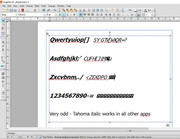
Screenshot attached. There appears to be no relation to the normal & italic characters. Edit: Just noticed there appears to be a shift 2 characters to the right each time?
Maybe I will need to research further.
Thanks for your reply.

I was up your way in 2006 when I visited my late cousin in Chehalis.

https://i.postimg.cc/4HxLtCm0/ppx9-screen.jpg

31

(8 replies, posted in Fonts)

I have a problem with Tahoma Italic font in both PagePlus XP8 & XP9. The standard font works fine in normal and bold, but in italic shows completely incorrect characters. However it works OK in bold italic. And when I try to highlight & replace bold italic with std, italic, it reverts back to incorrect characters.

Tahoma Italic works fine in all other apps such as MS Word, Notepad, Wordpad etc.

And when I download the italic font, and install it, the message shows it’s already installed. Though I haven’t tried deleting and reinstalling yet.

I prefer Tahoma font as in Bold, it is noticeably larger than normal, great for the start of paragraphs. But I choose another font if it’s not going to work.

This seems to have happened after a recent Window 10 update.

I would like to know if others can replicate this problem. TIA John

Thanks GB, all understood, I must be more careful when selecting!

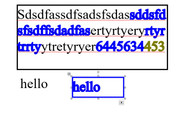
When I create a text box in PPX9 without a border line, the text I enter is normal (black). But when I create a text box and select a line colour first, the entered text is the same colour and is very bold. To return to normal text, I either have to select a clear border line, or select 'Clear Text formatting'.

An I doing something wrong, or is it a bug?

Example attached, hope I have explained it OK.
https://i.postimg.cc/626MH7dD/example.jpg

34

(11 replies, posted in PagePlus)

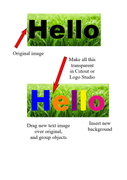
It can be done using LogoStudio & Cutout Studio, but it's rather fiddly!  You would need to type your new text into a text box, then convert it to an image. It’s quite a learning curve!

See sample.
https://i.postimg.cc/8fkzpNYQ/hello-trial.png
Hope it works for you.

35

(11 replies, posted in PagePlus)

Select the image. In PhotoLab select Crop and Straighten Tool.
Crop the area you require…> OK
To proceed further if required, use Cutout Studio to create the Object you want.…> OK
Save to Assets or Export as Picture
Hope that works for you…

I should have shown NCH DrawPad, sorry.

Thanks for your help on this jackneve, I'm sorry for my very late reply. I was unable to get PagePlus X8 going, as you mentioned the Product Key is dedicated, so I've had to abandon ship on that.

I've tried Affinity Publisher for iPad (paid) but it's over my head.
Also I paid for NCH but don't like that. PagePlus X8 suited me nicely.
In the meantime I am using Kingsoft WPS for my weekly newsletter, I can do most of what I need on that. I can use BG Remove online which is quite handy.

Best wishes & Season's Greetings...

Just after joining this group, my Windows 10 PC crashed, and I lost my emails, program files etc. including PPX8
I saved the download at the time of purchase in 2016 onto a CD.
I have unpacked the program, but the Product Key is nowhere to be found, so I can't install it.
All I have is the Registration Key and the Product Installation Number but not any group of 5 blocks of 5 characters.

I assume it's no use contacting Serif as they have discontinued support for this excellent program.
I wonder if Cleverbridge (the payment agents) would have any record of the transaction including the Product Key, or am I wasting my time.

I have the PPX8 Starter Edition, but many of the features are blocked out.

I had thought of purchasing Affinity Publisher, but I only produce a 3-page weekly newsletter. I might have to limp along with MS Word.

Any suggestions