901

(106 replies, posted in Art & Literature)

Alfred wrote:
William wrote:

https://i.postimg.cc/mhnC04S3/still-life.png

I spy with my little eye something beginning with … ImpactPlus!!

Well, that is very nice of you, because, for the benefit of those readers who do not already know, ImpactPlus is/was a 3D image generating program made by Serif.

Yet actually I produced the image using Affinity Designer.

Based on learning from John's book and analysing the underlying structure of John's still life paintings.

John has a section about having three items, not evenly spaced and slightly different from each other.

I tried to add a background wall.

William

902

(7 replies, posted in General Discussion)

In England, villages have a Council. It is called a Parish Council. Notwithstanding the name 'Parish' a Parish Council is a civil body, not connected to the church.

https://en.wikipedia.org/wiki/Parish_council_(England)

William

903

(106 replies, posted in Art & Literature)

https://i.postimg.cc/mhnC04S3/still-life.png

904

(106 replies, posted in Art & Literature)

Alfred wrote:
William wrote:

I wonder what are the angles.

The angles are the bits where adjacent sides meet, aren’t they?

I suspect you mean ‘I wonder what the values of the angles are.’

Possibly

But I would not end my statement of wondering with a verb.

I wonder what are the values of the angles.

William

905

(106 replies, posted in Art & Literature)

William wrote:

On page 16 of John's book, in the picture Still Life with Stoneware Jar is the table top, which would be rectangular, expressed using a rotated parallelogram?

Where art and mathematics meet.

I wonder what are the angles.

The angle of the long edge of the parallelogram to the horizontal edge of the picture.

14 degrees

William wrote:

The smaller of the two internal angles of the parallelogram.

36 degrees

William wrote:

Hopefully I can use Affinity Designer to find out.

William

Yes, I did.

So to try a humble pastiche of John's picture using Affinity Designer, one can start with a rectangular table top much longer than wide and apply a rotation of 166 degrees and a shear of -58 degrees.

So, allowing for experimental error, it looks iike the -58 degrees relates to 90 degrees - 34 degrees.

William

906

(106 replies, posted in Art & Literature)

On page 16 of John's book, in the picture Still Life with Stoneware Jar is the table top, which would be rectangular, expressed using a rotated parallelogram?

Where art and mathematics meet.

I wonder what are the angles.

The angle of the long edge of the parallelogram to the horizontal edge of the picture.

The smaller of the two internal angles of the parallelogram.

Hopefully I can use Affinity Designer to find out.

William

907

(106 replies, posted in Art & Literature)

Alfred wrote:
William wrote:

On the system that you are using, is the display not so good?

The display is fine on the systems that I’m using. What prompted you to ask about that?

As you mentioned higher dots per inch I was wondering if my 501 pixels high pictures displayed as very tiny.

William

908

(106 replies, posted in Art & Literature)

When I am experimenting and learning I typically start with an A3 plus bleeds landscape document at 300 dots per inch. This is so that if I later decide that I would like a print of what I have produced, then the document is ready for me to produce a PDF document to upload to Viking Virtual Print House to get some prints (what they term Loose (as contrasted with a bound result of one of various kinds)). I usually choose colour prints on 350 gsm matt paper.

As a secondary result I may want to produce a png graphic for display on the web. Exporting from the A3 document as a png graphic initially offers a png of 4961 pixels by 3508 pixels, so I change the 3508 to become 501 and then when I click in the width box the 4961 changes to become 709.

This forum shows a smaller size within a post, but clicking on the image shows it larger. In fact, I did that and downloaded a copy as a "got back" test and upon opening it I found it to be 709 pixels by 501 pixels.

On the system that you are using, is the display not so good?

The most recent picture in this forum, which is not the one we have been discussing up to now, did not start as A3, it was started based on the png that had two golden ratio lines, one at 0.618 and one at 0.382 x 0.618.

So that is why the watercolour lines are much wider than those in the picture that we had been discussing.

William

909

(106 replies, posted in Art & Literature)

The A3 plus bleeds original is at 300 dots per inch.

The screen displays at maybe 96 dots per inch.

So the A3 plus bleeds original is in case I decide to get a print, whereas the one seventh size png is intended for screen display here.

The one seventh choice is influenced by the fact that when exporting as png the original height offered is 3508 pixels, so changing that to 501 is a convenient size that seems to work well in this forum.

William

910

(106 replies, posted in Art & Literature)

https://i.postimg.cc/RWvkrwqd/watercoloured-pen-tool-goes.png

911

(106 replies, posted in Art & Literature)

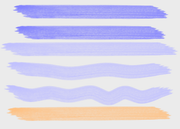
Just to try something, in Affinity Designer, I made a copy of my earlier picture, then locked it, added a new layer, then drew over various parts of it with the Pen Tool, then I used the Flat Watercolour brush on those Pen Tool drawn lines.

Then I hid the original picture and exported at one seventh size. The original is A3.

So this picture has the rabatment and the golden ratio horizon.

William


https://i.postimg.cc/wthjkRBJ/rabatment-and-golden-watercolour.png

912

(106 replies, posted in Art & Literature)

I find it good that this thread can drift its topic to wherever it goes.

Going back to the claim in the article linked from the first post in this thread, I decided to try the following prompt to Bing Chat AI.

Please produce an original painting. A dark background. At the right is a candle, with a flame. At the middle is a lady who is wearing a long green dress. The face of the lady is lit by the candlelight.

Here is the picture that I consider the best of the four that were produced.

I am a beginner in producing art, and I do not have the expertise to judge whether the AI has produced a good artistic effect.

William


https://i.postimg.cc/ct4xmfc6/b028546b-12ef-4664-babd-1eee115ea086.jpg

913

(106 replies, posted in Art & Literature)

I wonder if golden ratio of golden ratio can be recursive in picture composition.

For example, the horizon, the position of a cloud in the sky.

The position of a bird flying in front of the cloud.

Sort of like the Fourier series of a square wave.

William

914

(106 replies, posted in Art & Literature)

In the picture, the 0.382 of the whole height of the picture, seems too high, but half of it, about 0.191 seems too low.

Yet the 0.382 of the picture is 0.618 of the height of the sand and sea part, so maybe the desired location is at a height of 0.382 of the sand and sea part.

So at a height of 0.382 x 0.618 = 0.236076

So as the height of the picture is 915 pixels, that is

0.236076 x 915 = 216.00954 so use 216 pixels, measured from the base of the picture, so 699 from the top.


https://i.postimg.cc/6TbpB6g7/Sea-sky-sand-golden2.png


William

915

(106 replies, posted in Art & Literature)

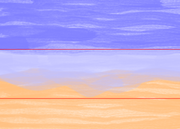
I thought that I would add some golden ratio lines onto a copy of the Sea_sky_sand picture that is in my previous post, just out of interest as to where they are in relation to the sea, the sky, and the sand.

So using the figures of 0.618 and 0.382 and the 915 pixel height of the picture, gives

0.618 x915 = 565.47 so use 565

0.382 x 915 = 349.53 so use 350

Use red filled 3 pixel wide rectangles to show the golden ratio lines.

The picture is 1278 pixels wide.


https://i.postimg.cc/gXVQgwDj/Sea-sky-sand-golden.png


That seems quite amazing.

Yet looking at the picture - I have been looking at the print from time to time for over a month now - I tend to think it might look better if the interface between sea and sand were lower down with about half as much sand and more sea.

(Break for a while while I try a quick mash up to see what it looks like.)

Yet I am not so sure now.

Where would the best height in the picture be for where the sea and the sand meet please?

William

An article that uses the word quotidian.

I do not remember ever seeing that word before. I needed to look up its meaning.

> Scientists discover ‘revolutionary’ phenomenon that solves 80-year-old mystery

https://www.msn.com/en-gb/news/world/sc … r-AA1nENsm

William

917

(106 replies, posted in Art & Literature)

Hello John

Thank you for your reply.

I have only just now noticed it. I had been writing my subsequent post for quite a while and producing the illustration graphic for it.

Best regards,

William

918

(106 replies, posted in Art & Literature)

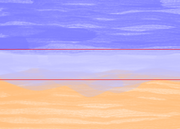
While recognizing that this thread has, due to me, drifted off-topic, but, well, with your forbearance please.


https://i.postimg.cc/cgH32DcY/Sea-sky-sand.png


In July 2024 I tried a watercolour brush in the Affinity Designer software program, looking at how overlapping brush strokes look.

Well, rather than just arbitrary brush strokes I decided to try to sort of sketch a seascape of the tide coming in over a beach, thus sky, sea, sand.

Using only one colour for each, so three colours in total.

The result seems to have more than three colours,but that is due to the overlapping of the brush strokes.

I started with an A2 landscape canvas, then I added an A3 plus bleed areas rectangle in the centre.

First I did the sky, then the sand, then the sea. This order as I wanted to try to have the effect of the sand being visible through the water of the incoming tide where the leading part of the water was not very deep.

So most overlapping of brush strokes of sky upon sky, sand upon sand, sea upon sea, yet some sea upon sand.

As it happened, rather than just leave the result as an electronic image, I made a copy of the Affinity Designer file and in that copy I enlarged the guide rectangle a little to become double the size, both horizontally and vertically, of the size needed for A5 plus bleed areas, then exported that selection at exactly half size as a png (Portable Network Graphics) graphics file, using measurement in units of pixels for maximum accuracy. I bought a giclée print and framed it.

Until yesterday, I had been thinking that I should have put the horizon across the middle of the picture. But after reading (part thus far) of the book to which John kindly supplied a link, I now realize that it is good that I had not put the horizon across the middle.

So, bearing in mind that I am a beginner and how the picture came to exist, I am wondering what is good and what is not so good about its composition.

Is the horizon in the right place?

If not, where would it be better placed?

Is the sea and sand "quasi-horizon" where the sea meets the visible sand in the right place? I have sometimes thought it is too high up the picture, but it is an incoming tide, not the tide already in.

The illustration is approximately half in both directions of the A5 plus bleed areas png graphic, so around A7 in size.

William

919

(106 replies, posted in Art & Literature)

I am very much a beginner with producing art, so constructive criticism of my pictures is welcome.

William

920

(106 replies, posted in Art & Literature)

Here is a second version, which I think is an improvement.

William


https://i.postimg.cc/JHwK0S5C/rabatment-and-golden-2.png

921

(106 replies, posted in Art & Literature)

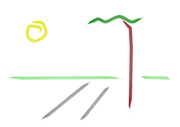
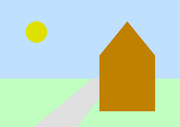
I have had a go at producing an original picture of my own using Affinity Designer so as to feature both rabatment for the end view of a house and golden ratio for the positioning of the horizon.

I do not know why I included the sun and why I positioned it where it is, it just seemed necessary to include it and the position just seemed right.

The perspective of the roadway just sort of happened, I used what Affinity Designer refers to as the Trapezoid tool and then used a -45 degree sheer and there is was, I just needed to then move it behind the building while keeping it in front of the grass and choose a colour for it.

The original is A3 plus bleed areas in case I decide to get an A3 print. The image here is one seventh scale both horizontally and vertically.

William


https://i.postimg.cc/G41S7nk8/rabatment-and-golden.png

922

(106 replies, posted in Art & Literature)

Do the AI generated images presented in this thread have the faults with AI generated images that are purported in the article linked from the first post in this thread?

William

923

(106 replies, posted in Art & Literature)

Moving on to page 14 of John's book.

Rabatment.

I wonder how rabatment would look on an A3 landscape picture, and on an A5 greetings card version of it.

Can rabatment and golden ratio be used in the same picture?

If so, golden ratio of the whole picture, or of one side or other,or both, of the rabatment?

William

924

(106 replies, posted in Art & Literature)

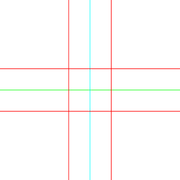
https://i.postimg.cc/2b2PNj3q/au-and-centre001.png


https://i.postimg.cc/dDC8fHXF/picture2-and-golden-and-centre.png

925

(106 replies, posted in Art & Literature)

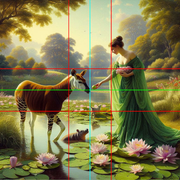
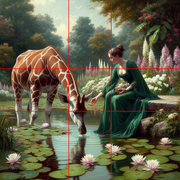
https://i.postimg.cc/62cysZdd/giraffe-plus-golden-ratio-lines.png