Skip to forum content
Alfred's Serif Users' Forums
An independent forum site for members of the Serif software community
You are not logged in. Please login or register.
Active topics Unanswered topics
Tips and Announcements
Automated signup has been disabled for these forums. If you wish to register, please send an email to admin[at]punster[dot]me stating your preferred username.
Embedded images: Click on the  Add image to post link below the message box. Your photo will be uploaded to the postimage website and then shared here via a thumbnail link. Click on the thumbnail for a larger view.
Private messages: There is no pop-up alert for new PMs on these forums, so you need to look out for the PM link (near the top right-hand corner of any forum page) becoming bold.
HAPPY NEW YEAR!
Search options (Page 1 of 2)
I still can't decide whether to get a new laptop or not. Trouble is I have read that the virus and malware programmes, although they still work, give little protection as they only cater for the latest platforms and don't update for the previous ones so they give very little protection.
I have anything from 1 to 10 images on each page and they are all embedded.
Out of interest, do you only use that computer for Webplus? Just wondering how you keep it secure.
I use X7 on Windows 10. Site has about 100 pages and currently working just as fast as ever. Going to have to get a new laptop with Windows 11 by October as that's when my extended support runs out so will have to see how the new configuration goes.
Wolstan Dixie wrote: because I have moved some pictures on my PC, so I can't do that - I only ever 'Quick Publish' the single page I am working on. And in any case it is quite a large site.
Do you not embed the images in your site?
You don't need to see the WP file to answer "have you checked that the description is in both these locations" which, had I of known, would have been my answer to someone asking the question.
Ali wrote:Without seeing how you have set up the WP file, nobody will be able to answer your question. Where would we start?
I really don't see how that has anything to do with it but anyway, I have just discovered the problem.
It appears that the page meta tag description has to be entered in the description box under Page Properties > Navigation as well as Page Properties > Search Engine > Search Terms
As title, I've noticed that Google is showing the site description for all pages rather than the page description that I've entered.
Is there something I've missed?
Thanks.
As soon as I clicked the problem I think I've found it! Now updated text as required. However found a new problem so will start a new thread.
Well I'm going round in circles here!
Realised that for many years I've been cutting corners and adjusting Body Text to the size and font I wanted, Now trying to have a mass tidy up and can't for the life of me find how I set up H1, H2 etc to the style I want.
Unfortunately ChatGPT keeps telling me to look for things that aren't there :-)
Any pointers please?
Thanks as always.
I'm still using X7. Set the page to 910 wide. Simple site but shows quite nicely on my iphone in landscape.
Alfred wrote:Wow, is it really 20 years since we first ‘met’?? 
I'm afraid so.
You'd think I'd know what I was doing by now but no :-)
All sorted and explained by Alfred. Thank you so much for your help - over the last 20 years !
As a follow up, after a lot of messages with ChatGTP, this is obviously a lot easier if I had the original disk. If I could get hold of a copy, would I use my original Product Key or the one that comes with the disk. Also, do I remember that you had to update the program once installed? If so, is it known what files were updated and could I copy those from my current installation?
Had a close call earlier this week! Had realised I didn't have any cds for X7, must have downloaded it, and I should back the programme up. I had copied across everything in the Serif directory and was going to continue next day. Then the laptop failed. Luckily it's been fixed but makes you sweat when you realise old programmes were not backed up completely.
So, what other files do I need to copy across? And will my licence details be included in any of these files?
Thanks as always.
Just wondering if anyone has tried the above combination and whether it worked ok. I've managed to sign up for Windows 10 support for another year but would be nice to know if X7 will work in future.
Thanks all.
Sorted, thanks Alfred. Is there a way to check if any images are not being embedded that I may have missed the size of?
I've not seen that setting. I shall look into it !
I've found it! For anyone that wishes to know:
Highlight Image
Go to Export Options in the toolbar that appears
Click on Picture Tab
Check the box - Embed file in site
It seems strange to me that an animated gif doesn't seem to have that as the default setting.
I've got a page with an animated gif. Just noticed that after I deleted the gif on my computer it's disappeared from the web page. Is there a way to embed it like normal images are?
If I look at the source it looks like it is embedded - confused now!
https://faze3.infy.uk/hanging-crystals.html
Thanks.
I had to lift the flowing text frames from X4 and import into X7. As far as I can see, the facility for flowing text isn't available in X7. So, I have a feeling that by doing this is causing the problem.
No, definitely text. This is what shows when you click export options:
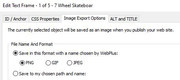
Well I'm sort of there!
I opened my file set up in X4, lo and behold the frames were linked. Copied the five frames and pasted them into my latest X7 version and all working as expected except . . .
It's uploading the five frames of text which are flowing exactly as they should but as an image. So the finished product looks a bit fuzzy and of course there's nothing for Google to pick up now.
So all I've got to do now is see if I can get it to upload as text.
And this is what I see now which I'm trying to change
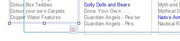
In my latest save, when I click on one of the five frames and make it shorter so the text doesn't fit it shows as a little red circle bottom right. I've just opened an old copy of the site and the image shows what I see on the frame in that version. If you hover over the little symbol it shows "Continued" which is what I'm after.

The product list page basically has 5 text frames with lists of products in each. Originally I set them up so that if I remembered something I could just add it in alphabetical order and the excess line in that frame would just move to the next one. Can't for the life of me remember how I did it!
The little miniature bears were definitely popular in their day :-)
I wonder if it's something new in Windows 11 which my daughter is now on. Are you using 10 or 11 Alfred?
Posts found: 1 to 25 of 27