Thank you Alfred and Ali for your replies.
I am also looking forward how to create mockups in Affinity. I am sure we all will learn something new on Sunday.
Kind regards,
Chris
An independent forum site for members of the Serif software community
You are not logged in. Please login or register.
Automated signup has been disabled for these forums. If you wish to register, please send an email to admin[at]punster[dot]me stating your preferred username.
Embedded images: Click on the  Add image to post link below the message box. Your photo will be uploaded to the postimage website and then shared here via a thumbnail link. Click on the thumbnail for a larger view.
Private messages: There is no pop-up alert for new PMs on these forums, so you need to look out for the PM link (near the top right-hand corner of any forum page) becoming bold.
Alfred's Serif Users' Forums → Posts by Bad_Wolf
Thank you Alfred and Ali for your replies.
I am also looking forward how to create mockups in Affinity. I am sure we all will learn something new on Sunday.
Kind regards,
Chris
Hello everybody,
Next Sunday, 8 March 2026 (3 pm UK / 4 pm CET time), there will be a new tutorial about creating mockups in Affinity by Canva. I am sure it will be another very interesting tutorial.
Here is the link:
https://www.youtube.com/watch?v=JccY9ypHV1k
In the following link, you can check the time when this tutorial starts in your location:
https://www.timeanddate.com/worldclock/ … 308T150000
Enjoy!
Kind regards,
Chris
Hello everyone,
Another webinar about bulleted and numbered lists is coming up on Saturday 28 February 2026. I’m sure this will be a very interesting topic for many of us.
Here is the link to the YouTube webinar:
https://www.youtube.com/watch?v=Ckq9fT32cP4
The webinar will take place on Saturday 28 February 2026 at 7 pm UK time.
You can check your local time by clicking the following link:
https://www.timeanddate.com/worldclock/ … 228T190000
Kind regards,
Chris
Hello Ali and Alfred,
It was meant light-heartedly, yes Alfred is absolutely correct.
In any case, it’s great to see so many people supporting and promoting her work. The more positive engagement around truly educational content, the better.
Kind regards,
Chris
Last week, Elaine mentioned the sudden increase in viewers. We both did a great job!
It is important that truly educational channels like Elaine’s remain visible among all the noise on YouTube. That is why our support for her channel matters.
Kind regards,
Chris
Thank you Alfred for the international times.
Kind regards,
Chris
For everyone interested, here is the link to the “Master Pages” webinar on Sunday, 22 February 2026 at 3:00 PM UK / 4:00 PM CET:
https://www.youtube.com/watch?v=SwNJEsAtCA4
This will undoubtedly be a very interesting and educational webinar.
Kind regards,
Chris
Thank you, AdmiralP, for your reply.
I found the explanation of the wrapping options very interesting and learned a lot from it. I didn’t know that a Table of Illustrations was possible, so that was something new for me as well.
I really enjoy Elaine’s webinars because they are detailed and clearly explained.
Hello everyone,
For those who attended last Sunday’s webinar about working with images, what was your experience? What did you learn? Any opinions or ideas you’d like to share?
Next Sunday, Elaine will be covering master pages, and knowing her previous tutorials, I expect she will go through it very thoroughly.
Kind regards,
Chris
Hello everyone,
Group styles are very useful when building your text style structure (a style tree). However, in Affinity Studio Layout, I believe there is a bug.
You create a group style called “G_BaseStyle.” You set the properties you need and close the dialog. A group style cannot be applied directly to text in your document (something important to remember).
Next, you create a paragraph style named “P_Body” and base it on the group style “G_BaseStyle.” You adjust the properties as needed and close the dialog.
If you then notice in the Styles panel that “P_Body” has suddenly become a group style, you’ve encountered the bug.
It took me several days to realize that I was actually fighting a bug in Affinity Studio Layout.
To fix this issue, you need to reset the Text Styles panel.
Restart the application and, while it is restarting, hold down the CTRL key. A reset dialog will appear. Select only “Text Styles” and make sure all other options are deselected. Then click “Clear.”
After this, your Styles panel should behave normally again.
I hope this helps.
Kind regards,
Chris
Very good idea Ali, it is a very educational channel. Always something new to learn. At the end of each live tutorial is a Q&A section where Elaine is answering questions from members.
Thank you all for your interesting replies. Elaine Giles is indeed an excellent teacher and what she teach can be applied in our daily design work.
I suggest, everyone starting with Affinity, should watch her live/replay tutorials. By doing so, you put a very strong foundation on using Affinity.
Thank you Alfred,
Exactly, what I was thinking too.
By the way Alfred,
Your forum is rapidly becoming a great fountain of information. Much better and more professional than Discord.
I am happy you keep your forums very clean, without all the noise as on Discord.
You are welcome Alfred,
Next Sunday there will be another great webinar about "Working with Images".
I am looking forward to it because I learn a lot from Elaine her webinars.
Hello Alfred,
Thank you for your input which I appreciate.
After reading your reply, I did a lot of experimenting and came to the conclusion that stylesheets in Affinity are very buggy.
For example, I create a GROUP style "G_GroupStyle" and this is a group style in the style panel.
Then I create a PARAGRAPH style "P_BodyStyle" as a paragraph style. (please note the uppercase for clarity)
At this moment the panel shows a group and a paragraph style.
Now I edit the "P_BodyStyle" style again and base it on "G_GroupStyle". Please take a look at screencapture below:
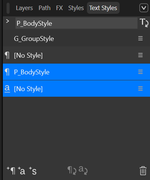
How is this be possible? Do I understand something wrong or is it a bug?
I am open for any reply, even when you tell me I am very wrong.
Honestly, I will appreciate your genuine reply very much.
Thank you so much for looking into my problem.
Kind regards,
Chris
Hello Ali and Alfred,
Thank you both for your replies. I didn't save the file yesterday, which is not very smart of me.
However, today I experimented with two new Layout files;
In the first document I deleted all unused styles. Then I created the following styles in order:
1. The style on which I based all other styles on: cal_BaseStyle.
Font: Poppins 12 pt,
Align: Left
Leading: exact 16 pt
2. cal_Cal_CalendarHeadings --> based on cal_BaseStyle
Font: Playfair Display
Font size: 48 pt
Align: center
Leading: exact 52 pt
3. cal_Weekdays --> based on cal_BaseStyle
changed:
Font-size: 14 pt
In this document, everything worked as expected.
However, in the second document when I delete all unused styles and then based cal_CalendarHeading and cal_Weekdays on the standard style Base. In Base I changed the font to poppins 12 pt.
In this document the inheritance is lost.
I have no explanation for this weird behaviour.
My suggestion is to delete all unused styles and make your own BaseStyle on which you base your other styles on. Then the inheritance works fine.
I hope this helps other people too.
Thank you both again for your input, which is appreciated.
Kind regards,
Chris
Thank you Ali, I just added the image.
Hello everyone,
For anyone interested in creating crosswords, word searches, and other activity content, Elaine Giles is hosting a YouTube webinar tomorrow, Sunday 8 February 2026, at 3 PM (UK time).
Elaine explains her process clearly and in great detail. If you’d like to improve your skills or learn new techniques, this is a great opportunity.
Here is the link to join:
https://www.youtube.com/watch?v=OYzSxv0XNVk
Kind regards,
Chris
Hello everyone,
I am experiencing a style inheritance issue in the latest version of a-Studio Layout for Windows and would appreciate your help.
Please, look to the following image. It contains the style tree and an explanation of the setup.

Here is what I am doing:
The style P_Base uses Poppins as the font.
I then create P_CalendarHeadings, based on P_Base, and change the font to Playfair Display and the font size to 48 pt.
Next, I create P_DayHeadings, also based on P_Base. In this style, I only change the font size (to 12 pt) and the weight to Bold. I do not change the font family.
Therefore, P_DayHeadings should inherit Poppins from P_Base.
However, the font in P_DayHeadings appears as Playfair Display instead of Poppins.
I cannot determine what is causing this behaviour.
Could someone please advise what might be going wrong?
Thank you very much in advance — your help is greatly appreciated.
Kind regards,
Chris
Thank you Pioneer for your suggestion. I already watched that webinar.
Elaine her tutorials are always long but very interesting and educational.
Saturday 31 January 2026 is also a very interesting one: How to create church newsletters.
Kind regards,
Chris
Hello Stuck,
Thank you for your reply and the information, which was really helpful.
I didn’t know about that manual before, but I’ve downloaded it now. There is a short explanation about group styles in it.
I also found out how to put paragraph and character styles inside a group style, and it is much simpler than it looks.
For example, let’s say you create a group style called “My Group Style”, in which you define font and paragraph properties. Then you create another paragraph or character style called “Body Text.”
If you want to link the style “Body Text” to the group style “My Group Style,” you simply go to the Style tab and, in the “Based on” field, select the group style “My Group Style.” The linked style will then inherit all properties of the group style.
You can check how styles belong to a group style by opening the menu at the top right of the Text Styles panel and choosing Hierarchical (or Hierarchy) view.
Thank you again for your help — it is much appreciated.
Kind regards,
Chris
Hello everyone,
Could you please help me understand how group styles work?
I’m trying to organize my text styles using a group style. I created a group style, but I can’t seem to add other paragraph and character styles to it.
My intention is to create a group style with the name of our company and then place a hierarchy of paragraph and character styles inside that group.
I’m not sure if my understanding of group styles is correct. Could you please explain how group styles are meant to be used, and how I can add other styles to a group style?
I’m using Affinity Studio.
Thank you very much for your help — it is truly appreciated.
Kind regards,
Chris
Very much success, much happiness and a good health to you Alfred.
From the bottom of my heart, I want to thank you for all the help and advice I received from you. You are a truly kind and helpful person.
My Internet is restored and all the Affinity apps work again as normal.
Have a very nice day and all the best.
Kind regards,
Chris
Happy Holidays everyone,
I hope you are all well.
I am experiencing the following issue with Affinity Studio and the Affinity Suite v2.6.5 on Windows 11, and I would really appreciate some guidance.
Since last Sunday, this laptop has had no internet access. Despite this, all Affinity applications continued to work normally for some time. However, as of yesterday, none of the Affinity applications will start anymore.
When I try to launch any Affinity app, I briefly see a spinning cursor and then nothing happens — no splash screen, no error message, and no crash dialog.
Important clarification:
This silent startup failure already occurred before I uninstalled and reinstalled the applications. The reinstall was attempted only after the problem started, as a troubleshooting step.
So far I have tried:
Completely uninstalling and reinstalling the applications (EXE/MSI installer)
Running the applications as administrator
Attempting to reset preferences using CTRL on launch
Restarting the system multiple times
Unfortunately, none of these steps helped, and none of the Affinity applications (Photo, Designer, Publisher, or Studio) start at all.
Given that the laptop has been offline since Sunday, I am wondering whether this behavior could be related to offline licence validation, licence token expiry, or another known issue that can cause Affinity apps to silently exit on startup.
Any advice or confirmation would be greatly appreciated.
Kind regards,
Chris
Alfred's Serif Users' Forums → Posts by Bad_Wolf
Powered by PunBB, supported by Informer Technologies, Inc.