1 (edited by Bad_Wolf 2026-02-07 19:38:36)

Topic: Style inheritance issue in a-studio Layout Windows, latest version

Hello everyone,

I am experiencing a style inheritance issue in the latest version of a-Studio Layout for Windows and would appreciate your help.

Please, look to the following image. It contains the style tree and an explanation of the setup.

https://i.postimg.cc/WdKkkzPn/Style-Inheritance-Problem-Layout.png

Here is what I am doing:

The style P_Base uses Poppins as the font.

I then create P_CalendarHeadings, based on P_Base, and change the font to Playfair Display and the font size to 48 pt.

Next, I create P_DayHeadings, also based on P_Base. In this style, I only change the font size (to 12 pt) and the weight to Bold. I do not change the font family.

Therefore, P_DayHeadings should inherit Poppins from P_Base.

However, the font in P_DayHeadings appears as Playfair Display instead of Poppins.

I cannot determine what is causing this behaviour.

Could someone please advise what might be going wrong?

Thank you very much in advance — your help is greatly appreciated.

Kind regards,
Chris

Re: Style inheritance issue in a-studio Layout Windows, latest version

No file attached, Chris.

Re: Style inheritance issue in a-studio Layout Windows, latest version

Thank you Ali, I just added the image.

Re: Style inheritance issue in a-studio Layout Windows, latest version

I think anyone troubleshooting this will need the file, not a picture.

Re: Style inheritance issue in a-studio Layout Windows, latest version

Ali wrote:

I think anyone troubleshooting this will need the file, not a picture.

What she said!

“Welcome to the present moment. Here. Now. The only moment there ever is.”
― Eckhart Tolle

Re: Style inheritance issue in a-studio Layout Windows, latest version

Hello Ali and Alfred,

Thank you both for your replies. I didn't save the file yesterday, which is not very smart of me.

However, today I experimented with two new Layout files;

In the first document I deleted all unused styles. Then I created the following styles in order:

1. The style on which I based all other styles on: cal_BaseStyle.
Font: Poppins 12 pt,
Align: Left
Leading: exact 16 pt

2. cal_Cal_CalendarHeadings --> based on cal_BaseStyle
Font: Playfair Display
Font size: 48 pt
Align: center
Leading: exact 52 pt

3. cal_Weekdays --> based on cal_BaseStyle
changed:
Font-size: 14 pt

In this document, everything worked as expected.

However, in the second document when I delete all unused styles and then based cal_CalendarHeading and cal_Weekdays on the standard style Base. In Base I changed the font to poppins 12 pt.

In this document the inheritance is lost.

I have no explanation for this weird behaviour.

My suggestion is to delete all unused styles and make your own BaseStyle on which you base your other styles on. Then the inheritance works fine.

I hope this helps other people too.

Thank you both again for your input, which is appreciated.

Kind regards,

Chris

Re: Style inheritance issue in a-studio Layout Windows, latest version

Bad_Wolf wrote:

However, in the second document when I delete all unused styles and then based cal_CalendarHeading and cal_Weekdays on the standard style Base. In Base I changed the font to poppins 12 pt.

In this document the inheritance is lost.

I have no explanation for this weird behaviour.

It sounds to me as though the inheritance is lost because you based other styles on the standard style as it existed at the time, and you then broke the connection by changing the base style (somewhat akin to using ‘Edit Detached’ on an object inherited from a Master Page in PagePlus).

“Welcome to the present moment. Here. Now. The only moment there ever is.”
― Eckhart Tolle

Re: Style inheritance issue in a-studio Layout Windows, latest version

Hello Alfred,

Thank you for your input which I appreciate.

After reading your reply, I did a lot of experimenting and came to the conclusion that stylesheets in Affinity are very buggy.

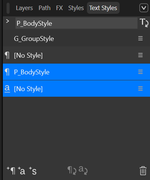
For example, I create a GROUP style "G_GroupStyle" and this is a group style in the style panel.

Then I create a PARAGRAPH style "P_BodyStyle" as a paragraph style. (please note the uppercase for clarity)

At this moment the panel shows a group and a paragraph style.

Now I edit the "P_BodyStyle" style again and base it on "G_GroupStyle". Please take a look at screencapture below:

https://i.postimg.cc/gXsP4Zw2/Text-Style-Panel-Problem.png

How is this be possible? Do I understand something wrong or is it a bug?

I am open for any reply, even when you tell me I am very wrong.

Honestly, I will appreciate your genuine reply very much.

Thank you so much for looking into my problem.

Kind regards,

Chris

Re: Style inheritance issue in a-studio Layout Windows, latest version

Bad_Wolf wrote:

Do I understand something wrong or is it a bug?

It looks like a bug to me, Chris, unless we’re both overlooking something.

“Welcome to the present moment. Here. Now. The only moment there ever is.”
― Eckhart Tolle

Re: Style inheritance issue in a-studio Layout Windows, latest version

Thank you Alfred,

Exactly, what I was thinking too.