Skip to forum content
Alfred's Serif Users' Forums
An independent forum site for members of the Serif software community
You are not logged in. Please login or register.
Active topics Unanswered topics
Tips and Announcements
Automated signup has been disabled for these forums. If you wish to register, please send an email to admin[at]punster[dot]me stating your preferred username.
Embedded images: Click on the  Add image to post link below the message box. Your photo will be uploaded to the postimage website and then shared here via a thumbnail link. Click on the thumbnail for a larger view.
Private messages: There is no pop-up alert for new PMs on these forums, so you need to look out for the PM link (near the top right-hand corner of any forum page) becoming bold.
HAPPY NEW YEAR!
Search options (Page 1 of 2)
I was not aware of the my heritage one. It sounds from what you say as if it might be the best one to try first. I have nothing to lose if the account is a free one. I hope that it remains free rather than options from NCL which start that way and then ask you to pay when the free trial period (which they fail to point out) expires.
Thanks for the feedback. I had that one on my list to download, but won't bother now you had tested it for me.
I have one more prospective download to try and that is https://www.gimp.org/downloads/. I have not yet explored how easy it might be to use.
I have been using the basic feature of version X11 for sometime, but have not ventured into the realms of actually editing an image in this way.
I cannot see anything obvious that suggests that it is possible using this program, but that is probably because I don't really know what I am looking for.
Can anyone tell me if it is possible to add colourisation to a black and white image and if so how I can do this.
The simplest method might be best to try first.
jfg17 wrote:I am potentially at the start of this journey.
I have use WebPlus X8 in a Windows 10 PC for sometime. All the files are on One Drive.
Unfortunately my Windows 10 PC looks like it is at the end of life.
All my other PC's run Windows 11 and are linked on the same One Drive so that is the good news.
My first question is where can I download a copy of WebPlus X8 to install on one of my Windows 11 PC's
You could preserve your windows 10 PC if you wish. Most components are replaceable such as the motherboard, graphics card and hard drives. I intend running mine specifically for 'old' programs. That will not prevent me from moving on with my PC as I will purchase a windows 11 version at some point, but I will still be able to use these now historic programs on the former PC.
Thank you both for your replies. The verdict does seem to be that they might work but with limitations. I may have to 'bite the bullet' and hope for the best.
Has anyone installed Draw Plus X6, PhotoPlus 11 or WebPlus X8 onto windows 11 successfully? I want to upgrade my computer but as I use these programs a lot did not want to do so if they will not work on the latest windows version.
I have managed to work out how to do it. I use 'export as picture', select the image area and then save. This then produces an image the same size as that imported into X6.
I am sorry but I am not familiar with this program and do not understand how I can achieve what you suggest. Could you please elaborate with simple step by step instructions? I have an option to crop the video image but not for cropping the A4 template.
Thanks.
I am wanting to import a video still picture whilst retaining the 16.9 ratio. As far as I can see, there is not an option to do this in X6.
I don't want to have any blank white spaces which I get if using say an A4 template.
How might I retain the full 16.9 image so that when exporting to picture it continues to fill the video screen?
This is getting even more curious by the minute. Having done as in the previous post entered £1 in the handling charge box and £2 in the postage box, the first purchase made using these entries resulted in an addition of £4 to the purchase and not the £3 that I expected. PayPal seems to do what it wants and I cannot seem to influence it.
pberk wrote:Do you know what is meant by "These values can be used to override those set in your PayPal profile"?
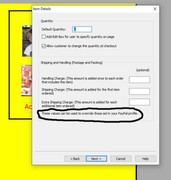
No, I have no idea. It looks as though I will have to see if my £2 postage box together with my £1 handling charge box add together to make the total of £3 that I want. I have never set specific parameters within Pay Pal. I have always made adjustments using web Plus.
The only problem with doing that is that if the buyer buys multiple items, they end up paying a colossal postage rate, which would deter them ordering.
Yes, I am using the configuration within Web Plus X8. The page you show is not quite the same, insofar as I have three options
1 Handling charge - added once to each order that includes this item
2 Shipping Charge - added for the first item ordered
3 Extra Shipping Charge - added for each additional item ordered.
I don't know where to find other options. Do you mean things like 'continue shopping'. When creating a payment button, a series of boxes accrue on the way to completing the creation of the button, but I cannot see any other options.
Thanks for your response. Here is a link to one of the purchasing pages on my site.
https://www.bkvpsport.co.uk/footballdvd … eason.html
It seems that there is no-one on here that can assist me with this and I really need to do something about it as currently, I am subsidising the postage on every item that I despatch, particularly as the 1st class rate has just been increased again.
Perhaps if I put £1 in the Handling charge box and £2 in the shipping charge box, I might achieve it that way.
Might that work?
Here is an odd one. For a long time I have had a posting and packing charge of £2 applied to my orders, but with the increase in postal charges, decided to increase this to £3 in future.
I changed the figure in the Handling Charge box to £3 but when I receive an order the former charge of £2 is applied. How can I change it to the required new charge of £3?
Hi all
Just as a point of interest, I did initially get speedier completion of the uploaded page, but since doing a full upload of the site, it has reverted to taking 10 minutes again.
It would seem that there is still some 'memory' in there of the various previous uploads that originally caused the problem.
Thank you both for confirming what I thought I needed to do. I was hoping not to have to as I have an extremely slow internet speed and quite a large site, but will have to bite the bullet and do it properly.
I don't find myself amending my website all that often these days and, given the passing years, my memory is not what it once was.
I have added a page to my website, checked in preview that it is working and now want to upload it. Do I need to do a full upload rather than just an incremental one please?
I have been accessing a forum for a local football team for many years without problem but this morning I received an interception message as follows-
Your connection is not private
Attackers might be trying to steal your information from www.fifc.proboards.com (for example, passwords, messages, or credit cards).
This server could not prove that it is www.fifc.proboards.com; its security certificate is from ssl544910.cloudflaressl.com. This may be caused by a misconfiguration or an attacker intercepting your connection.
Since I recently raised a point stating that my website suddenly appeared with a padlock symbol, should I be concerned that the above may have happened to me? My forum (from the same provider as the above listed one) also has a padlock which has recently appeared.
Precisely Alfred. I would have expected them to shout about it (the host that is), which is why I am somewhat bemused as to what has occurred. Anyway it is gratefully accepted.
Although I have made no purchase regarding an SSL Certificate, nor has my host informed of a free granting of this facility, I notice that google is no longer labelling it as 'not secure'. The padlock symbol now appears ahead of the web address in the search box.
Is anyone aware of any changes from google or could perhaps explain why this has suddenly happened?
Thank you Alfred. I would not necessarily have expected you to get back to me yesterday as I am sure you have other things to do besides staring at the forum waiting for people like me to pose questions. I am grateful for any response, however long it takes.
Hi Alfred
I have managed to change the extension to '.old' in the cpanel as that had an option to rename the file. However, when I enter Maintain website in WebPlus, the file still shows as '.txt'. Does this mean that when I upload, a new .txt file will be created which is empty? I assume it would.
Posts found: 1 to 25 of 38