Topic: Superscript numbers missing

For several years I've been using special font superscripts for notes 1, 2, 3 etc.

Example :  philosophy³

That's because the built-in superscripts increase the linespace above the text, disrupting the look of the text blocks.

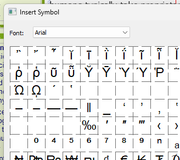
Now, for unknown reasons, the available superscripts at Text, Insert, Symbol are missing half the numbers in all fonts, starting at 0 then 56789. But for subscripts all the numbers are available : 0123456789.

Do you know of a workaround for superscripts that don't add a linespace?

2

Re: Superscript numbers missing

What program are you using?

Credendi non mutant facta

Re: Superscript numbers missing

APoster wrote:

Now, for unknown reasons, the available superscripts at Text, Insert, Symbol are missing half the numbers in all fonts, starting at 0 then 56789.

What fonts have you tested? There are hundreds of thousands of fonts out there, but the ones that include a full set of superscripts are probably very much in the minority, with most of the rest only including ² and ³.

“Welcome to the present moment. Here. Now. The only moment there ever is.”
― Eckhart Tolle

Re: Superscript numbers missing

GB wrote:

What program are you using?

Serif WebPlus X8
from many years ago

5 (edited by APoster 2025-10-30 00:43:15)

Re: Superscript numbers missing

Alfred wrote:
APoster wrote:

Now, for unknown reasons, the available superscripts at Text, Insert, Symbol are missing half the numbers in all fonts, starting at 0 then 56789.

What fonts have you tested? There are hundreds of thousands of fonts out there, but the ones that include a full set of superscripts are probably very much in the minority, with most of the rest only including ² and ³.

Serif WebPlus X8

Body text font is Verdana, and I've tried several others for superscripts, including Arial & Times New Roman & WingDings. All fonts I looked at had the same missing numbers (123) for superscripts [see image below]. Subscripts have a full set of numbers. I've been using superscripts from Arial for the last couple of years.

https://i.postimg.cc/Ln8fK1qz/Arial-Missing-Superscripts.png


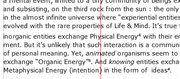
Is there a workaround to prevent WebPlus from adding space above the line to accommodate superscripts in "text, character, superscripts"? In the image below "Organic Energy" has a superscript from Arial a year or two ago, but "Physical Energy" has a new superscript added today.  Notice the extra linespace above the superscript "4".

https://i.postimg.cc/8FNf4fVp/Superscripts-old-and-new.png

Re: Superscript numbers missing

Those superscript numerals are actually included in the fonts you mention, but I think the problem is that (for historical reasons) they aren’t in the contiguous block that you were expecting.

https://en.wikipedia.org/wiki/Unicode_s … ipts_block

“Welcome to the present moment. Here. Now. The only moment there ever is.”
― Eckhart Tolle

7 (edited by APoster 2025-10-30 01:01:40)

Re: Superscript numbers missing

Alfred wrote:

Those superscript numerals are actually included in the fonts you mention, but I think the problem is that (for historical reasons) they aren’t in the contiguous block that you were expecting.

https://en.wikipedia.org/wiki/Unicode_s … ipts_block

That's strange. I've been using Arial superscripts via Font, Insert, Symbol, Other for several years. But the 1,2,3 superscripts have only recently disappeared from the table of symbols. Does that make sense to you?

Note : For convenience, I've retained all superscript numbers on the bottom line of the table. But as I add new symbols, the old ones get bumped off. Naively, I thought I could just add them back in, but discovered that the most common superscripts are missing from the current table. In my technical writing I use a lot of footnotes.

PS___ I've been using Arial superscripts instead of Verdana to make them small but noticeable and readable. Now the Verdana table of symbols is also missing the numbers 1,2,3.

8 (edited by Joe 2025-11-02 17:58:45)

Re: Superscript numbers missing

This is probably an ugly solution but here goes:

Type in a number at the appropriate place within your text.
Highlight it > Right click > Text format >Character > Superscript. Change size to around 8pt.

This will give you superscript with any number you want to use.


Edit: removed css note - not required

Somewhere over the rainbow, weigh a pie ...

Re: Superscript numbers missing

Joe wrote:

Change size to around 8pt.

That’s too big, of course, if it’s in a block of 8 or 9 point text! Generally speaking, superscripts and subscripts should be around 70% or 75% of the size of the body text.

“Welcome to the present moment. Here. Now. The only moment there ever is.”
― Eckhart Tolle

10

Re: Superscript numbers missing

Alfred wrote:
Joe wrote:

Change size to around 8pt.

That’s too big, of course, if it’s in a block of 8 or 9 point text! Generally speaking, superscripts and subscripts should be around 70% or 75% of the size of the body text.

I tried 8pt superscript with 12pt text and it didn't look too bad but I agree, best to experiment and see what suits.

Somewhere over the rainbow, weigh a pie ...

11 (edited by APoster 2025-11-06 01:14:33)

Re: Superscript numbers missing

Joe wrote:

This is probably an ugly solution but here goes:

Type in a number at the appropriate place within your text.
Highlight it > Right click > Text format >Character > Superscript. Change size to around 8pt.

This will give you superscript with any number you want to use.

Thanks for the tip. I had tried it before and found that it added a linespace above, which is the problem I was trying to avoid.  I work hard to make my HTML documents look like printed works. But the inherent HTML and WebPlus limitations make it almost impossible. Using the Insert/Symbol/Other worked well for several years, but now that option too is blocked by the missing 1,2,3 in the list of superscript symbols.

Alas, I continue my search for a superscript sans linespace.


PS___ I found that Unicode superscripts will work, but it's a lot of work to go outside WebPlus to copy & paste from these websites : 

https://academy.datawrapper.de/article/ … atawrapper

https://www.fileformat.info/info/unicod … subscripts


Apparently WebPlus X8 is not Unicode compliant. Any ideas for a Unicode shortcut or workaround?

Re: Superscript numbers missing

APoster wrote:

Apparently WebPlus X8 is not Unicode compliant.

Both PagePlus and WebPlus had Unicode support added at version X5. To insert a superscript 4, type its Unicode hex value U+2074 (or simply 2074 without the leading ‘U+’) and then choose the ‘Toggle Character Code’ option from the Text menu; the keyboard shortcut for that command is Shift+Alt+X on my WPX8 installation.

“Welcome to the present moment. Here. Now. The only moment there ever is.”
― Eckhart Tolle

13

Re: Superscript numbers missing

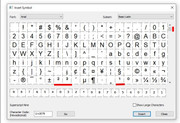
I think you will find that the superscripts 1 2 3 are at the top of the page of symbols and the other numbers near the bottom.


https://i.postimg.cc/nstkzTJr/supersc.jpg

Joe

Somewhere over the rainbow, weigh a pie ...

Re: Superscript numbers missing

Joe wrote:

I think you will find that the superscripts 1 2 3 are at the top of the page of symbols and the other numbers near the bottom.


https://i.postimg.cc/nstkzTJr/supersc.jpg

Joe

Thanks. I thought I had searched for stray numbers. But now I can find the missing superscripts cleverly hidden in the middle of a page of random symbols. This may be a solution to my added linespace problem, but it's still a lot of work to move all the numbers into one place, in the selected character line at the bottom of the page.

Re: Superscript numbers missing

APoster wrote:

it's still a lot of work to move all the numbers into one place, in the selected character line at the bottom of the page

The place to which you move them doesn’t have to be that ‘selected character’ line. You can simply insert the numbers into a text frame, and then move the frame to the pasteboard or the Assets tab.

“Welcome to the present moment. Here. Now. The only moment there ever is.”
― Eckhart Tolle

16

Re: Superscript numbers missing

APoster wrote:

Thanks. I thought I had searched for stray numbers. But now I can find the missing superscripts cleverly hidden in the middle of a page of random symbols. This may be a solution to my added linespace problem, but it's still a lot of work to move all the numbers into one place, in the selected character line at the bottom of the page.

If you are still having linespace problems we may be able to fix that with some css but it depends how consistant Webplus is with superscript (span) class names. Post if you still have issues.

Somewhere over the rainbow, weigh a pie ...

Re: Superscript numbers missing

APoster wrote:

Is there a workaround to prevent WebPlus from adding space above the line to accommodate superscripts in "text, character, superscripts"? In the image below "Organic Energy" has a superscript from Arial a year or two ago, but "Physical Energy" has a new superscript added today.  Notice the extra linespace above the superscript "4".

https://i.postimg.cc/8FNf4fVp/Superscripts-old-and-new.png

I can’t reproduce the extra line space here, but looking more closely at the screenshot I can see that the superscript 4 after “Physical Energy” isn’t the same as the superscript 4 after “ideas”.

https://i.postimg.cc/7C27kkND/IMG-8009.jpg

“Welcome to the present moment. Here. Now. The only moment there ever is.”
― Eckhart Tolle

18

Re: Superscript numbers missing

Alfred wrote:
APoster wrote:

Is there a workaround to prevent WebPlus from adding space above the line to accommodate superscripts in "text, character, superscripts"? In the image below "Organic Energy" has a superscript from Arial a year or two ago, but "Physical Energy" has a new superscript added today.  Notice the extra linespace above the superscript "4".

https://i.postimg.cc/8FNf4fVp/Superscripts-old-and-new.png

I can’t reproduce the extra line space here, but looking more closely at the screenshot I can see that the superscript 4 after “Physical Energy” isn’t the same as the superscript 4 after “ideas”.

https://i.postimg.cc/7C27kkND/IMG-8009.jpg

It looks like the Energy 4 is Verdana and the ideas 4 is Arial.

Somewhere over the rainbow, weigh a pie ...

Re: Superscript numbers missing

Joe wrote:

It looks like the Energy 4 is Verdana and the ideas 4 is Arial.

Thanks for your observation, Joe. I think you’re right, and that difference explains the issue which the OP has been struggling with. If I place the cursor in a block of text set in 36pt Arial and choose the ’Paragraph…’ option on the Text menu, the default line spacing is shown as 42.750 pt; if I do the same with a block of text set in 36pt Verdana, the default line spacing is shown as 44.250 pt. Changing the line spacing from ‘Single’ to ‘Exactly’ allows me to set the value to 42.750 pt, and the lines close up accordingly.

“Welcome to the present moment. Here. Now. The only moment there ever is.”
― Eckhart Tolle

20

Re: Superscript numbers missing

Alfred wrote:
Joe wrote:

It looks like the Energy 4 is Verdana and the ideas 4 is Arial.

Thanks for your observation, Joe. I think you’re right, and that difference explains the issue which the OP has been struggling with. If I place the cursor in a block of text set in 36pt Arial and choose the ’Paragraph…’ option on the Text menu, the default line spacing is shown as 42.750 pt; if I do the same with a block of text set in 36pt Verdana, the default line spacing is shown as 44.250 pt. Changing the line spacing from ‘Single’ to ‘Exactly’ allows me to set the value to 42.750 pt, and the lines close up accordingly.

Hi Alfred, I didn't look at the line spacing on the tests I did at 12pt but is was noticable that the the Arial superscripts were smaller than the Verdana when inserted into a Verdana paragraph, and did not increase the line spacing.

Somewhere over the rainbow, weigh a pie ...

Re: Superscript numbers missing

Joe wrote:

Hi Alfred, I didn't look at the line spacing on the tests I did at 12pt but is was noticable that the the Arial superscripts were smaller than the Verdana when inserted into a Verdana paragraph, and did not increase the line spacing.

I think the bottom line is that sometimes it’ll work without tweaking and sometimes it won’t. It all depends on the font metrics.

“Welcome to the present moment. Here. Now. The only moment there ever is.”
― Eckhart Tolle