Topic: User Interface where is the Light option?

Being lazy and reluctant to go discourse or whatever it is to search so hope I get an answer here:

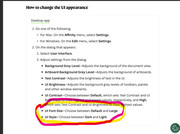
on the old AFphoto there was a preference setting to make the UI light or dark, so far using the new Studio I hate the black. I asked Ritson (screenshot) and followed the instructions but I cant find the "style" option. Where am I going wrong? I scroll down from the screenshot but it's not in any option that I can see.
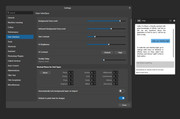
https://i.postimg.cc/SnYTR6B3/Screenshot-2025-11-01-113112.jpg

Re: User Interface where is the Light option?

Doing some more digging in the help I dont have the option to change the font size either

3 (edited by Ali 2025-11-01 12:50:31)

Re: User Interface where is the Light option?

There is no light option, but in the Start dialog in Windows search for Accent Colour, and try changing that to see if that helps.

Then, if you can in the app, go to Help > Send Feedback and ask for a change, as I and others have done.

Font size is dependent on your Windows settings - ask for that to be improved, as well.

Re: User Interface where is the Light option?

Thanks Ali, annoying though as if I bring up the "help" in the Studio it has that option
https://i.postimg.cc/zLFKd3m2/help-screenshot.jpg

Re: User Interface where is the Light option?

Yes, that's already been flagged with Affinity.