Topic: Messed up my working layout

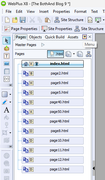
I don't know what I did to change the workspace layout. I got it back to this point, but the Pages used to have names instead of numbers. Suggestions to change back to named pages.

Example : Page 10 should say "Post 147 Right Stuff"


https://i.postimg.cc/562rqfqj/Web-Plus-X8-toolbar-pages.png

Re: Messed up my working layout

The section for WebPlus queries is here: https://punster.me/serif/viewforum.php?id=6

I never experienced this in all the years I ran WP, so it must be something that you have done, but I don't know what. I don't use WP any more - sorry.

Re: Messed up my working layout

Ali wrote:

The section for WebPlus queries is here: https://punster.me/serif/viewforum.php?id=6

Thanks, Ali! I’ve moved this topic from the General Discussion forum.

@APoster: Your screenshot shows that the ‘.html’ button on the Pages tab is active. If you hover over that button you’ll get a tooltip with the words ‘Show Page Name or File Name’, which tells you that it toggles between those two options. Simply click on the button to deactivate it and get your page names back.

“Welcome to the present moment. Here. Now. The only moment there ever is.”
― Eckhart Tolle

Re: Messed up my working layout

APoster wrote:

I don't know what I did to change the workspace layout.

Once you’ve got it back to the way you prefer, go to the View menu and choose ‘Tabs > Save Workspace’ so that it’s available for reinstating (via ‘Tabs > Load Workspace’) if it ever gets messed up again.

“Welcome to the present moment. Here. Now. The only moment there ever is.”
― Eckhart Tolle