Topic: Click text to popup hidden text box

Serif WebPlus X8 on Windows 11

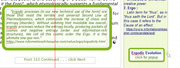
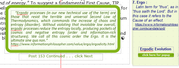
I have placed a text box and rounded rectangle boundary, grouped as grp 1334 on top of a full page of text. Near it I placed a small text box with a title and "for popup click here" instruction. Separately, the text & rectangle are Hidden in CSS properties. And when I group them they remain Hidden.  But in the browser, clicking the title does not display the Hidden grp1334.

If I do only the text without the rectangle, it will display when clicked.

So, I made a text box with border and rounded corners. But couldn't add a fill to hide the page of text behind.

For the action object, I also created a button with same settings. When I point to it the hand symbol appears. Still the group doesn't popup.

I've been doing popups for years, but I seem to be missing something. Any suggestions? BTW, I did try a different browser, MS Edge


https://i.postimg.cc/sQ08XrMG/Popup-text-box.png

Re: Click text to popup hidden text box

A *.wpp file would make it easier to see what you’ve tried to do, but from your description you have a hidden text box that you’re trying to unhide via CSS properties. I suggest doing it the other way around: cover the text box with a filled rectangle, and use CSS properties to hide the rectangle so that the text box shows through when the user clicks on the ‘Click for popup’ button.

“Welcome to the present moment. Here. Now. The only moment there ever is.”
― Eckhart Tolle

3 (edited by Joe 2026-04-22 10:36:15)

Re: Click text to popup hidden text box

As an alternative place your stuff to hide on a panel and then hide the panel in it's css properties > visibility tab.

Using a styled button, in the Action tab choose something like  Panel_1 show on rollover hide on rollout.

Joe

Somewhere over the rainbow, weigh a pie ...

Re: Click text to popup hidden text box

Alfred wrote:

A *.wpp file would make it easier to see what you’ve tried to do, but from your description you have a hidden text box that you’re trying to unhide via CSS properties. I suggest doing it the other way around: cover the text box with a filled rectangle, and use CSS properties to hide the rectangle so that the text box shows through when the user clicks on the ‘Click for popup’ button.

The intent is to hide the invisible text & border on top of a full page of text. Then unhide only when the Popup button is clicked.
So, I'm now trying the Panel suggestion below. But I'm not familiar with Panels. So . . . .

5 (edited by APoster 2026-04-23 00:41:58)

Re: Click text to popup hidden text box

Joe wrote:

As an alternative place your stuff to hide on a panel and then hide the panel in it's css properties > visibility tab.

I've never used Panels, but I'm try to make it work. I created a Panel slightly larger than the text box. Now I'm trying to figure out how to place the hidden text inside the panel. When I slide the hidden text box over the Panel it automatically pops up a dialog. But nothing I need for this purpose.

Next, I drew the Panel on top of the text box, and it seemed to automatically group them as "Panel 2". Then I tried to Edit Properties for the group. But the group edit does not allow CSS invisibility. . . .

Anyway, I now have a hidden panel with text box inside, labeled as Panel_2. And a "click here" button set to Action : Panel_2 show on click . hide when click elsewhere.  But in browser, when I click the button nothing happens.

I'm still missing something about setting actions in this situation.

Here's an excerpt from the HTML code for the Panel and Text Box :

<script type="text/javascript">
            $(document).ready(function() {
            $("a.ActiveButton").bind({ mousedown:function(){if ( $(this).attr('disabled') === undefined ) $(this).addClass('Activated');}, mouseleave:function(){ if ( $(this).attr('disabled') === undefined ) $(this).removeClass('Activated');}, mouseup:function(){ if ( $(this).attr('disabled') === undefined ) $(this).removeClass('Activated');}});
            clickShowHide('txt_1603', 'txt_1583', 150);
            clickShowHide('panel_2', 'panel_2', 150);
            clickToggle('btn_44', 'panel_2', 150);

What does "('disabled') === undefined )" mean in this context? Did I do something wrong?


https://i.postimg.cc/8FH7rtdT/popup-panel-with-text-box.png

Re: Click text to popup hidden text box

APoster wrote:

Here's an excerpt from the HTML code for the Panel and Text Box :

<script type="text/javascript">
            $(document).ready(function() {
            $("a.ActiveButton").bind({ mousedown:function(){if ( $(this).attr('disabled') === undefined ) $(this).addClass('Activated');}, mouseleave:function(){ if ( $(this).attr('disabled') === undefined ) $(this).removeClass('Activated');}, mouseup:function(){ if ( $(this).attr('disabled') === undefined ) $(this).removeClass('Activated');}});
            clickShowHide('txt_1603', 'txt_1583', 150);
            clickShowHide('panel_2', 'panel_2', 150);
            clickToggle('btn_44', 'panel_2', 150);

What does "('disabled') === undefined )" mean in this context? Did I do something wrong?

Please use the ‘Post reply’ option so that you have access to the Attachments feature, allowing you to attach a *.wpp file instead of just screenshots and code snippets.

“Welcome to the present moment. Here. Now. The only moment there ever is.”
― Eckhart Tolle

7 (edited by APoster 2026-04-23 18:00:40)

Re: Click text to popup hidden text box

Reply to Alfred

The .wpp file was too big to upload. So I zipped it.

I browsed and added the ZIP file, but I'm not sure it worked.

The Preview doesn't show the file.

Any suggestions for uploading a ZIP file?

Re: Click text to popup hidden text box

A zip archive should upload just like any other file. You simply need to make sure that you don’t miss out any steps.

1. Click on ‘Post reply’.
2. Type something in the message box. If you leave it empty, you’ll get a ‘Fill out this field’ prompt at step 5.
3. Click on ‘Choose File’ in the Attachments section below the message box.
4. Browse to the zip file.
5. Press the ‘Add file’ button.
6. Press ‘Submit reply’.

If you’re still having problems, use a file-sharing service such as Dropbox or WeSendit and then post the download link here.

“Welcome to the present moment. Here. Now. The only moment there ever is.”
― Eckhart Tolle

9 (edited by APoster 2026-04-25 01:02:16)

Re: Click text to popup hidden text box

Alfred wrote:

A zip archive should upload just like any other file. You simply need to make sure that you don’t miss out any steps.

If you’re still having problems, use a file-sharing service such as Dropbox or WeSendit and then post the download link here.

I tried again, and it said "the ZIP file is too big to upload". The compressed file is still 4.5mb. 20mb unzipped. It's just one page.

Even Dropbox can't seem to compress a .wpp file. Still 4.5mb.

Need an email address to transfer the file from Dropbox. Please put address in your reply.

Re: Click text to popup hidden text box

After I created the Panel with a transparent background, I dragged the text box over the Panel and it snapped into place. So I assumed the Panel and Text became a single object. But that doesn't seem to be the case.

When I type directly inside the Panel, the Text becomes invisible like the background.
Next, I created an empty text box inside, and then began typing. That seems to work.

Is'nt there a way to create a Panel, and then drag & drop an existing Text Box into it?

Re: Click text to popup hidden text box

APoster wrote:

I tried again, and it said "the ZIP file is too big to upload". The compressed file is still 4.5mb. 20mb unzipped. It's just one page.

Even Dropbox can't seem to compress a .wpp file. Still 4.5mb.

A *.wpp file is just a zip archive with a different file extension, so it’s never going to become significantly smaller without a more efficient compression method.

APoster wrote:

Need an email address to transfer the file from Dropbox. Please put address in your reply.

Why not simply post the Dropbox link here? You would need an email address to share it privately, but if you do that you won’t enable multiple users to inspect the file and potentially offer solutions to the problem.

“Welcome to the present moment. Here. Now. The only moment there ever is.”
― Eckhart Tolle

12 (edited by Joe 2026-04-25 07:47:12)

Re: Click text to popup hidden text box

APoster wrote:
Joe wrote:

As an alternative place your stuff to hide on a panel and then hide the panel in it's css properties > visibility tab.

I've never used Panels, but I'm try to make it work. I created a Panel slightly larger than the text box. Now I'm trying to figure out how to place the hidden text inside the panel. When I slide the hidden text box over the Panel it automatically pops up a dialog. But nothing I need for this purpose.

Next, I drew the Panel on top of the text box, and it seemed to automatically group them as "Panel 2". Then I tried to Edit Properties for the group. But the group edit does not allow CSS invisibility. . . .

Anyway, I now have a hidden panel with text box inside, labeled as Panel_2. And a "click here" button set to Action : Panel_2 show on click . hide when click elsewhere.  But in browser, when I click the button nothing happens.

I'm still missing something about setting actions in this situation.

If it helps I have attached


Here's an excerpt from the HTML code for the Panel and Text Box :

<script type="text/javascript">
            $(document).ready(function() {
            $("a.ActiveButton").bind({ mousedown:function(){if ( $(this).attr('disabled') === undefined ) $(this).addClass('Activated');}, mouseleave:function(){ if ( $(this).attr('disabled') === undefined ) $(this).removeClass('Activated');}, mouseup:function(){ if ( $(this).attr('disabled') === undefined ) $(this).removeClass('Activated');}});
            clickShowHide('txt_1603', 'txt_1583', 150);
            clickShowHide('panel_2', 'panel_2', 150);
            clickToggle('btn_44', 'panel_2', 150);

What does "('disabled') === undefined )" mean in this context? Did I do something wrong?


https://i.postimg.cc/8FH7rtdT/popup-panel-with-text-box.png

If it helps I have attached a file to this post which shows a panel styled with a border and rounded corners with a text frame on it, and a styled text frame with a similar border used as a button with click to show and click elsewhere to hide.

If they are of use, copy and paste them into your project and amend ID's and actions as required.

Joe

Post's attachments

panelBorder.wpp 18.45 kb, 2 downloads since 2026-04-25 

You don't have the permssions to download the attachments of this post.
Somewhere over the rainbow, weigh a pie ...

13 (edited by APoster 2026-04-25 18:01:16)

Re: Click text to popup hidden text box

Alfred wrote:

Why not simply post the Dropbox link here? You would need an email address to share it privately, but if you do that you won’t enable multiple users to inspect the file and potentially offer solutions to the problem.


DropBox link to "the BothAnd Blog fix popup"

https://www.dropbox.com/scl/fi/w8exmwj4 … t&dl=0

I shared the .wpp file to my email. When I click on URL above, DropBox says : this file type not supported"

Note1 --- I could do the popup myself if someone could describe the steps to create a Panel with invisible background, and then insert a text box that would be visible.

Note2 --- I now have a Panel and a new Text Box created within the Panel. But cant figure out how to Associate the text with the Panel. They remain separate objects.

WP Help says : "You should treat your panel as an empty building block which can be developed using WebPlus standard tools and features. By creating objects within the panel area, they belong to the panel. This extends to objects such as text frames, artistic text, tables, QuickShapes, and pictures. Dragging the panel will also move its associated objects."

Dont know how to "associate" Text with Panel, so I can drag them together as a single object. Grouping doesn't work. I can drag the group, but the panel still seems to remain separate.

Re: Click text to popup hidden text box

APoster wrote:

When I click on URL above, DropBox says : this file type not supported"

It says it’s unsupported here [my emphasis]. Image files (and a few other file types such as PDF, depending on your OS and browser) can be displayed directly on that page, but WebPlus project files obviously have to be downloaded instead. Use the ‘Download’ button below the message to choose between downloading or copying to your Dropbox.

“Welcome to the present moment. Here. Now. The only moment there ever is.”
― Eckhart Tolle

Re: Click text to popup hidden text box

APoster wrote:

WP Help says : "You should treat your panel as an empty building block which can be developed using WebPlus standard tools and features. By creating objects within the panel area, they belong to the panel. This extends to objects such as text frames, artistic text, tables, QuickShapes, and pictures. Dragging the panel will also move its associated objects."

Dont know how to "associate" Text with Panel, so I can drag them together as a single object. Grouping doesn't work. I can drag the group, but the panel still seems to remain separate.

If the text frame is on top but moving the panel doesn’t also move the text frame, you don’t have the text frame fully within the panel area. Try enlarging the panel after dragging the text frame away from it, so that you have a larger target to aim for when you drag the text frame back onto it. You can reduce the size of the panel once the text frame is properly associated with it.

“Welcome to the present moment. Here. Now. The only moment there ever is.”
― Eckhart Tolle

Re: Click text to popup hidden text box

Alfred wrote:

If the text frame is on top but moving the panel doesn’t also move the text frame, you don’t have the text frame fully within the panel area. Try enlarging the panel after dragging the text frame away from it, so that you have a larger target to aim for when you drag the text frame back onto it. You can reduce the size of the panel once the text frame is properly associated with it.

Thanks to all for the suggestions. Sorry to bother you with my amateur problems.

The text box was completely within the Panel, and they automatically snapped together. So I thought they would function as a group. The text box alone would popup with invisible backgroun, but together with the Panel, they both seem to remain invisible when the button is clicked.

So I have given up on the Panel approach. And gone back to the original, except that I cant group the Text and Rounded Box together for the Popup. Instead, I just place the text on top of the rounded box, and make both Hidden. Now, when I click the popup button -- with two targets -- both text and box display.

I thought I had successfully popped-up grouped text & box in the past. But now I cant make it work.

17

Re: Click text to popup hidden text box

I thought I had successfully popped-up grouped text & box in the past. But now I cant make it work.

Did you not download the file that I attached to my post above? It will help you.

Joe

Somewhere over the rainbow, weigh a pie ...

Re: Click text to popup hidden text box

Joe wrote:

I thought I had successfully popped-up grouped text & box in the past. But now I cant make it work.

Did you not download the file that I attached to my post above? It will help you.

Joe

Yes. I have, but haven't had time to do anything with it. I'll look at it in the next few days. Thanks for the help.

Meanwhile, I have achieved the desired effect, even though the hidden popup is two separate items instead of one group.