[WJGO]
I am writing a post about this language for a web forum. Please describe the language so that I can copy and paste your description into the forum thread.
[Copilot]
Absolutely, William — here’s a clear, copy-ready description of your language that you can post to your forum. It explains the syntax, behavior, and structure in a concise and engaging way:
[Not even attempted to enter it here due to rich text structure]
[WJGO]
That is good. However the forum only accepts plain text, so could you present the same infomation as plain text all of one font size please, no panels, just text.
[Copilot]
Absolutely — here’s the same description in plain text format, suitable for posting in a forum that only accepts basic text:
This is a minimalist command language for generating vector-style graphics using simple text input. It operates on a small set of variables and commands, allowing precise control over drawing operations with compact syntax.
Variables:
a: current X-coordinate
b: current Y-coordinate
p: previous X-coordinate (used for drawing)
q: previous Y-coordinate (used for drawing)
h: input buffer for numeric values
All variables start at 0.
Digit Commands (0–9): Each digit command updates h by multiplying the current value by 10 and adding the digit: h = h * 10 + n
So the sequence 2 5 7 builds h = 257.
Symbolic Commands:
x: sets a = h, then resets h to 0
y: sets b = h, then resets h to 0
d: draws a line from (p, q) to (a, b), then sets p = a and q = b
m: moves to (a, b) without drawing, then sets p = a and q = b
Syntax Rules:
Spaces are ignored. Input can be tightly packed or spaced out.
Commands are interpreted sequentially, character by character.
The coordinate system places the origin (0, 0) at the top-left corner.
X increases to the right
Y increases downward
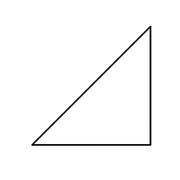
Example: The input string: 200x100ym700xd500yd200x100yd
Produces a triangle with vertices at: (200, 100), (700, 100), (700, 500), and back to (200, 100)
This language is compact, expressive, and ideal for generating simple vector paths with minimal syntax.
Let me know if you’d like to include a sample image description or a few more examples!