Topic: MoviePlus X6 installation
I have a new computer and wish to install my MoviePlus X6. I have the codes and have copied them, but I do not have the disc, so is it still possible to move my installation?
JIM
An independent forum site for members of the Serif software community
You are not logged in. Please login or register.
Automated signup has been disabled for these forums. If you wish to register, please send an email to admin[at]punster[dot]me stating your preferred username.
Embedded images: Click on the  Add image to post link below the message box. Your photo will be uploaded to the postimage website and then shared here via a thumbnail link. Click on the thumbnail for a larger view.
Private messages: There is no pop-up alert for new PMs on these forums, so you need to look out for the PM link (near the top right-hand corner of any forum page) becoming bold.
Alfred's Serif Users' Forums → MoviePlus → MoviePlus X6 installation

I have a new computer and wish to install my MoviePlus X6. I have the codes and have copied them, but I do not have the disc, so is it still possible to move my installation?
JIM

Please clarify what you have. Have you exported your codec unlock codes in a small "mfu" file? Plus you need your Product Key for activating on your new pc. Your Product Key can be found in your existing X6 installation by going to Help/Registration Wizard where it's shown at the bottom of the window.
You also need either a disc or an installation file which we'll deal with when you reply to the above.

Please clarify what you have. Have you exported your codec unlock codes in a small "mfu" file? Plus you need your Product Key for activating on your new pc. Your Product Key can be found in your existing X6 installation by going to Help/Registration Wizard where it's shown at the bottom of the window.
You also need either a disc or an installation file which we'll deal with when you reply to the above.
When Jim posted to an old topic before creating this new one as you advised, he wrote:
I have the export codes, but they will not import onto a new computer or activate the MoviePlus X6. Therefore, do you need a disc to complete this?
I don’t currently have access to a working copy of the installer, and Jim clearly doesn’t have one either. Please can you assist, Eric?
Alfred - Probably but first I need clarification of what exactly he has before taking it further. The comment "I have the export codes, but they will not import onto a new computer or activate the MoviePlus X6" doesn't make sense to me.
Somewhere I have a copy of the X6 disc which I can temporarily upload to Google Drive. When I do I'll also give you the link so you can add it to your library.
Alfred - Probably but first I need clarification of what exactly he has before taking it further. The comment "I have the export codes, but they will not import onto a new computer or activate the MoviePlus X6" doesn't make sense to me.
We obviously need clarification from Jim, but it sounds as though he may expect to be able to install the unlock codes independently of MoviePlus, in much the same way as you usually install fonts in Windows instead of installing them in individual programs. The reference to activating MvPX6 doesn’t make sense to me, either.
Somewhere I have a copy of the X6 disc which I can temporarily upload to Google Drive. When I do I'll also give you the link so you can add it to your library.
Thanks in advance!
Hi, Thanking everyone for their input on my problem installing my MoviePlus X6 to a new computer. Yes I have the Product Key from my MP on the old computer and I recognise it as what Serif had sent me recently and all the other codes for my other products from them.
Therefore, I have the Product Key from the Wizard and the other downloaded units for installation. How can I place this on my new computer?
Thanking everyone for your help.
jim
A downloaded *.exe installer file simply needs to be double-clicked. A zip archive of an installation package needs to be unzipped to your local hard drive, preferably in a folder of its own so that its files don’t get mixed up with unrelated files: double-click the setup.exe file in that folder to run it.
Hi Alfred and Ericlnz,
Thank you both for your help.
I have the codes and the Product Key from my copy of Movie Plus X6 from the dying computer. Therefore, it is my understanding I still need a copy of the disc to begin with before placing these codes from my hard drive into the uploaded disc. Have I finally got this right?
JIM
Jim, I've sent you a PM with a link for what you need.
Eric
Alfred, I've also sent you a PM.
Eric
Hi Eric Thank you. I'll have a look. JIM
Thanks, Eric. A wonderfully smooth and rapid download here!
Hi Alfred,
I have not seen anything to download as yet.
If you need further proof, I could send you a copy of all my genuine ownership of the products with the Product Keys. I could send you a copy by email of all my product keys from Seriff. BEST WISHES JIM
I have not seen anything to download as yet.
Where have you looked? Eric said he sent each of us a PM (Private Message) and I’ve already picked up mine. Look in the top right-hand corner of this page for a bold PM link.
Not that it greatly matters for discontinued software which isn’t going to generate any further revenue for the software house, but it’s usually a bad idea to share your product keys with other people.
Hi Alfred, After numerous attempts to download the unit needed I have failed bitterly to see anything downloaded?
Sorry but it looks a tricky operation to me or I have done something wrong?
Thanking you for your help in this, JIM
Jim, the PM link is here

and you click on it to see your PM messages. There should be one there from me giving you a Download link which when you click on it should give you a page containing this.
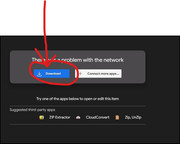
Click on the Download option. Ignore the other messages.
Hi Ericinz,
Thank you for your very informative message. However, I have not seen any of that. Therefore, somehow, I am doing something wrong. Sorry for this, but I am not gifted with technical work.
So Very Sorry,
JIM
Thank you for your very informative message. However, I have not seen any of that.
Near the top of this page you should see a navigation bar with buttons displaying white text on a blue background:
Index | User list | Search | Profile | Logout | Standard smilies | …Below that you should see
Logged in as Jim.
on the left and links for
New posts | Active topics | Unanswered topics | PM
on the right. When the PM (Private Messages) link is in bold type as in my example above, it means that there is at least one unread message waiting for you. Click on PM link to go to your inbox.
Hi Alfred, I do not get the second image on Ericlnz's Post on the 22?
JIM
First things first, Jim! Have you found your way to your PMs?
Hi Alfred, Thank you for your response. Yes, I see the PM above, although it is not highlighted and is dark.
ubject Last edited
read ericlnz
MVPX6 Hi Jim Here's a link to download a zip file containing the disc image plus last patch. Keep a copy
2025-04-19 12:41:08
Then what is supposed to happen? I have clicked it and then searched for it without success?
Thank you so much for all the hard work explaining this to me. JIM
I have clicked it and then searched for it without success?
Clicking the link should have taken you straight to a page on the Google Drive website. Where did you search, and what did you try to search for?
I clicked on the site which did open a Google site but quite frankly I found it misleading as, for instance |I never saw the second box described and indeed illustrated in one of the above messages. Then the link appeared as a placement on the top of my page which I thought might lead me to something constructive but nothing happened. Therefore I was baffled completely.
JIM
I never saw the second box
Instead of telling us what you don’t see, please show us what you do see. You can use Snip & Sketch to capture a screenshot and save it as an image file, and then use the ‘Add image to post’ link below the message composition box here to share what you’ve captured.
Hi Alfred,
I have it on my computer so thank you for all your help.
However, I am having a problem saving my films to MP4, for YouTube, and Facebook. I can export the films made on Movie Plus and export them to my old computer and continue to transfer them to MP4; what would be wrong there?
I should add I am online but it will not convert to MP4, then a request comes up for help if not online. On my other computer, I simply placed convert Mp4 for YouTube and it always worked without an issue
JIM
Alfred's Serif Users' Forums → MoviePlus → MoviePlus X6 installation
Powered by PunBB, supported by Informer Technologies, Inc.