Topic: How do I copy pages between documents

As it says How do I copy pages between documents

I want to take 7 ages out of one publisher document and drop them into another complete with text, images and formatting.


I am sure I have done it before but can't remember.  Any suggestions?

www.JAmedia.uk, primarily an Affinity Publisher V2 user for books and magazines.
[ Win 11 home | AMD Ryzen 5950X 16 Core CPU ]
[128GB Ram | NVIDIA 3080TI 2GB | MB ASUS ProArt B550| ]

2 (edited by William 2025-10-06 17:33:23)

Re: How do I copy pages between documents

In Windows, at least, I am not sure, but I think that you might need to do each page separately.

I think that one way to do each page is to do CTRL A to select all, then use

Layer

Group

Then use CTRL C to copy the grouped item onto the clipboard.

Then go the desired page in the other doument and use CTRL V to paste.

In that second document you could if you so choose use

Layer

Ungroup

It is possible that grouping the items for the transfer is not essential, but my instinct is always to do so, even though I cannot prove that it is necessary.

3 (edited by JAmedia 2025-10-06 18:01:09)

Re: How do I copy pages between documents

FOUND IT!!!

Shaun Richardson posted a comment on a YT video (that didn't solve the problem)

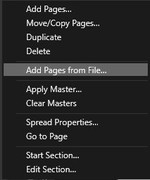
>Right click on the pages in the left hand panel
>Select Add Pages from File
>Choose the Publisher document that you wish to copy from and an option box will appear
>Select options to suite, including the range of pages

It is that simple, and it works.

https://i.postimg.cc/w3PGfBFB/menu.jpg


https://i.postimg.cc/ZvyVtrjW/dialog.jpg


The thing is: no one gave this solution last time I asked in the Official (now dead) Affinity forum.  Also I can't find it in the help files anywhere no matter how I ask.

www.JAmedia.uk, primarily an Affinity Publisher V2 user for books and magazines.
[ Win 11 home | AMD Ryzen 5950X 16 Core CPU ]
[128GB Ram | NVIDIA 3080TI 2GB | MB ASUS ProArt B550| ]