Topic: Missing or moved features
Is it just me or have the following moved or changed 3.01
1. Preview PDF after generation
2. Resize handles are locked in a proportional mode and not free
An independent forum site for members of the Serif software community
You are not logged in. Please login or register.
Automated signup has been disabled for these forums. If you wish to register, please send an email to admin[at]punster[dot]me stating your preferred username.
Embedded images: Click on the  Add image to post link below the message box. Your photo will be uploaded to the postimage website and then shared here via a thumbnail link. Click on the thumbnail for a larger view.
Private messages: There is no pop-up alert for new PMs on these forums, so you need to look out for the PM link (near the top right-hand corner of any forum page) becoming bold.
Alfred's Serif Users' Forums → Affinity Studio → Missing or moved features

Is it just me or have the following moved or changed 3.01
1. Preview PDF after generation
2. Resize handles are locked in a proportional mode and not free

1. I can’t see an option for that, but you can choose to open the target folder after export (and from there it’s a small step to displaying the result in your favourite PDF viewer).
2. The ‘Move Tool Aspect Constrain’ setting (under ‘Edit > Settings > Tools’) hasn’t changed: ‘Automatic (based on selection)’, ‘Constrain by default’, or ‘Do not constrain by default’. Use the Shift key modifier to swap between default and non-default behaviour.
1. I can’t see an option for that, but you can choose to open the target folder after export (and from there it’s a small step to displaying the result in your favourite PDF viewer).
2. The ‘Move Tool Aspect Constrain’ setting (under ‘Edit > Settings > Tools’) hasn’t changed: ‘Automatic (based on selection)’, ‘Constrain by default’, or ‘Do not constrain by default’. Use the Shift key modifier to swap between default and non-default behaviour.
Thank you Alfred. Appreciate it!


Is it just me or have the following moved or changed 3.01
1. Preview PDF after generation
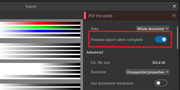
sneil69 wrote:Is it just me or have the following moved or changed 3.01
1. Preview PDF after generation
Walt good to have you here and thank you!
sneil69 wrote:Is it just me or have the following moved or changed 3.01
1. Preview PDF after generation
Thanks, Walt. I don’t know how Sam and I missed that! 

Interesting ... How can you preview an export after it is complete? 
Interesting ... How can you preview an export after it is complete?

Thanks, Ali. I don’t know how Sam and Walt and I missed that!
So am I. My nitpick RADAR is obviously working better than yours this morning.
Interesting ... How can you preview an export after it is complete?
Don't understand your question?
Ali wrote:Interesting ... How can you preview an export after it is complete?
Don't understand your question?
Serif have always called it ‘preview’, but you’re viewing the export after it’s complete, so it isn’t actually ‘pre’ anything!
sneil69 wrote:Ali wrote:Interesting ... How can you preview an export after it is complete?
Don't understand your question?
Serif have always called it ‘preview’, but you’re viewing the export after it’s complete, so it isn’t actually ‘pre’ anything!
I See LOL OK - Thank you
Alfred's Serif Users' Forums → Affinity Studio → Missing or moved features
Powered by PunBB, supported by Informer Technologies, Inc.