Topic: Creating a Mobile Site for Web Plus X8 - Help Please

Hi there
I haven't created a mobile site before and don't really understand how to do it.  Could someone give me a basic explanation of the process to help me get started?

I have created my desktop site and now looking at how to do the mobile one.

Is there an option where all the objects from the pages on my desktop site can be utilised and re-placed on the mobile site to reduce the amount of extra work required?

Or do I have to build the site again from scratch?

Would appreciate any assistance.

Thanks

Troy

OZ Designer 99
Using Web Plus X8 for over 8 years
Designing and managing my own website for Music Lessons and other Sales
www.soundvillage.live

Re: Creating a Mobile Site for Web Plus X8 - Help Please

I used to use WPX8, but decided it was time to move on just over a year ago.

I now use WYSIWYG Web Builder 20, which allows you to build a responsive site that will adapt for all devices. There's a learning curve, but there is an active support forum.

If you stick with WPX8, you have to build a mobile-friendly version of your site and then set parameters for the desktop site to recognise mobile devices and switch to the mobile version - it's two sites, effectively, that would both need maintaining.

Re: Creating a Mobile Site for Web Plus X8 - Help Please

Ali wrote:

If you stick with WPX8, you have to build a mobile-friendly version of your site and then set parameters for the desktop site to recognise mobile devices and switch to the mobile version - it's two sites, effectively, that would both need maintaining.

Furthermore, you would only have two fixed layouts to choose between. With a modern product such as WWB, you can define multiple breakpoints to cater for a selection of different screen sizes — so the result is, technically, adaptive rather than responsive — which is not only more flexible but also makes site maintenance much less of a chore.

“Welcome to the present moment. Here. Now. The only moment there ever is.”
― Eckhart Tolle

Re: Creating a Mobile Site for Web Plus X8 - Help Please

Alfred wrote:

Furthermore, you would only have two fixed layouts to choose between. With a modern product such as WWB, you can define multiple breakpoints to cater for a selection of different screen sizes — so the result is, technically, adaptive rather than responsive — which is not only more flexible but also makes site maintenance much less of a chore.

In practice, you need only one breakpoint (for mobile phones). Tablets will be able to use the responsive desktop design. You can have as many as you want, of course, but as Pablo (the developer) advised me when I was building my site in January, they are rarely needed.

Re: Creating a Mobile Site for Web Plus X8 - Help Please

Ali wrote:

In practice, you need only one breakpoint (for mobile phones). Tablets will be able to use the responsive desktop design. You can have as many as you want, of course, but as Pablo (the developer) advised me when I was building my site in January, they are rarely needed.

Thanks, Ali. Given the plethora of mobile phone screen sizes nowadays, that’s very useful to know.

“Welcome to the present moment. Here. Now. The only moment there ever is.”
― Eckhart Tolle

6 (edited by OzDesigner99 2025-11-24 14:43:14)

Re: Creating a Mobile Site for Web Plus X8 - Help Please

Ali wrote:

I used to use WPX8, but decided it was time to move on just over a year ago.

I now use WYSIWYG Web Builder 20, which allows you to build a responsive site that will adapt for all devices. There's a learning curve, but there is an active support forum.

If you stick with WPX8, you have to build a mobile-friendly version of your site and then set parameters for the desktop site to recognise mobile devices and switch to the mobile version - it's two sites, effectively, that would both need maintaining.

There seems to be a strong sentiment in this post and also in your comment on my post about the mobile sites that it’s no longer suitable to use web plus X8 or any of the web plus software in the modern environment. Would that be correct?

OZ Designer 99
Using Web Plus X8 for over 8 years
Designing and managing my own website for Music Lessons and other Sales
www.soundvillage.live

7 (edited by Ali 2025-11-24 17:40:57)

Re: Creating a Mobile Site for Web Plus X8 - Help Please

OzDesigner99 wrote:

There seems to be a strong sentiment in this post and also in your comment on my post about the mobile sites that it’s no longer suitable to use web plus X8 or any of the web plus software in the modern environment. Would that be correct?

No, designing for mobile sites is not my main concern about using WebPlus X8 now. The bigger issue that should inform your choice of software is that WebPlus produces code that was up-to-date when Serif stopped developing that software. Browser architecture and security has changed in the meantime, and you would be far better advised to use software that is still in active development and keeping up with modern HTML rather than something that is stuck in the past and generating outdated code.

Re: Creating a Mobile Site for Web Plus X8 - Help Please

Ali wrote:
OzDesigner99 wrote:

There seems to be a strong sentiment in this post and also in your comment on my post about the mobile sites that it’s no longer suitable to use web plus X8 or any of the web plus software in the modern environment. Would that be correct?

No, designing for mobile sites is not my main concern about using WebPlus X8 now. The bigger issue that should inform your choice of software is that WebPlus produces code that was up-to-date when Serif stopped developing that software. Browser architecture and security has changed in the meantime, and you would be far better advised to use software that is still in active development and keeping up with modern HTML rather than something that is stuck in the past and generating outdated code.

Ok, Thanks. I appreciate your candour.

OZ Designer 99
Using Web Plus X8 for over 8 years
Designing and managing my own website for Music Lessons and other Sales
www.soundvillage.live

Re: Creating a Mobile Site for Web Plus X8 - Help Please

OzDesigner99 wrote:

There seems to be a strong sentiment in this post and also in your comment on my post about the mobile sites that it’s no longer suitable to use web plus X8 or any of the web plus software in the modern environment. Would that be correct?

I'm also a user of WYSIWYG web builder and although there is a learning curve as with any new program, it has a feature that you can preview your design in any mode from the smallest phone screen to PC monitor. By doing this you can tweek images, texts etc. until you are satified with the results. One design and that's it.

Somewhere over the rainbow, weigh a pie ...

Re: Creating a Mobile Site for Web Plus X8 - Help Please

That's a pretty decent function Joe

OZ Designer 99
Using Web Plus X8 for over 8 years
Designing and managing my own website for Music Lessons and other Sales
www.soundvillage.live

Re: Creating a Mobile Site for Web Plus X8 - Help Please

Ali wrote:
OzDesigner99 wrote:

There seems to be a strong sentiment in this post and also in your comment on my post about the mobile sites that it’s no longer suitable to use web plus X8 or any of the web plus software in the modern environment. Would that be correct?

No, designing for mobile sites is not my main concern about using WebPlus X8 now. The bigger issue that should inform your choice of software is that WebPlus produces code that was up-to-date when Serif stopped developing that software. Browser architecture and security has changed in the meantime, and you would be far better advised to use software that is still in active development and keeping up with modern HTML rather than something that is stuck in the past and generating outdated code.

Ali, could I ask where you got that information about the coding changes?  I asked my brother who is a programmer of a large company website and he said the programming language hasn't changed that much and should not be an impediment.

OZ Designer 99
Using Web Plus X8 for over 8 years
Designing and managing my own website for Music Lessons and other Sales
www.soundvillage.live
12

Re: Creating a Mobile Site for Web Plus X8 - Help Please

You will find changes in javascript, and many changes in jquery. I think that when launched, Webplus used jquery at around version 1.1. Since then there have been 23 updates released to get to the current v4. On websites http is now https. The youtube app in webplus will in a number of instances, error out. Google maps is also a casualty for a number of reasons. There are ways to get round the issues which sometimes require coding. Webplus also uses inline css which even back then was not preferred and the compilation could at times present issues if you wanted to change the style of a particular item.

In my X8 project folder, file explorer tells me I have 1453 projects. A handful of them are websites. The rest are tests and demo's of how to get webplus to do other stuff and also help other forum users, which as Alfred and others on here would testify was a daily requirement when we had hundreds of users on the old forums. Those information exchanges were exciting times and a great learning curve.

For a simple website webplus may be ok. For anything else you will run into problems.

Somewhere over the rainbow, weigh a pie ...

13

Re: Creating a Mobile Site for Web Plus X8 - Help Please

Ali, could I ask where you got that information about the coding changes?

Joe has explained perfectly above the sort of problems you will run into. I suspect your brother-in-law will be hand coding, which is not the same thing at all. Bottom line is that WPX8 is outdated software, so unless your website will be simplistic in the extreme, I wouldn't use it.

But it's up to you, of course, and if your brother-in-law knows more about WPX8 than I do, then by all means, follow his advice and not mine and Joe's.

Re: Creating a Mobile Site for Web Plus X8 - Help Please

I'm still using X7. Set the page to 910 wide. Simple site but shows quite nicely on my iphone in landscape.

15 (edited by Pilotlon 2026-01-02 21:40:25)

Re: Creating a Mobile Site for Web Plus X8 - Help Please

@ozdesigner99 On YouTube, you'll find some old videos by Greg Hughes regarding 90 Second Web Builder (a white label version of WYSIWYG Web Builder that is no longer being offered). There are three particular related videos on building a responsive site with Layout Grids. These are quite old vids, but still totally relevant to WWB, and Greg does an excellent job of showing how to build a responsive site.  Well worth your time, I suspect, and if you don't happen to own WWB, Pablo always seems to have pretty good pricing and specials that make the entry affordable.  You'll find that WWB has a lot of similarities to WebPlus, just with more control. I'm busy finally making the jump, even though I first bought WWB at version 15.  Here we are at v20, and I'm finally getting my head around it.  Very pleased so far, especially having remembered Greg Hughes' vids.

We're 12 months into v20 now, and Pablo often keeps about a 15 to 18-month cycle on new versions, but offers price protections for those who have recently purchased WWB.  Makes it pretty easy to jump in at any point.  As of this post, just $44.95 USD.

The first of Greg's three vids: https://www.youtube.com/watch?v=_VncgH_cPVM

Greg actually has around 40 vids devoted to WWB (aka 90 second website builder). You'll find lots of useful info.  Good luck. By the way, I took a look at your website, and it looks like it would be pretty easy to replicate in WWB.  There's a bit of a learning curve, but with your WPX8 experience, you'll transition easily enough.


HTH

Just a little bit of paradise, in NW Arkansas

16 (edited by Pilotlon 2026-01-04 02:03:13)

Re: Creating a Mobile Site for Web Plus X8 - Help Please

@ozdesigner99.  Here's a little one-page landing page, just uploaded today from WYSIWYG Web Builder.  It consists of a single image of the site title, a rocking chair image, and some polaroid cards created in DrawPlus.  A bit of text. A footer.  I'm really just getting my head around WWB, but this was quite easy to do, and it's fully responsive.

https://jackriston.com/

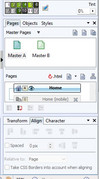
If you really are locked into WPX8, PM me, and I'll lead you through doing the mobile page setup, although you'll find good instructions in the WPX8 HELP file.   The image below should help you also.

EDIT:  Another slightly more complicated site published yesterday.  The SSL certificate is still propagating through the interweb tubes, so it might throw you an error.  This would have taken quite a while in WebPlus, and would have taken nearly as long in WWB, if it was absolute positioning. But, this is done with layout grids (responsive) that do all the work for you.  I'm a happy camper at this point, although there are some little niggles still to take care of.  https://forallthemarbles.com/


https://i.postimg.cc/t1TbF4VF/riston-wpx8-mobile-setup.jpg

Just a little bit of paradise, in NW Arkansas