Topic: Popup doesn't work

Serif Web Plus X8   16.0.4.32

Popup doesn't work

# Created a Box plus Text, then grouped as grp1239, CSS visibility is hidden

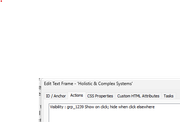
# Created an Arrow image plus Text, then added CSS Action :
"grp 1239 Show on click, hide when click elsewhere"

# I want to click on the arrow and/or text to make the hidden box/text group visible.

# I've tried with Arrow and Text separate, and as a Group.
    I also tried a Buttton design.

# When I click on the Arrow or the Text nothing happens

I've been doing similar popups for years, but only on rare occasions. What am I missing here?

https://i.postimg.cc/JDKLCC7J/Web-Plus-X8-popup-text-box.png

Re: Popup doesn't work

There’s probably something covering the area that should be clickable. Please share your *.wpp file or a cut-down version of it, or at least attach a screenshot showing the layer structure.

“Welcome to the present moment. Here. Now. The only moment there ever is.”
― Eckhart Tolle

Re: Popup doesn't work

You might have to force the issue by giving it a Z number (9999, for example). But, as Alfred says, a .wpp file containing the page in question will help.

Re: Popup doesn't work

In your post you show grp1239 and grp 1239.

Do you have the same typo in your events?

Somewhere over the rainbow, weigh a pie ...

Re: Popup doesn't work

Alfred wrote:

There’s probably something covering the area that should be clickable. Please share your *.wpp file or a cut-down version of it, or at least attach a screenshot showing the layer structure.

Thanks Alfred,

I hope screenshots will be sufficient to illustrate how the Show-Hide for a hidden text box is setup. I don't know how to copy the HTML for only this one page. I can't find anything covering the visible or hidden text boxes. The "click here for popup" is in front of the graphic arrow. I don't know how to show the Layer Structure.

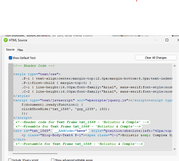
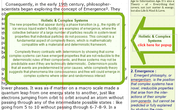
A. Image "WebPlus X8" is a screenshot of the hidden text box with a graphic arrow and a text box set to popup the hidden text.

B. Image "show hide text 1568" is where I used a Text Box to popup a hidden Text Box.

C. Image "text frame action" is the CSS setting for Visibility from the Show Hide text to the Hidden text.

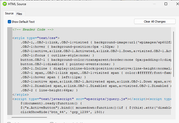
D. Image "btn_44" was just a quick attempt for an alternative to the Text Box. It didn't work either.

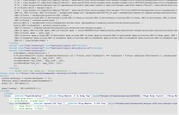
E. Image "click show hide" is the section of HTML that includes the Arrow, Text Box, and Button.


A. Web-Plus-X8 https://i.postimg.cc/JDKLCC7J/Web-Plus-X8-popup-text-box.png


B. Show-Hide-Text-1568  https://i.postimg.cc/gwVy93Qr/Show-Hide-Text-1568.png


C. Text-frame-Action  https://i.postimg.cc/fVjQJr0m/Text-frame-Action.png


D. btn-44-grp-1239  https://i.postimg.cc/d7YQfCGh/btn-44-grp-1239.png


E. click-show-hide  https://i.postimg.cc/QKtdbrc3/click-show-hide.png

Re: Popup doesn't work

Problem solved. Popup now works. Thanks for your offers of help.


The text & box were grouped, but I had made the visibliity for only one of the two.

Now the "Click Here" text refers to both hidden Text and Box. So the group now appears when clicked.

I knew it was something stupid, but had to be challenged to find the glitch.

Re: Popup doesn't work

Thanks for sharing the good news!

APoster wrote:

I don't know how to show the Layer Structure.

For future reference, the Objects tab in the Studio shows the stacking order of objects on the page. As Ali hinted, you can specify a CSS z-index value to change the position of an object in the stack.

Please see https://www.w3schools.com/cssref/pr_pos_z-index.php.

“Welcome to the present moment. Here. Now. The only moment there ever is.”
― Eckhart Tolle

8 (edited by Alfred 2025-12-11 08:40:21)

Re: Popup doesn't work

For future popups you might want to consider placing text and images on a panel. By doing so it automatically becomes a group because everything is within the panel div. Individual items can be amended without ungrouping/regrouping and events applied to the panel remain the same. If you hide the panel everything on it is also hidden.

[Edited by Alfred]

Somewhere over the rainbow, weigh a pie ...