Topic: Web Host does not support WebPlus

I've used BlueHost for many years to put my non-commercial essays online. But when something goes wrong, the techs say they only support WordPress. They tell me to contact the Developer. But the developer was WebPlus. And my software is an orphan.


After many years on BlueHost an Index.HTML file has disappeared, and the tech says he can't replace it. It's a small simple file, and I found a sample online. But I don't know exactly what to put where.


Do you know of any host that can support WebPlus?

Re: Web Host does not support WebPlus

Your hosting provider doesn’t need to support WebPlus specifically. If you use the built-in FTP uploader it should all just work as long as the host supports the FTP variant that you’re trying to use, and there’s always the alternative of publishing to a local folder on your PC and then using a third-party program such as FileZilla to upload the published files.

Please note that ‘index.html’, ‘Index.html’ and ‘Index.HTML’ all refer to different files unless you’re using Windows hosting.

“Welcome to the present moment. Here. Now. The only moment there ever is.”
― Eckhart Tolle

Re: Web Host does not support WebPlus

I should think that a fresh publishing of the whole site would rectify any issues.

Re: Web Host does not support WebPlus

Alfred wrote:

Your hosting provider doesn’t need to support WebPlus specifically. If you use the built-in FTP uploader it should all just work as long as the host supports the FTP variant that you’re trying to use, and there’s always the alternative of publishing to a local folder on your PC and then using a third-party program such as FileZilla to upload the published files.

Please note that ‘index.html’, ‘Index.html’ and ‘Index.HTML’ all refer to different files unless you’re using Windows hosting.

Actually, the filename is "index_HTML". And I use WinSCP (FTP client) to upload and download files to the BlueHost site. And that worked well for about 15 years, until the Index file mysteriously disappeared. So I couldn't access the stored files with my FireFox browser.

A BlueHost tech has recreated the Index_HTML file for me. And the list of essays is now accessible. But I had hundreds of images on the site, so he left it up to me to add them to the Index. Now I need to know how to add 191 images to the Index, as a group, instead of one by one. I'm still wondering about that.

In the meantime, I can use WinSCP to access & open each image. But it's not as convenient as using my browser.


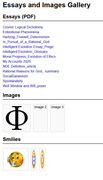
This is what the Essay & Images site looks like in my browser :
https://i.postimg.cc/bDy5HdYD/Index-without-Images.png

Re: Web Host does not support WebPlus

APoster wrote:

[Now I need to know how to add 191 images to the Index, as a group, instead of one by one. I'm still wondering about that.

It looks as though you should be able to select a block of files in the usual way: click on the first one and then Shift-click on the last one. Once selected, effect the transfer by dragging the selected block from the source pane to the destination pane.

https://winscp.net/eng/docs/task_upload

“Welcome to the present moment. Here. Now. The only moment there ever is.”
― Eckhart Tolle

Re: Web Host does not support WebPlus

Ali wrote:

I should think that a fresh publishing of the whole site would rectify any issues.

Thanks for the suggestion. Sorry to bother you with my little non-commercial unprofessional problems.

Unfortunately, I originally created the Essay & Image storage site about 15 years ago, and on an older computer. So, I no longer have access to the original WebPlus file. I stopped adding Essays to the list long ago, but I continue to add images for use in new essays, and on forum posts.

That's why I asked the BlueHost Chat tech to recreate the Index file for me. It now works fine in my FireFox browser, but there were too many images for him to add them to the Index. I asked Alfred above, if there is a way to add the images as a group, instead of as 191 separate files. Meanwhile, I can access & open the image files in my FTP client. But that's not as convenient as using my browser.


This is what the Index looks like in my browser, with only one image, and a few smiles. I don't need the smiles anymore.

https://i.postimg.cc/bDy5HdYD/Index-without-Images.png


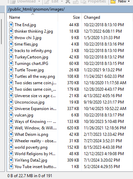
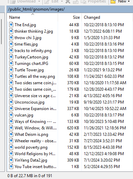
This is part of the list of images as displayed on WinSCP, my FTP client :

https://i.postimg.cc/mhDHKRt7/Partial-list-of-Images-on-FTP-site.png

Re: Web Host does not support WebPlus

APoster wrote:

That's why I asked the BlueHost Chat tech to recreate the Index file for me. It now works fine in my FireFox browser, but there were too many images for him to add them to the Index. I asked Alfred above, if there is a way to add the images as a group, instead of as 191 separate files. Meanwhile, I can access & open the image files in my FTP client. But that's not as convenient as using my browser.

If you (or BlueHost tech support personnel) have been adding image files to something called ‘Index’, then Index must be a folder rather than a file. If you find it tedious to drag and drop multiple selections, one simple alternative is to compress the selected files to a *.zip archive, add the zip file to the remote folder, and then unzip that copy of the archive so that the individual files are directly accessible once again.

APoster wrote:

This is what the Index looks like in my browser, with only one image, and a few smiles. I don't need the smiles anymore.

https://i.postimg.cc/bDy5HdYD/Index-without-Images.png

The only image shows a Greek capital letter phi. Can’t you include that as a text character rather than an image?

APoster wrote:

This is part of the list of images as displayed on WinSCP, my FTP client :

https://i.postimg.cc/mhDHKRt7/Partial-list-of-Images-on-FTP-site.png

The file ‘Turnings chart’ has a JPG extension instead of a jpg extension: it’s best to be consistent. I suspect that ‘Uinverse’ (in the first filename listed after the Ts) contains a typo.

Is there a particular reason why the ‘images’ folder is a subfolder of the ‘gnomon’ folder?

“Welcome to the present moment. Here. Now. The only moment there ever is.”
― Eckhart Tolle

Re: Web Host does not support WebPlus

APoster wrote:

Sorry to bother you with my little non-commercial unprofessional problems.

Not quite sure how to read this statement, but if you felt I was being flippant or dismissive, I am sorry - I wasn't.

APoster wrote:

So, I no longer have access to the original WebPlus file.

Sorry, I didn't realise this from your opening post.

9 (edited by APoster 2026-01-24 23:15:10)

Re: Web Host does not support WebPlus

Alfred wrote:

Is there a particular reason why the ‘images’ folder is a subfolder of the ‘gnomon’ folder?

This folder is just a storage site for old essays and images. The images were added one by one over many years using WinSCP client for FTP files. I no longer use the the Essays or Smilies, but I continue to use the images in my WebPlus essays and forums.

Since I don't use WordPress, the BlueHost techs won't touch the Index file.

As you suggested, I could ZIP the list of images. But I don't know how to do that in WinSCP.
In BlueHost File Manager, I could do "select all", then "Move To", and send the 191 files to the Index folder. But I assume the list can't just go just any place in the Index file.

How can I ZIP 191 files in BlueHost File Manager?
https://i.postimg.cc/rRtrT1SC/Partial-list-of-Images-on-FTP-site.png


I don't know how the Index file works.
I guess I'll have to "Copy" and "Send To" "Index_HTML" in File Manager, for all 191 files. I'll try it for a few, and then see if the images show up in the browser.

Thanks for the suggestions. I'm too old to learn WordPress, so I'm trying to hang-on with my orphan software until rigor mortis sets in.

Re: Web Host does not support WebPlus

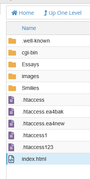
What files and subfolders do you have in the ‘public_html’ folder?

“Welcome to the present moment. Here. Now. The only moment there ever is.”
― Eckhart Tolle

Re: Web Host does not support WebPlus

From the BlueHost Knowledge Base:

Compressing Files into an Archive (GZip)

Extracting Files from an Archive

“Welcome to the present moment. Here. Now. The only moment there ever is.”
― Eckhart Tolle

Re: Web Host does not support WebPlus

Alfred wrote:

What files and subfolders do you have in the ‘public_html’ folder?


BlueHost File Manager
https://i.postimg.cc/bsxKYKYM/Blue-Host-File-Manager.png


Contents of Index
https://i.postimg.cc/Vd8VhD94/Contents-of-Index-HTML.png

Re: Web Host does not support WebPlus

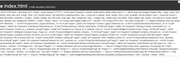
Your ‘Contents of Index’ screenshot shows the text contained in the file ‘index.html’. It would be easier to work with the text rather than a screenshot of it, but I see that there’s a reference to ‘/public_html/gnomon’ near the end. Although the  ‘BlueHost File Manager’ screenshot purports to show the contents of the ‘public_html’ folder, there’s no ‘gnomon’ subfolder listed there. That subfolder has been mentioned previously, but I still don’t know where it is.

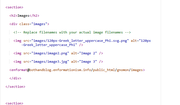
The comment in the Images section reads:

<!— Replace filenames with your actual image filenames —>

but you’ve left placeholders for two nonexistent files (instead of removing them since you only have one image to list in that section).

“Welcome to the present moment. Here. Now. The only moment there ever is.”
― Eckhart Tolle

Re: Web Host does not support WebPlus

Alfred wrote:

Your ‘Contents of Index’ screenshot shows the text contained in the file ‘index.html’. It would be easier to work with the text rather than a screenshot of it, but I see that there’s a reference to ‘/public_html/gnomon’ near the end. Although the  ‘BlueHost File Manager’ screenshot purports to show the contents of the ‘public_html’ folder, there’s no ‘gnomon’ subfolder listed there. That subfolder has been mentioned previously, but I still don’t know where it is.

I could copy & paste 191 filenames from BlueHost FileManager, but they wouldn't be in the prescribed format, which begins with a back arrow. My keyboard doesn't have a back arrow key, and the shortcuts I found on the net don't work.

I could edit the Index in BlueHost FileManager or in WinSCP. But I don't know how to do the formatting, such as the back arrow.

I don't know how to show you the Index Text except as a screenshot.

Here's a screenshot of the Images section of the Index_HTML. The full URL address for the Index is near the bottom.
The BlueHost tech added the three images shown, but left the rest up to me :
https://i.postimg.cc/kV65RTRp/Images-section-of-Index-HTML-on-Win-SCP.png

Gnomon subfolder is near the bottom of the list under Public_HTML
https://i.postimg.cc/N5XF0JTP/Gnomon-subfolder.png

Partial list of Images
https://i.postimg.cc/QB8c1GJ8/Partial-list-of-Images-on-FTP-site.png

Re: Web Host does not support WebPlus

APoster wrote:
Alfred wrote:

Your ‘Contents of Index’ screenshot shows the text contained in the file ‘index.html’. It would be easier to work with the text rather than a screenshot of it, but I see that there’s a reference to ‘/public_html/gnomon’ near the end. Although the  ‘BlueHost File Manager’ screenshot purports to show the contents of the ‘public_html’ folder, there’s no ‘gnomon’ subfolder listed there. That subfolder has been mentioned previously, but I still don’t know where it is.

I could copy & paste 191 filenames from BlueHost FileManager, but they wouldn't be in the prescribed format, which begins with a back arrow. My keyboard doesn't have a back arrow key, and the shortcuts I found on the net don't work.

I could edit the Index in BlueHost FileManager or in WinSCP. But I don't know how to do the formatting, such as the back arrow.

You only need to type (or copy and paste) the relevant filenames, as far as I can see. Why do you need back arrows unless you want to show us the structure of the folder instead of simply describing it?

APoster wrote:

I don't know how to show you the Index Text except as a screenshot.

Highlight the text, copy it to the Windows clipboard, and then paste it into a forum post. Use the ‘quote’ button or the ‘code’ button (on the toolbar above the message composition area) to distinguish the selected text from the rest of your posted message.

APoster wrote:

Here's a screenshot of the Images section of the Index_HTML. The full URL address for the Index is near the bottom.
The BlueHost tech added the three images shown, but left the rest up to me :
https://i.postimg.cc/kV65RTRp/Images-section-of-Index-HTML-on-Win-SCP.png

Gnomon subfolder is near the bottom of the list under Public_HTML
https://i.postimg.cc/N5XF0JTP/Gnomon-subfolder.png

Partial list of Images
https://i.postimg.cc/QB8c1GJ8/Partial-list-of-Images-on-FTP-site.png

I don’t know what ‘<enformat@…> refers to, and I don’t see the full URL for ‘index.html’ anywhere.

“Welcome to the present moment. Here. Now. The only moment there ever is.”
― Eckhart Tolle

Re: Web Host does not support WebPlus

I could edit the Index in BlueHost FileManager or in WinSCP. But I don't know how to do the formatting, such as the back arrow.

Alfred wrote:

You only need to type (or copy and paste) the relevant filenames, as far as I can see.

Reply : See Contents below

Alfred wrote:

Why do you need back arrows unless you want to show us the structure of the folder instead of simply describing it?

Reply : Each image name in the Index folder is bracketed with forward & back arrows (angle brackets). I could laboriously add that formating to each of the 191 filenames. But my keyboard doesn't have a Left "angle bracket" key. Here's a "right arrow (bracket) :  >

Example image name :  <img src="images/120px-Greek_letter_uppercase_Phi.svg.png" alt="120px-Greek_letter_uppercase_Phi" />
Do you see why I want to add the list of images automatically instead of individually and manually?


Alfred wrote:

I don’t know what ‘<enformat@…> refers to, and I don’t see the full URL for ‘index.html’ anywhere.

Reply : "enformat" is the user ID that Bluehost assigned to me. It's an abbreviation of the domain name.
URL : https://gnomon.enformationism.info
public_html/gnomon/index.html


Contents of Index_HTML :

<!DOCTYPE html> <html lang="en"> <head> <meta charset="UTF-8" /> <meta name="viewport" content="width=device-width, initial-scale=1" /> <title>Essays and Images Display</title> <style> body { font-family: Arial, sans-serif; margin: 20px; } h2 { border-bottom: 2px solid #333; padding-bottom: 5px; } .essay-list a { display: block; margin: 5px 0; color: #1a0dab; text-decoration: none; } .essay-list a:hover { text-decoration: underline; } .images, .smilies { display: flex; flex-wrap: wrap; gap: 10px; margin-top: 10px; } .images img, .smilies img { max-width: 150px; height: auto; border: 1px solid #ccc; border-radius: 4px; padding: 5px; background: #f9f9f9; } </style> </head> <body> <h1>Essays and Images Gallery</h1> <section> <h2>Essays (PDF)</h2> <div class="essay-list"> <!-- Replace filenames with your actual PDF filenames --> <a href="Essays/Cosmic Logical Dichotomy_ 01-19-10.pdf" target="_blank" rel="noopener">Cosmic Logical Dichotomy</a> <a href="Essays/Ententional Phenomena _07-31-12.pdf" target="_blank" rel="noopener">Ententional Phenomena</a> <a href="Essays/Hartung_Freewill_Determinism_121496.pdf" target="_blank" rel="noopener">Hartung_Freewill_Determinism</a> <a href="Essays/In_Pursuit_of_a_Rational_God.pdf" target="_blank" rel="noopener">In_Pursuit_of_a_Rational_God</a> <a href="Essays/Intelligent Evolution Essay_Prego_120106.pdf" target="_blank" rel="noopener">Intelligent Evolution Essay_Prego</a> <a href="Essays/Intelligent Evolution_Glossary _11-16-09.pdf" target="_blank" rel="noopener">Intelligent Evolution_Glossary</a> <a href="Essays/Moral Progress_Evolution of Ethics_09-04-93_rev 03-25-10.pdf" target="_blank" rel="noopener">Moral Progress_Evolution of Ethics</a> <a href="Essays/My Accounts 2020.pdf" target="_blank" rel="noopener">My Accounts 2020</a> <a href="Essays/NDE Definition_article.pdf" target="_blank" rel="noopener">NDE Definition_article</a> <a href="Essays/Rational Reasons for God_ summary 04-05-08.pdf" target="_blank" rel="noopener">Rational Reasons for God_ summary</a> <a href="Essays/SocialDarwinism.pdf" target="_blank" rel="noopener">SocialDarwinism</a> <a href="Essays/Spontandeity.pdf" target="_blank" rel="noopener">Spontandeity</a> <a href="Essays/Well Window and Will_poem 1994.pdf" target="_blank" rel="noopener">Well Window and Will_poem</a> </div> </section> <section> <h2>Images</h2> <div class="images"> <!-- Replace filenames with your actual image filenames --> <img src="images/120px-Greek_letter_uppercase_Phi.svg.png" alt="120px-Greek_letter_uppercase_Phi" /> <img src="images/image2.png" alt="Image 2" /> <img src="images/image3.jpg" alt="Image 3" /> <enformat@bothandblog.enformationism.info/public_html/gnomon/images> </div> </section> <section> <h2>Smilies</h2> <div class="smilies"> <!-- Replace filenames with your actual smilies --> <img src="Smilies/Embarrassed smilicon.jpg" alt="Embarrassed smilicon" /> <img src="Smilies/Grin.gif" alt="Grin" /> <img src="Smilies/Happy.gif" alt="Happy" /> <enformat@bothandblog.enformationism.info/public_html/gnomon/smilies> </div> </section> </body> </html>

Re: Web Host does not support WebPlus

APoster wrote:

Reply : Each image name in the Index folder is bracketed with forward & back arrows (angle brackets). I could laboriously add that formating to each of the 191 filenames. But my keyboard doesn't have a Left "angle bracket" key. Here's a "right arrow (bracket) :  >

Example image name :  <img src="images/120px-Greek_letter_uppercase_Phi.svg.png" alt="120px-Greek_letter_uppercase_Phi" />
Do you see why I want to add the list of images automatically instead of individually and manually?

Thank you for the further explanation. The angle brackets are not directional arrows, which is why your reference to a ‘back arrow’ key confused me. It’s simply a left bracket (or, more generally, a ‘less than’ sign) which is usually found immediately to the left of the right bracket or ‘greater than’ sign on the keyboard.

If your hosting package includes support for a server-side scripting language such as PHP, iterating through the filenames to create the desired list automatically should be fairly straightforward.

“Welcome to the present moment. Here. Now. The only moment there ever is.”
― Eckhart Tolle

Re: Web Host does not support WebPlus

Alfred wrote:

Thank you for the further explanation. The angle brackets are not directional arrows, which is why your reference to a ‘back arrow’ key confused me. It’s simply a left bracket (or, more generally, a ‘less than’ sign) which is usually found immediately to the left of the right bracket or ‘greater than’ sign on the keyboard.

If your hosting package includes support for a server-side scripting language such as PHP, iterating through the filenames to create the desired list automatically should be fairly straightforward.

Sorry about the terminology. As I said, I'm not a coder. My college introduction to computer programming, back in the 1970s, isolated the computer in a locked, air conditioned room. And we Architectural students used teletype keyboards to communicate in Basic language. We stored our simple programs on rolls of paper-punch ticker-tape. 20 years later I had to learn computer drafting, but still no coding.

I assume that BlueHost allows PHP scripting language, but I have no idea how to work in PHP.

I just want to get the Index_HTML file back in my Essay & Image storage site, with as little coding as possible. I don't know what happened to the original, created automatically by WebPlus many years ago. Since then, I have only added images, using WinSCP FTP client. I've never intentionally deleted anything, especially the Index. The images are still there, but my browser can't access them without an Index.

Until I can get the Index fixed, I've used WinSCP to drag & drop the images back to my hard drive. But I still need to get them on a webpage, so I can reference them with a URL on an online forum, which is my retirement hobby.

PS___
Since WebPlus is an unsupported orphan, my best option for webpage creation may be Affinity by Canva. But I assume there will be a learning curve, and an annual $120/year subscription price, which I can't afford on my Social Security income. And I don't do commercial websites.

Do you have any experience with Affinity? Is it anything like WebPlus? Would the free version upload a website of images to BlueHost?

19

Re: Web Host does not support WebPlus

Affinity has no web design capability, but it is completely free.

Your best bet would be WYSIWYG Web Builder, not least because there are those of us here who use it and who might be able to guide you with it. It is not expensive.

Re: Web Host does not support WebPlus

Ali wrote:

Affinity has no web design capability, but it is completely free.

Your best bet would be WYSIWYG Web Builder, not least because there are those of us here who use it and who might be able to guide you with it. It is not expensive.

Thanks, I'll check it out.