Topic: How Do I make ALL Grid Lines Bold

Am using X5.

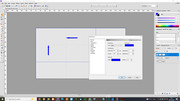
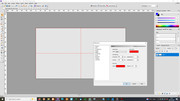
Starting a new (1920 x 1080) Layer, I wanted to change my preferred grid layout from one sub-division of ‘960 x 540’ to two of ‘640 x 360’. Look at the two images attached including the Preferences Grid dropdown, and my preferred one, in red, both lines are bold.

But changing, here I’ve used blue to see if the darker colour would be better, two of the guidance lines are faint. (I have added two arrows showing where two of the lines, very faint, are.)

Any suggestions on how to make all grid lines bold?
https://i.postimg.cc/McKzBNHL/Layout-01.jpg

https://i.postimg.cc/7CYqzdhV/Layout-02.jpg

Re: How Do I make ALL Grid Lines Bold

In the blue version the horizontal and vertical subdivisions are set to 2, so the subdivision lines are fainter. In the red version the horizontal and vertical subdivisions are set to 1, so you don’t have the above problem.

“Welcome to the present moment. Here. Now. The only moment there ever is.”
― Eckhart Tolle

Re: How Do I make ALL Grid Lines Bold

Brilliant, thankyou. I had changed the size but, wrongly, assumed I had to also alter the sub division guide.

So obvious when you know how.

Many Thanks

Re: How Do I make ALL Grid Lines Bold

You’re very welcome, George. I’m glad I was able to help.

“Welcome to the present moment. Here. Now. The only moment there ever is.”
― Eckhart Tolle