1 (edited by Jennymac7064 2026-05-31 06:51:25)

Topic: Booklet Printing Nightmare

UPDATE: The function I was needing is called Complex Signature Pagination, and not even InDesign offers it. But I did find a website that does it for free. It goes beyond imposition. This is definitely complex.

Here is the link to the Reddit article that led me to the solution. There is some valuable information in it for bookbinders.

https://www.reddit.com/r/bookbinding/co … t/ixf886u/

Here is the link  to the website that I would do the complex signature pagination function, if anyone is in need of this.

https://momijizukamori.github.io/bookbi … igLength=0


I am using PagePlus X9. I love this program to the moon and back. However, I am trying to print a book that is 168 pages long. Broken down it is 42 pages 8.5 x 11, 2 pages up, front and back making it a total of 4 numbered pages on each 8.5 x 11 sheet. Because I will be sewing the signatures, I am using the right side booklet option when I set up the document. If I use the book function, I would have to do a "perfect bind" which does not allow me to create a "lay flat" design. But sewing signatures into a text block does.

My problem is this.

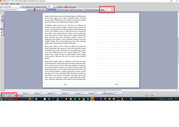
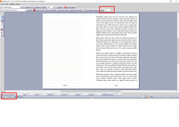
But when I go to print it, it prints wrong. The front side the page is 168,1 and the backside is 2,167.

I will be setting up 6 letter size pages in each signature. That should give me pages 1-24. (The paginated numbered pages). But because it is grabbing the back pages of the document, I can't create signatures for the sewn text block.

See attached examples.

I hope someone knows what I am talking about. Can you help?


https://i.postimg.cc/zVDPyVyj/printing-error00.jpg

https://i.postimg.cc/Tp2HKpKt/printing-error01.jpg

2 (edited by GB 2026-06-01 21:00:21)

Re: Booklet Printing Nightmare

I suggest you create a separate file for each signature. First save the complete book as a single file and keep it safe and backed up.

Create the signatures by deleting the unwanted pages from a copy of the whole book file. Other than signature 1, you will have to use Format/Page Number Format to change the first page number.

If, for example, you are producing 24 page signatures (to be printed on six sheets), signature 1 will be the whole book file with pages 25-168 deleted.

Signature 2 will be the whole book file with pages 1-24 and 49-168 deleted, and the first page number changed to 25 using Format/Page Number Format. (Deleting the first 24 pages will have automatically caused p25 to be renumbered 1.)

You can then print the signatures separately, and the page numbering will be correct.

Credendi non mutant facta

3

Re: Booklet Printing Nightmare

Thinking of this further, I realise that my suggestion won't work if, as is likely, the text in your book is in a series of linked frames. Deleting pp1-24 would just result in the text starting in p25!

A solution would be to make a PDF version of the whole book file and use that to make the separate signature files as I suggested. This would also eliminate the need to adjust page numbering in the later signature files.

HOWEVER, note this WARNING! When you create this PDF file, give it a name different from the original .ppp file. This is a VERY IMPORTANT safeguard. The thing is, if (when) you open the PDF version in PagePlus, it becomes a .ppp file, and if it has the same name as the original, and you Save it from PagePlus, you will overwrite the original - something you must avoid! The PDF version will not have linked frames, so will be impossible to edit!

Should any future editing be required, use the original .ppp file, and repeat the procedure for making the signatue files.

Credendi non mutant facta