Topic: Indexing Help

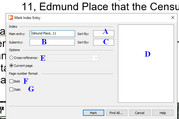
Completely new to the concept of Indexing, I am now looking at attempting to index addresses in my latest project. My initial attempt has the address indexed under the House Number, but I would like, as shown in the attached screenshot, the address in this case – ‘5, Flint Street, West Thurrock’, I’d like it to be indexed under ‘F’ for Flint Street and not 5, the house number, as it is showing on my initial attempts at Indexing.

I see space on the Indexing Template for … Sort By? … Sub Entry ? and … Cross Reference? but so far cannot see any clue as to what they are for.

Also, noticing that option of ‘Cross Referencing’, does that have any reference to if the same address appears again, if so, then should that automatically be activated in case the address does appear again?
Would appreciate any advice?
https://i.postimg.cc/0zCJqhjS/Index.jpg

2

Re: Indexing Help

I'm not sure what you are wanting. If you put an index mark on the word "Flint" the index will show every page on which that word occurs. But are you just wanting to sort your address list by road name?

Credendi non mutant facta

Re: Indexing Help

No, I don’t just want ‘Flint’ but the whole address.

My hope was to be able to index every address that appears in my Project, that is Family History related. Then finally at the end I would create an Index that shows all addresses that have appeared. In this example it would be ‘Flint Street, No 5’. Thus all Ancestors that lived in Flint Street and I had included in the Project, whatever the house number, would be grouped together in the Index.

So yes, sort by addresses but the house number showing after the street name.

Re: Indexing Help

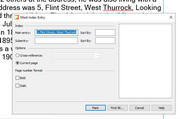
I have finally found an answer to my question. Quite simple as it turns out. All you had to do was to amend the main entry showing the house number to the end of the address, and like in this example, the address is indexed under ‘E’, the street name.

Now I have never ever wanted to do indexing before and therefore have seen this Index Template for the first time. Cannot see any clues either in the Manual or the Help section or tutorial on Youtube and wonder if anyone knows what sections I have marked ‘A – G’ are for? 

https://i.postimg.cc/4mtxGW3S/Index-01.jpg

5

Re: Indexing Help

Hi George,

Indexing is a feature I have never used (or needed), so I can't help with that dialogue box. However I'm pleased you have found a workable solution.

Geoff

Credendi non mutant facta