Skip to forum content
Alfred's Serif Users' Forums
An independent forum site for members of the Serif software community
You are not logged in. Please login or register.
Active topics Unanswered topics
Tips and Announcements
Automated signup has been disabled for these forums. If you wish to register, please send an email to admin[at]punster[dot]me stating your preferred username.
Embedded images: Click on the  Add image to post link below the message box. Your photo will be uploaded to the postimage website and then shared here via a thumbnail link. Click on the thumbnail for a larger view.
Private messages: There is no pop-up alert for new PMs on these forums, so you need to look out for the PM link (near the top right-hand corner of any forum page) becoming bold.
HAPPY NEW YEAR!
Search options (Page 51 of 87)
Topics by Alfred User defined search
Posts found: 1,251 to 1,275 of 2,165
I think you need the Proper Menubar add-on.
In your first post to this new thread, you wrote:
The next effect seems to be the menu bar is vertical down the left side and that using Alt F puts a cascaded menu down the right side.
1. What did you expect Alt+F to do instead?
2. What was the previous effect?
Affinity file download link for my Sanzo Wada colour palette:
https://forum.affinity.serif.com/index. … nt-1178075
Thanks for joining us here, Les. 
I’d be happy to share the download link with you, but you can’t install any of the X8 products without a valid product key. I’m afraid I don’t have a WPX8 key to spare, but perhaps one of our fellow forum members does.
Sandy wrote:I am still getting to grips with the Forum Alfred.
I see that jpeg images can be uploaded, but what about files such as in PP or DP etc.
There's no attachments option if you use the 'Quick reply' box at the bottom of the page, but if you click on 'Post reply' in an existing topic or 'Post new topic' at parent level in a forum section, you'll find an Attachments option below the 'Write message' box. Press the 'Browse...' button to browse to your PP or DP file (or whatever) and then press 'Add file' to attach the chosen file to your forum post.
Thanks for joining us here, François. I hope you enjoy using PPX8 on your new computer!
GStree wrote:I have never been, but my dad did go over when he was 95! so I still have a few years left (God willing).
You’re not your dad, Gordon! You never know how much longer you’ll be fit and able to travel, so if I were you I’d try to arrange a trip sooner rather than later.
Autosaves, if any, are in a subfolder of your Temp folder. For PagePlus X9, which is version 19, the name of the relevant subfolder is ‘PagePlus 19 Autosaves’. To go straight to that subfolder:
1. Copy the folder path %temp%\PagePlus 19 Autosaves to the Windows clipboard.
2. Press and hold the Windows key (the one with the Windows logo, to the left of the space bar).
3. Press and release the R key, and then release the Windows key.
4. Paste the copied folder path into the ‘Run’ box.
5. Press the ‘OK’ button in the dialog, or press the Enter key on your keyboard.
Any files in the folder will have a *.tmp extension. You can change that to *.ppp if you want to be able to open it in PagePlus by double-clicking it, or you can leave it as is and open the file by dragging it to the toolbar area in the PagePlus window.
I have to confess that I don’t think I would have remembered if you hadn’t reminded me!
I think the word ‘interesting’ is somewhat redundant here, William. I can’t imagine you posting about something that you didn’t find … er … interesting enough to post about!
Interesting! Thanks for the demo, Sandy.
Welcome to my merry little band, Paul! Please accept my apologies for not responding sooner.
You’ve got mail.
Sandy wrote:Hi Geoff, I can see what you mean about the Slope setting, but I'm not sure that's what Robert wanted? He really was talking about the Mesh Warp Tool. So, does my graphic here explain my thoughts, or did I miss something? Cheers, Sandy
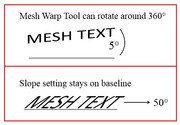
Couldn’t you slope the text and rotate the object? Or did I miss something (as somebody famous once said)?
Sandy wrote:I just looked again - Robert's topic was started 29.1.2024 - three weeks ago - although registered 22.2.2022. Same here though, sad to see so many unanswered topics...
Oops! Thanks for that, Sandy. I don’t know how I managed to convince myself that it was January of last year rather than this year.
I remember now that Robert emailed me quite recently to request access, at which point I discovered that I had already added him to the membership list in February 2022.
GB wrote:Maybe he doesn't come here any more since failing to get a reply.
There are currently 130 unanswered topics in these forums. I wish people would ‘bump’ their threads if no one has replied within a week or two!
GB wrote:I seem to have missed this query from Robert. Maybe he doesn't come here any more since failing to get a reply.
I’ve just checked Robert’s profile. His last visit was more than a year ago now, a little over three weeks after he posted.
GB wrote:I wonder if what he wants could be achieved by using the Slope setting in the Character tab, instead of using Warp?
That does sound as though it should achieve what he described.
Sandy wrote:Completed my text on a path with Quick Donut Quick Shape. I usually do badges in DrawPlus, and never thought of doing them in PagePlus before - so, thanks for the tip Alfred as I can utilise my PPX4 for this also, AND still learning in PPX4 after 15 years!


William wrote:It appears [in the American system] copyright needs to be registered, whereas in the United Kingdom it is free and automatic.
From the Wikipedia article:
In August 2023, the United States Court of Appeals for the District of Columbia Circuit ruled that the mandatory deposit requirement is an unconstitutional violation of property rights. The separate deposit requirement to optionally register copyright, however, remains in place.
William wrote:Does America have Legal Deposit like we have in the United Kingdom?
https://en.wikipedia.org/wiki/Legal_dep … ted_States
It looks to me as though you’ve pressed the Enter key on your keyboard after typing the text for rows 3 and 4, but not for row 2. The text for the latter therefore fits on one line, but the text for the other rows spills over onto a second line and the visible text gets pushed up.
When you click on the Table object to select it, you should see grey buttons along the top and down the left-hand side. Mousing over the line between two buttons will make the cursor change to a double-headed arrow, and if you click and drag you’ll change the height or width of the button above or to its left, and the corresponding row or column will resize accordingly. In your case, however, you simply want to make all of your columns the same width, and the easiest way to do that is via the ‘Set Column Widths…’ option on the Table menu.
The difference between the various table formats is indeed purely cosmetic, as far as I’m aware.
KarenPL wrote:Alfred wrote:KarenPL wrote:An ancient kind of 'cancel culture', I suppose you could say.
It’s no great surprise that ‘cancel culture’ is nothing new.
Alas.
That’s people for you! Some people, anyways.
KarenPL wrote:An ancient kind of 'cancel culture', I suppose you could say.
It’s no great surprise that ‘cancel culture’ is nothing new.
Posts found: 1,251 to 1,275 of 2,165