Skip to forum content
Alfred's Serif Users' Forums
An independent forum site for members of the Serif software community
You are not logged in. Please login or register.
Active topics Unanswered topics
Tips and Announcements
Automated signup has been disabled for these forums. If you wish to register, please send an email to admin[at]punster[dot]me stating your preferred username.
Embedded images: Click on the  Add image to post link below the message box. Your photo will be uploaded to the postimage website and then shared here via a thumbnail link. Click on the thumbnail for a larger view.
Private messages: There is no pop-up alert for new PMs on these forums, so you need to look out for the PM link (near the top right-hand corner of any forum page) becoming bold.
HAPPY NEW YEAR!
Search options (Page 9 of 20)
Topics by GB User defined search
Posts found: 201 to 225 of 486
Agreed Alfred. I don't think the language needs personipulating to accommodate what's known as political correctness.
Why would you want a fictional report about an actual event?
I’m unsure how he could reasonably have been described as expressionless if he had a glum look on his face!
Just more "fake news" I guess!
Amongst all the rubbish one sees on Quora there is occasionally something amusing! This caught my eye, and although I'm not too sure I like where the area I live in is positioned......

Hi James,
Glad to have helped. Yes, it can take a l o n g time for the search!
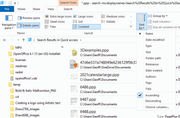
To help you find the file you want, it is possible to sort the resultant list in various ways in File Explorer. See attached illustration. Click the little arrowhead at Sort By for the drop=down list.
Geoff
I've just logged in and see that there are 16 "guests" also on line. Who are these guests? Why don't they sign up? Or are they just bots looking for somewhere to post spam?
I haven't tried voidtools. No doubt if Tom recommends it, it is excellent and easier to use, but you can search in File Explorer too. Open FileExplorer, navigate to This Computer/C:, type *.ppp in the Search slot. and press Enter. The search may take some time to complete, depending how much clutter is on the hard drive.
a solution in search of a problem
Yes, indeed!
Very clever! But I can't think of why or when I would want to use it.
Thanks for the confirmation.
Halls were painted in a green livery like the top express locomotives
Halls were built by the GWR at their Swindon works. The livery nof the Halls was similar to those of Castles, Kings etc. I doubt if Stanier had anything to do with their design.
No. I want to know what you find interesting.
You don't need the Registration number to install (you can use 881887), you need the Product Key. You will see this under Help/Registration Wizard.
Put the CD (actually a DVD) in the drive, and if it doesn't run automatically, open File Explorer, and double click Setup.exe.
You may have to copy the whole DVD to your hard drive if that doesn't work.
This is not something I have ever done or attempted. I found this https://www.youtube.com/watch?v=1FVA1snxRhE tutorial for doing this in PhotoShop, and I would think you should be able to much the same in PhotoPlus. Good luck!
If you still have the program installed on a computer you can see the product key under Help/Registration Wizard.
I just selected your circle, went to the Colour tab, and selected a transparent fill.
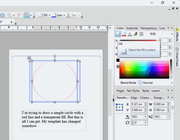
What am I missing?
Thanks for the feedback. I'm glad you got it to work.
Displaying Ken's string using the Webdings font is interesting.
But you can't be bothered to show us?
Quite right, Kevin. Don't forget you can also add Padding, and/or margins, to a frame using Frame Properties on the Format menu.
Which community? The Serif Community is no more. Some of us have moved here.
Put the text in a frame, select the frame (not the text) and add a line with the Line & Border tool (left toolbar).
The funeral of the Belfast flute maker Sam Murray
William, Please stop your very annoying habit of posting links with no explanation of what they are about.
Posts found: 201 to 225 of 486