Skip to forum content
Alfred's Serif Users' Forums
An independent forum site for members of the Serif software community
You are not logged in. Please login or register.
Active topics Unanswered topics
Tips and Announcements
Automated signup has been disabled for these forums. If you wish to register, please send an email to admin[at]punster[dot]me stating your preferred username.
Embedded images: Click on the  Add image to post link below the message box. Your photo will be uploaded to the postimage website and then shared here via a thumbnail link. Click on the thumbnail for a larger view.
Private messages: There is no pop-up alert for new PMs on these forums, so you need to look out for the PM link (near the top right-hand corner of any forum page) becoming bold.
HAPPY NEW YEAR!
Search options
Sometimes it works very well.....try posting it into Chat Gpt and tell it specifically what you want e.g. colour the butterfly and soften/sharpen the flowers etc.....hit and miss but costs you nothing.
believe me I have searched and consulted "help" in Studio.
In AF Photo 2 when working on a photo and wanting to go back to the original (losing any adjustments etc) under menu "Document > Restore snapshot> background ....that would give me the original to start again.
In Studio I cant find this. Under Document > restore snapshot> none. Unless you create a snapshot somewhere. It seems you have to delete all history to get back to the original photo, I don’t like it, What am I missing?
The size and colour wouldn't change but looking again the file extension may not be correct. Whatever..It is of no importance
The brushes I wanted are working (in V3 studio) ...I had a couple wouldn't render correctly but they wouldn't in Affinity Photo 2 either, all sorted for the time being. thanks for replies
is it possible to use Photoshop stuff in Affinity Studio? I can't seem to import them though I am having "one of those days"
And to you Ali (and everyone here) that is an impressive image I must say!
Pioneer wrote:Good morning sadly I cannot find how to retrieve the printer margin setting from my printer within Affinity3 (Canva) can anybody point me to the setting please? Cheers Vicki
So annoying as my Canon printer has different top and bottom margins (presumably to allow the paper grab feed?) Yes I can enter these manually but just another reason for me to continue using Photo 2 on windows 11.
(sigh) the start of another week and I seem to be getting more despondent as I age....I feel I'm no longer part of the world...no doubt every generation feels that way as they age also - but it seems everything has changed - no common sense applied to anything, and the attitude of (some) people ....(sigh again) 
I only open it to see if there is an update. I find it impossible to use with the dark mode however much or little I try to tweak the UI greys etc plus the few other "lack of" and changes mentioned by others. Happy to continue with the last Affinity Photo prog until (hopefully) it alters to suit my way of working.
In AFphoto when I start a new project/document I can set margins and guides from the create new document. then there is a setting to retrieve margins from printer. A must for me as my canon printer has different top an bottom defaults. In this new thing I can't find a way to do this except by entering the actual measurements setting guides. Help doesn't give any hint, is this missing from the Affinity now? I'm not enjoying the app at all and happy to carry on using AFphoto for now I have to add.
Thanks Ali, annoying though as if I bring up the "help" in the Studio it has that option
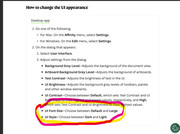
Doing some more digging in the help I dont have the option to change the font size either
Being lazy and reluctant to go discourse or whatever it is to search so hope I get an answer here:
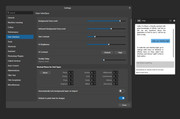
on the old AFphoto there was a preference setting to make the UI light or dark, so far using the new Studio I hate the black. I asked Ritson (screenshot) and followed the instructions but I cant find the "style" option. Where am I going wrong? I scroll down from the screenshot but it's not in any option that I can see.
It did not. but I think I sort of understood why one was greater than the other in numeric terms
Yikes! not my thing but I did run it through ChatGpt out of curiosity.
The page on the Serif Affinity shop website appears to have gone. There were several assets and macros etc to purchase and some free, I dithered waiting for special offer/discounts as had my eye on the brilliant James Ritson's work - specifically a "sky assets" pack.
If you go to his website https://jamesritson.co.uk/resources.html there are several assets and macros available to download and many free (although you can make a donation if you want). I thought this might be of interest to other users of Photo who are still looking for these kind of things.
(I wonder whether James has continued with Canva or moved elsewhere)
Thank you Alfred.
A long time user of Serif stuff (occassionaly dip into Page Plus still!) and user of Affinity Photo from its inception. Loved using the Affinity forum just browsing or lurking and learnt so much and always got a sensible answer to a question there.
Nothing lasts forever and goodbye Serif but so pleased there is still a place to come to for advice and ideas.
Posts found: 17