Skip to forum content
Alfred's Serif Users' Forums
An independent forum site for members of the Serif software community
You are not logged in. Please login or register.
Active topics Unanswered topics
Tips and Announcements
Automated signup has been disabled for these forums. If you wish to register, please send an email to admin[at]punster[dot]me stating your preferred username.
Embedded images: Click on the  Add image to post link below the message box. Your photo will be uploaded to the postimage website and then shared here via a thumbnail link. Click on the thumbnail for a larger view.
Private messages: There is no pop-up alert for new PMs on these forums, so you need to look out for the PM link (near the top right-hand corner of any forum page) becoming bold.
HAPPY NEW YEAR!
Search options (Page 1 of 5)
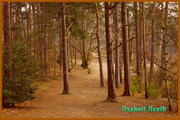
Been to Wisley a few time over the years as its only just down the road from my abode. Have always taken a video camera with me starting with a lumpy VHS camera (Dixons early 80's) that sat on my shoulder. Been using an XC10 over the last few years
Just playing around with the Affinity software today. Cheers Vicki
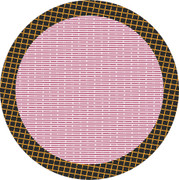
Latest work in Affinity studio. All done with Pixel persona. The style I wanted to use on the arched text would not work for me so I had to rasterise the text first. Its not an original design it just an idea I picked up on the internet. It was fun thinking out how to achieve the various layers.
Would be nice to see other works being submitted on here.

There is an in depth webinar by Elaine Giles on YouTube Mastering Text Styles in Affinity by Canva....... https://www.youtube.com/watch?v=piToaMImEdQ
Its quite long but worth a watch.
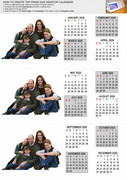
My modified Prism calendar for 2026. It was a work inspired by Mensch Mesch. and V_kyr in the original Serif Forum. So I take no credit for it. I print five copies of this with different images for our family.
Alfred wrote:It’s very ‘busy’, but I presume that’s a deliberate stylistic choice!
If you want to make the colours in the top right quadrant less washed out, an easy way to achieve that would be to duplicate that part of the design (or duplicate the entire design and apply a layer mask) and then set the layer blend mode to Multiply.
Yes Alfred it was a deliberate choice, the idea was to make people look at it rather than just passing by an everyday flier for a change. It was what we were asked to do.
Thanks for the tip on the washed out image. Will refer back to this when I/we need to do it in the future.
As always comments and criticism are always most welcome.
Cheers Vicki (and John)
Printed as A4 for the notice board along with A5's to go in table top holders and tickets Numbered 1=80

Re: PagePlusX9 to Affinity3
GB it is a task we intend to start next week as we are both busy catching up with family and friends at the moment. We are also currently in the middle of creating a 1 minute promo video.

Ha Ha, no need for going off topic, it was meant with the best of birthday greetings intentions.
Good afternoon to all and a happy forthcoming New Year. I propose to bring a 124 page Pageplus document into Affinity3 (text and images). What would be the best way to do this please? For PDF's in general I have used PDF/X-1a in the past. Cheers Vicki
Merry Christmas and a happy and prosperous New year to you all from John and I. Thank you for all your help during the years. From our house to everybody else's.

Good afternoon. Sadly my memory has failed me. In Affinity photo2 I could use a tool to remove/erase part of an image with a brush and then restore/repaint it with another colour brush. (black and white) Can anybody please point me towards what this tool was. Hopefully this is not too vague. Ok may have found it "mask layer" Cheers Vicki
Xmas wrapping paper for our great and grandchildren. Printed out on numerous sheets of A4. All done this year in Affinity3(Canva)
And yes 2026 was a mistake should of been 2025, just was distracted by the overall design. Cheers Vicki

Thank you Alfred, I should of said I am using win11. I wont carry on looking for it then. Have now created a couple of A4 pre-sets with margins. Retrieved from pageplusX9 Cheers Vicki.
Good morning sadly I cannot find how to retrieve the printer margin setting from my printer within Affinity3 (Canva) can anybody point me to the setting please? Cheers Vicki
Mike not that it is any help I am afraid but I am not seeing this on my Win11 (25H2) version. Sorry John (Vicki)
cgw Sadly I installed the MSI version by mistake and lost all my contents. I have since installed the Enterprise AMD version and all works as sweet as a nut. Have now uninstalled the MSI version. I use Irfanview as my photo browser along with FastStone capture and load both of these if I so choose into Affinity studio. Cheers Vicki (and John)
For my husband and I for the moment whilst we both have Affinity Studio we both do not like the monochrome icons for tools and much prefer the previous coloured icons.
On the subject of light and dark UI's we both remember the rise and scramble with a dark UI being implemented in a lot of programs at one time. Not sure which we prefer.
As regards the new studio it seems Ok on the face of it.
I think its future is going to be like it or lump it.
We both still use PagePlusX9 with no problem on Win 11 (25H2)
Just by the by does anybody know what became of Bikala Pesulu (not sure if I have at right) he used to be a prolific poster in the old Serif Forums.
Cheers Vicki
On re-reading I may have worded my question badly.
I was hoping that somebody like me who uses Publisher might of taken the time to be helpful and pointed me in the right direction of where the setting was to be found in Publisher.
After posting and then searching around in my publisher I found where it was in the menu it was ticked. So I looked for the same setting in Affinity Studio (which I and my friend still refer to as version 3) As do many online people in other social media sites
I am sorry if I caused this spat, it is the first time in many years that I have posted something in a Forum topic where it has caused a problem I have always strived to be polite and respectful of other members.
Cheers Vicki (and John)
Good morning. Not sure If I have not ticked anything but the redline under a miss spelled word in the new affinity does not show for me now. If I deliberately type a miss spelt word it does not show a redline under the word now, but when I right click it shows several words it should be. Any help or advice would be most grateful. Cheers Vicki. Update I may have found the probelm. If I go into Text/Spelling and check the "Spelling whilst typing" all appears to work ok.
I seem to be having a problem to load this plugin into Affinity (ver3). It works fine in Photo ver2 G'Mic 3.4.3. I have discovered that there is a newer version of the program and I have been to the site but I am unsure which file to download.
Using Win 11 25H2.
Can anybody point me to the file I need to install please to give it a try and see if I can get that to load into Affinity.
Thank you Vicki
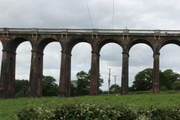
Not real adjustments but a straightforward create panorama in Affinity photo ver 2. Three images taken with a Canon 90D 18-50mm lens from a roadway approximately 350 yards away

I did a search on my external backup hard drive and this is one of the original images, so I replaced the sky and overhead lines I must of done a bit of work on it in Affinity Photo ver2
Is it ok to show fliers etc that I have done in Affinity photo also? Vicki
Image taken on a Samsung S21 Ultra and enhanced in Affinity Photo. Hope this is what this topic was for.
Posts found: 1 to 25 of 123