Hi George,
Indexing is a feature I have never used (or needed), so I can't help with that dialogue box. However I'm pleased you have found a workable solution.
Geoff
An independent forum site for members of the Serif software community
You are not logged in. Please login or register.
Automated signup has been disabled for these forums. If you wish to register, please send an email to admin[at]punster[dot]me stating your preferred username.
Embedded images: Click on the  Add image to post link below the message box. Your photo will be uploaded to the postimage website and then shared here via a thumbnail link. Click on the thumbnail for a larger view.
Private messages: There is no pop-up alert for new PMs on these forums, so you need to look out for the PM link (near the top right-hand corner of any forum page) becoming bold.
Alfred's Serif Users' Forums → Posts by GB
Hi George,
Indexing is a feature I have never used (or needed), so I can't help with that dialogue box. However I'm pleased you have found a workable solution.
Geoff
Tools are greyed out if there is nothing selected for them to operate on. Can you be more specific about which tools you are concerned about?
I'm not sure what you are wanting. If you put an index mark on the word "Flint" the index will show every page on which that word occurs. But are you just wanting to sort your address list by road name?
AND HOW THEY EARNED IT
They did not EARN it! They acquired it by a large slice of luck, and exploiting the rest of us, legally (perhaps) but undoubtedly unethically.
Try View/Master Page Objects or hide Master Page in the Layers tab.
is there a way to delete the lines on the inside ?
Yes. You can convert the quick rectangles to curves, then break the "curves" at nodes and remove the isolated parts.
I guess if PagePlus works OK for 15 minutes, there cannot be much wrong. Does the crash occur when an autosave is attempted? The default autosave is set for 15 minutes. If that is the case then autosave can be altered or turned off from Tools/Options/Options/General. If you turn it off, you must remember to do a manual save frequently to avoid losing changes.
There is some discussion at https://punster.me/serif/viewtopic.php?pid=1651#p1651
It seems the toolbars may appear very small, and cannot be enlarged. Copilot states:
Serif DrawPlus X6 does run on Windows 11, but it is not fully compatible. The main issue is that its toolbars and UI elements become tiny and nearly unreadable on modern high‑resolution displays because DrawPlus X6 is not High‑DPI aware. This is a known limitation confirmed by Serif users
Glad to hear that. Thanks for letting us know.
The Product Key required for installation is shown under Help/Registration Wizard. If you still have the old computer that PhP was installed on, you can see it there.
Thinking of this further, I realise that my suggestion won't work if, as is likely, the text in your book is in a series of linked frames. Deleting pp1-24 would just result in the text starting in p25!
A solution would be to make a PDF version of the whole book file and use that to make the separate signature files as I suggested. This would also eliminate the need to adjust page numbering in the later signature files.
HOWEVER, note this WARNING! When you create this PDF file, give it a name different from the original .ppp file. This is a VERY IMPORTANT safeguard. The thing is, if (when) you open the PDF version in PagePlus, it becomes a .ppp file, and if it has the same name as the original, and you Save it from PagePlus, you will overwrite the original - something you must avoid! The PDF version will not have linked frames, so will be impossible to edit!
Should any future editing be required, use the original .ppp file, and repeat the procedure for making the signatue files.
I'm glad you've got it sorted!
It works OK for me, so I don't have any ideas. Do you have Acrobat, or something else, set as the default for opening PDFs?
Hi Tom.
There's an option on the Publish PDF dialogue to preview the PDF. Do you have this checked?
Geoff
I suggest you create a separate file for each signature. First save the complete book as a single file and keep it safe and backed up.
Create the signatures by deleting the unwanted pages from a copy of the whole book file. Other than signature 1, you will have to use Format/Page Number Format to change the first page number.
If, for example, you are producing 24 page signatures (to be printed on six sheets), signature 1 will be the whole book file with pages 25-168 deleted.
Signature 2 will be the whole book file with pages 1-24 and 49-168 deleted, and the first page number changed to 25 using Format/Page Number Format. (Deleting the first 24 pages will have automatically caused p25 to be renumbered 1.)
You can then print the signatures separately, and the page numbering will be correct.
Is there a way to type roman numerals as a symbol like in Word ?
Not that I know of, but there are options to use Roman numerals for page and paragraph numbering.
If you want just the occasional Roman number you can use something like https://www.romannumerals.org/converter to create it.
back in 1912, Hellmann's mayonnaise was manufactured in England
Actually until 2000 or so it seems it was made in Scotland, not far from your location. It's not available here. West of the Rockies it's called Best Foods. I don't know why.
Was that intended to be a trick question, Geoff?
I should perhaps have said "What, shown in this picture, is wrong?" There are a great many Brits who make the same mistake! It's quite difficult to get England's flag upside down.
Some have argued, and continue to argue, that the Governor-General of Australia is the Head of State.
Well, they are wrong! The Governor General is the King's representative, who is empowered to perform the King's duties while the King is absent, such as signing legislation, and presenting honours.
Australian flags had to be removed from around D.C. and replaced with the proper flag.
Quite, but at least Charles is also the Head of State of Australia, and the flags were the right way up!
Oh dear!!!
What is wrong with this picture of King Charles at Arlington National Cemetery?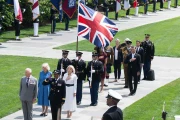
https://www.yahoo.com/news/articles/uni … ccounter=1
I think Charles' speech was absolutely brilliant! It was such an overwhelming contrast to anything that Trump has ever, will ever, or could ever deliver, that that alone was as much a rebuke of Trumpism as any head of state could possibly, diplomatically, be able to make. Those who wrote the speech, which undoubtedly included the King himself, Keir Starmer and the Foreign Office, ambassador Sir Christian Turner and a variety of diplomats, created a masterpiece. Charles' delivery was perfect too. Of course it was somewhat subtle, and will all have gone way over the head of Trump himself!
It's interesting to hear the comments on LBC https://www.youtube.com/watch?v=Ep3cz3go5fg, even from admitted UK republicans.
Like many in the UK, I thought it a mistake for this State Visit to go ahead, but Starmer and others who insisted it go ahead as planned, have been completely vindicated. It was a triumph!
No, not Buck House, London, I refer to the King Charles' speech to the US Congress today, which I have just watched. https://www.youtube.com/watch?v=u2UEPiN_xmA He received a great deal of enthusiastic applause for his comments, but it was quite noticeable, that there were two rather telling occasions when the Vice President did not join in. One was the need to strongly support Ukraine and the other was emphasising the benefit of NATO to its member countries and the rest of free world!
As you have shown, making the odd slip doesn't matter. Providing you keep going with the number remaining you will still end up with 6174.
very odd!
Alfred's Serif Users' Forums → Posts by GB
Powered by PunBB, supported by Informer Technologies, Inc.