Topic: Problem with MoviePlus X6 re-installation

Due to a hard drive replacement, I have been forced to reinstall my Serif applications. With MP the install has worked OK, but when I load an .MPV file, all the clips are locked, with the message in the attached file. This directs to Serif 'Technical support' which is of course no longer available.
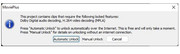
https://i.postimg.cc/nChFqzbQ/MPX8-message.jpg
Is there any way round this? I do have all the program files backed up on an external drive.

Re: Problem with MoviePlus X6 re-installation

If you exported your unlock codes from the old installation then you can simply import them into the new one, otherwise you’ll need assistance from one of our fellow forum members.

“Welcome to the present moment. Here. Now. The only moment there ever is.”
― Eckhart Tolle

Re: Problem with MoviePlus X6 re-installation

I don't recall doing this, or what sort of file they would be in.

Re: Problem with MoviePlus X6 re-installation

Please see the following post:

https://punster.me/serif/viewtopic.php?pid=2683#p2683

“Welcome to the present moment. Here. Now. The only moment there ever is.”
― Eckhart Tolle

Re: Problem with MoviePlus X6 re-installation

I have had a look at that, but it relies on an 'unlocked' installation to find the codes. I did try the export from my installation, just in case, but the files (3 different locked modes) all simply contain text 'SerifAVLockFile'.

Re: Problem with MoviePlus X6 re-installation

AlanM-R wrote:

I have had a look at that, but it relies on an 'unlocked' installation to find the codes. I did try the export from my installation, just in case, but the files (3 different locked modes) all simply contain text 'SerifAVLockFile'.

The export procedure should have resulted in the creation of a *.mfu file.

https://punster.me/serif/viewtopic.php?pid=4286#p4286

“Welcome to the present moment. Here. Now. The only moment there ever is.”
― Eckhart Tolle

Re: Problem with MoviePlus X6 re-installation

The files I mentioned are indeed .mfu files, but only have the text context as noted.

Re: Problem with MoviePlus X6 re-installation

AlanM-R wrote:

The files I mentioned are indeed .mfu files, but only have the text context as noted.

Ah, OK, I’m with you now! Since the unlocking server is offline, we can no longer unlock previously unused codecs. The import/export procedure enables you to take unlock codes from your old machine and use them on your new machine, but that’s clearly no use to you if you now need unlock codes that you never obtained while there was still a mechanism for doing so.

“Welcome to the present moment. Here. Now. The only moment there ever is.”
― Eckhart Tolle

9 (edited by AlanM-R 2024-10-08 18:28:58)

Re: Problem with MoviePlus X6 re-installation

I assume then that MP is lost to me forever, unless someone has a means of somehow extracting the unlock information from the  backed-up files. I presume also that the .mpv files are incompatible with any other software (:
Alternatively is there any means of removing the info in the clips themselves that is being locked?

Re: Problem with MoviePlus X6 re-installation

Alan, you seem to be making the situation with the mfu files complicated when it isn't. 

Have you imported your unlock codes (mfu file) into your new MVPX6 installation?  It's simply done but as Alfred said "that’s clearly no use to you if you now need unlock codes that you never obtained while there was still a mechanism for doing so"  Such a situation can occur if you are now using a more modern camera which requires codecs which weren't unlocked when MVPX6 was still unlocking.

Once you have your unlock codes imported we can work out what files you can unlock and find a way of making MVP usable for you.

Re: Problem with MoviePlus X6 re-installation

ericlnz wrote:

Alan, you seem to be making the situation with the mfu files complicated when it isn't. 

Have you imported your unlock codes (mfu file) into your new MVPX6 installation?

The problem is that i didn't have pre-existing mfu files before the computer went into dock. Unsurprisingly, given how long it is since  MP was installed, I have no recollection of having to unlock things, let alone export mfu files. Frustratingly it is something I could have done just before the repair if I had known it was going to be needed.

Re: Problem with MoviePlus X6 re-installation

Okay your situation is clearer now.  The unlock info would have been in your old HD registry from which a created mfu file would have taken it.  You didn't create a mfu so the information is lost.  To my knowledge there's no unlock info in your backed up mvp project files.

Unfortunately it puts you in the same position as many others.  You have a MVPX6 that won't read many files.

Re: Problem with MoviePlus X6 re-installation

One thing you could consider is trying to find third party codecs that MVP will recognise and use.

Re: Problem with MoviePlus X6 re-installation

Hello ericinz,

I am new to the group and I am in the same position as AlanM-R in that I have no record of the unlocking data for MoviePlus X6; the .mfu file which I can download from my old installation simply contain text 'SerifAVLockFile.

You suggest finding third party codecs but does anyone know where to place these in MVP or in Windows 11 so that they can be used?

As far as I can understand at the moment, and my understanding is very limited, when Serif ceased supporting MVP their licence to use the codecs was terminated. If this was the case is there any way others, such as this group, could repurchase the licence; and would anyone know what to do with it if "we" did?

I would be grateful if you would share your thoughts.
PeterLo

Re: Problem with MoviePlus X6 re-installation

Sorry Peter, I know no way in which codec licenses can be repurchased.

It is often not recommended to use any codec packs with editing programmes as they can sometimes interfere with the editors codecs. But if you haven't any to use then you have not much to lose.

A codec pack frequently mentioned is K Lite https://www.codecguide.com/download_kl.htm  If you decide to give it a try please let us know how you get on.