Topic: WebPlus to HTML not WYSIWYG

Many years ago, when I started using Serif PagePlus and WebPlus, a major attraction was the promise of WYSIWYG : what you see in the app is what you will see on the webpage. That was true to some extent, but I've always been disappointed to learn that HTML was designed for strings of text, not for traditional paragraphing. Hence, pages created on PagePlus typically looked good. But on WebPlus, the paragraphs are either ragged (left align), or forced-to-fit by adding space between words (justified). Consequently, when I export to a browser, what I get is not what I saw in the app. The bottom line is that the pages do not look neat & trim like printed pages. And the bottom line is often chopped-off by the text box. I assume this is not news to longtime users. So, they may just accept the raggedness as inevitable.

However, being a perfectionist, I have labored mightily to manually add & subtract word & paragraph spaces, or to replace longer words with alternatives just to make the paragraph look right, or to squeeze the text box just the right amount, in hopes of making the webpages look professional. (Note : I am not a professional) But I'm hoping that someone has discovered a less laborious method for producing pages comparable to magazine text. I'm not in a position to buy Affinity or WordPress or other alternatives. Does free Quill work with WebPlus? What's your cheap trick for making HTML look like WYSIWYG?

Re: WebPlus to HTML not WYSIWYG

APoster wrote:

I'm not in a position to buy Affinity or WordPress or other alternatives.

The product from WordPress.org is an open-source publishing platform, and even the commercial site WordPress.com offers a free plan.

“Welcome to the present moment. Here. Now. The only moment there ever is.”
― Eckhart Tolle

3 (edited by Ali 2026-01-02 08:13:53)

Re: WebPlus to HTML not WYSIWYG

APoster wrote:

But I'm hoping that someone has discovered a less laborious method for producing pages comparable to magazine text.

No, there isn't an easier way.

Fundamentally, a magazine page and a web page are two different things. The limitations in text handling are down to HTML, and not WebPlus per se. It doesn't matter how meticulously you curate your page, you cannot guarantee that it will look 'right' in everybody's browser.

Nowadays, many people surf the Net on smaller devices (phones and tablets), so creating responsive sites is all the more important, which is why I switched from WebPlus to WYSIWYG Web Builder a year ago.

The only way that you can guarantee that a web page will look like a magazine article is to turn the magazine page into a picture and add it to your page, but the text would not be searchable. This is why a lot of people will provide PDFs of things such as menus that they want visitors to see with the correct formatting.

What's your cheap trick for making HTML look like WYSIWYG?

I have completely changed my approach as it's too much effort for very little return and won't ever look right on the mobile devices that are pretty much ubiquitous these days.

The bottom line is that you are on a hiding to nothing, unfortunately. There is no panacea.

Re: WebPlus to HTML not WYSIWYG

Ali wrote:

The only way that you can guarantee that a web page will look like a magazine article is to turn the magazine page into a picture and add it to your page, but the text would not be searchable. This is why a lot of people will provide PDFs of things such as menus that they want visitors to see with the correct formatting.

Text in a PDF document should be searchable, but PDF is all about fixed formatting (so we’re back to the problem of viewing the content on a variety of screen shapes and sizes).

“Welcome to the present moment. Here. Now. The only moment there ever is.”
― Eckhart Tolle

Re: WebPlus to HTML not WYSIWYG

I always thought that there was a way to flow text from one column to another but couldn't find anything on X8.

I did find this video https://www.youtube.com/watch?v=mtEpWMfnvOY which shows (begining at 1.08) how to simply change a large text frame into x number of columns, but for the life of me I can't find the frame count gadget on X8. Is it on other versions?

Somewhere over the rainbow, weigh a pie ...

Re: WebPlus to HTML not WYSIWYG

There never was any flowing text in WebPlus, only in PagePlus.

Re: WebPlus to HTML not WYSIWYG

Alfred wrote:
APoster wrote:

I'm not in a position to buy Affinity or WordPress or other alternatives.

The product from WordPress.org is an open-source publishing platform, and even the commercial site WordPress.com offers a free plan.

Thanks, but I'm an 80 year old dog, not inclined to learn new tricks. Declining into senescence and obsolescence. I was hoping there was cheap-fix for WebPlus that wouldn't require much learning. But I still have enough energy to go back and manually insert hyphens to make lines and paragraphs come out right.

Re: WebPlus to HTML not WYSIWYG

APoster wrote:

Thanks, but I'm an 80 year old dog, not inclined to learn new tricks.

Thanks for the clarification! When you wrote “I’m not in a position to buy” I thought you were referring (solely) to budgetary constraints. Being disinclined to put in time and effort to become familiar with another product is rather different.

APoster wrote:

But I still have enough energy to go back and manually insert hyphens to make lines and paragraphs come out right.

Do you also have enough energy to test each page of your site in multiple browsers on both desktop and mobile devices?

“Welcome to the present moment. Here. Now. The only moment there ever is.”
― Eckhart Tolle

Re: WebPlus to HTML not WYSIWYG

Ali wrote:

There never was any flowing text in WebPlus, only in PagePlus.

It was to be expected that the text in the published HTML would be static, but I’ve never understood why WebPlus didn’t have reflowable columns and linked text frames available in Design View.

“Welcome to the present moment. Here. Now. The only moment there ever is.”
― Eckhart Tolle

10

Re: WebPlus to HTML not WYSIWYG

APoster wrote:

Many years ago, when I started using Serif PagePlus and WebPlus, a major attraction was the promise of WYSIWYG : what you see in the app is what you will see on the webpage. That was true to some extent, but I've always been disappointed to learn that HTML was designed for strings of text, not for traditional paragraphing. Hence, pages created on PagePlus typically looked good. But on WebPlus, the paragraphs are either ragged (left align), or forced-to-fit by adding space between words (justified). Consequently, when I export to a browser, what I get is not what I saw in the app. The bottom line is that the pages do not look neat & trim like printed pages. And the bottom line is often chopped-off by the text box. I assume this is not news to longtime users. So, they may just accept the raggedness as inevitable.

However, being a perfectionist, I have labored mightily to manually add & subtract word & paragraph spaces, or to replace longer words with alternatives just to make the paragraph look right, or to squeeze the text box just the right amount, in hopes of making the webpages look professional. (Note : I am not a professional) But I'm hoping that someone has discovered a less laborious method for producing pages comparable to magazine text. I'm not in a position to buy Affinity or WordPress or other alternatives. Does free Quill work with WebPlus? What's your cheap trick for making HTML look like WYSIWYG?

Hi,

There is a multi-column css function that auto split a page sized webplus text frame into two or more columns within the same frame.

Simple to use, as seen in the attached demo file (with instructions). Ref. W3 Schools https://www.w3schools.com/css/css3_multiple_columns.asp

Post's attachments

TextColumnsDemo.wpp 41.12 kb, 1 downloads since 2026-01-03 

You don't have the permssions to download the attachments of this post.
Somewhere over the rainbow, weigh a pie ...

Re: WebPlus to HTML not WYSIWYG

Alfred wrote:
Ali wrote:

There never was any flowing text in WebPlus, only in PagePlus.

It was to be expected that the text in the published HTML would be static, but I’ve never understood why WebPlus didn’t have reflowable columns and linked text frames available in Design View.

This is another example of the problem with HTML text and images. I used to automatically flow text around images but I've forgotten how to do that. And WP Help is no help. So, I try to do it manually.


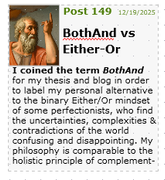
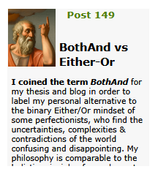
The top image below is what it looks like in WebPlus8. In this case, I simply indented the text on each line individually. I wasn't able to make the text auto-flow around the picture. The bottom image is what it looks like in a browser. Not WYSIWYG.

What am I missing?


https://i.postimg.cc/McpLQ8wn/Both-And-in-WP8.png

https://i.postimg.cc/rdwHrLTs/Both-And-in-browser.png

12

Re: WebPlus to HTML not WYSIWYG

I think the problem is that you are trying to replicate a magazine. A web page is not a magazine page, and it would be better to treat it for what it is. By continuing to try to replicate text flow, you are only making life harder for yourself.

I used to automatically flow text around images but I've forgotten how to do that. And WP Help is no help.

That's because it was never possible to do it automatically with WebPlus.

Re: WebPlus to HTML not WYSIWYG

APoster wrote:

This is another example of the problem with HTML text and images. I used to automatically flow text around images but I've forgotten how to do that. And WP Help is no help. So, I try to do it manually.


The top image below is what it looks like in WebPlus8. In this case, I simply indented the text on each line individually. I wasn't able to make the text auto-flow around the picture. The bottom image is what it looks like in a browser. Not WYSIWYG.

What am I missing?


https://i.postimg.cc/McpLQ8wn/Both-And-in-WP8.png

https://i.postimg.cc/rdwHrLTs/Both-And-in-browser.png

I think having the heading centre-aligned with the picture (as in the first example) looks better, but the blank line before ‘I coined the term’ (as in the second example) is also needed.

On a stylistic note, why do you have ‘Either-Or’ in the heading but ‘Either/Or’ in the body text, and why have you used the camel-case form ‘BothAnd’ (instead of ‘Both-And’ or ‘Both/And’ to match one or the other of the above)?

“Welcome to the present moment. Here. Now. The only moment there ever is.”
― Eckhart Tolle

14

Re: WebPlus to HTML not WYSIWYG

This is another example of the problem with HTML text and images. I used to automatically flow text around images but I've forgotten how to do that. And WP Help is no help. So, I try to do it manually.

1. Is the column issue now fixed and you've moved on to another issue?

2. With any software like webplus you need to work within it's capabilities, your own capabilities, and you need to think outside the box when you come across a problem. Within the program there are a number of ways to solve issues. You have panels, text frames, the ability to lock/combine images and text and panels. You need to look at all the available options. If doing it manually gets you the look you want then it's not an issue, it's a useful learning curve.

3. I view this forum as a two way discussion and it always flows better when the person requiring an answer let's others know what they have tried to do to solve an issue. What have you tried?

Somewhere over the rainbow, weigh a pie ...

Re: WebPlus to HTML not WYSIWYG

Joe wrote:

I view this forum as a two way discussion

Any forum thread should consist of a discussion between two or more parties, unless one person is talking to themselves! Otherwise you might as well not bother posting at all.

The OP is self-described as “an 80 year old dog, not inclined to learn new tricks”, which on the face of it seems to rule out a “think outside the box” approach.

“Welcome to the present moment. Here. Now. The only moment there ever is.”
― Eckhart Tolle

16

Re: WebPlus to HTML not WYSIWYG

It would be nice if the OP responded to all replies. There's not much point in taking time to write a reply if they cherry pick the posts they read and/or just move on to another query.

Re: WebPlus to HTML not WYSIWYG

You’re not imagining it. This isn’t really a WebPlus bug so much as a limitation of both the web and the era WebPlus was built in.

True WYSIWYG and HTML have always been slightly at odds. Text reflows based on screen size, browser, font rendering and user settings, so what you see in the editor is always a best-case preview. Justified text is especially fragile because browsers don’t handle spacing and hyphenation like print tools do.

On top of that, WebPlus predates a lot of modern CSS layout tools. Things like Flexbox, Grid, fluid containers and responsive typography give newer systems much better control over flow and spacing but WebPlus largely relies on fixed boxes and older layout models.

PagePlus felt more “print-like”, WebPlus aimed closer to real web output, but without today’s layout tools there was always a gap.

So to answer your question directly, there isn’t really a cheap trick that makes HTML behave like print-style WYSIWYG. The closest you can get is avoiding justification, keeping comfortable line lengths, and accepting some reflow as inevitable. Anything beyond that needs more modern layout control than WebPlus can provide.

Building Meadow Weaver - a desktop, visual website builder for Windows (Mac to follow). Focused on unified workflows, offline creation, and long-term ownership. https://meadowweaver.com

Re: WebPlus to HTML not WYSIWYG

Over in WYSIWYG Web Builder, there is a 'Wrap Text" container. Wrap margins can be set also. Copilot suggested a bit of HTML in lieu or the Wrap Text container...possibly for WP, but I haven't tried that in WebPlus to see if it would work.

I don't see anything in WWB that addresses autoflow, however.


<img src="yourimage.jpg" style="float:left; margin:10px;">


https://i.postimg.cc/LgP49KXf/Test-Wrap.jpg

Just a little bit of paradise, in NW Arkansas

19 (edited by Ali 2026-01-05 08:46:27)

Re: WebPlus to HTML not WYSIWYG

Pilotlon wrote:

I don't see anything in WWB that addresses autoflow, however.

I asked Pablo (WWB developer) about this a year ago and his response was similar to MeadowWeaver's above in that HTML and text flow, etc. are at odds. I don't believe he has any plans on addressing this.

As I have said (three times now), a web page is not a magazine page, and should be handled differently. Once you get into this mindset, you save yourself a lot of angst.

Re: WebPlus to HTML not WYSIWYG

Yep. Not of interest to me. I was just trying to help out @APoster.  I seem to recall that this was a topic of conversation in the old Serif forums, too.

Just a little bit of paradise, in NW Arkansas

21 (edited by APoster 2026-01-08 02:37:41)

Re: WebPlus to HTML not WYSIWYG

I think having the heading centre-aligned with the picture (as in the first example) looks better, but the blank line before ‘I coined the term’ (as in the second example) is also needed.

On a stylistic note, why do you have ‘Either-Or’ in the heading but ‘Either/Or’ in the body text, and why have you used the camel-case form ‘BothAnd’ (instead of ‘Both-And’ or ‘Both/And’ to match one or the other of the above)?

The illustrations are just two of several attempts to make text flow around the picture. I have forgotten how I used to do it, so these both show imperfect results. If I can find a way to make text flow around the image, I'll then deal with alignment of the title.

I started with PagePlus many years ago, and later migrated to WebPlus. Since my webpages are mostly for my own private use, and I don't get paid for doing this, and I only do a new blog post on occasion, I've never been forced to learn much about how WP8 works "under the hood". And, yes, I am painfully aware of the limitations of HTML, but I still strive to emulate printed text, for my own satisfaction. I am my own editor.

The BothAnd spelling is an idiosyncrasy of my philosophical blog. The Either-Or and Either/Or discrepancy is a result of two operations separated by an interval of time. The body text was copied and pasted from a separate page.

Any suggestions for reminding this "old dog", and amateur WP user, of how to wrap text around a picture?

Re: WebPlus to HTML not WYSIWYG

TryMeadowWeaver wrote:

So to answer your question directly, there isn’t really a cheap trick that makes HTML behave like print-style WYSIWYG. The closest you can get is avoiding justification, keeping comfortable line lengths, and accepting some reflow as inevitable. Anything beyond that needs more modern layout control than WebPlus can provide.

Thanks, that summarizes what I have learned the hard way over many years. I started long ago with PagePlus, and soon found that WebPlus had significant limitations. But, because I'm sort of perfectionist, I work long & hard to fix what some might consider to be minor problems. I am a retired Architect, visually & proportionally oriented, so there's that. But, too old to invest time & money in new software.

23 (edited by Ali 2026-01-08 07:19:38)

Re: WebPlus to HTML not WYSIWYG

Any suggestions for reminding this "old dog", and amateur WP user, of how to wrap text around a picture?

I am sure you'll just ignore this, as you have ignored all of my posts so far in this thread, but there is and never was a text wrap option in WebPlus. The only way to do it is manually by eye.

Re: WebPlus to HTML not WYSIWYG

APoster wrote:

The BothAnd spelling is an idiosyncrasy of my philosophical blog. The Either-Or and Either/Or discrepancy is a result of two operations separated by an interval of time. The body text was copied and pasted from a separate page.

Since you describe yourself as “sort of perfectionist”, I’d have thought you’d strive for consistency in your terminological choices. If you want to retain the BothAnd style, I would recommend changing both Either-Or and Either/Or to EitherOr.

“Welcome to the present moment. Here. Now. The only moment there ever is.”
― Eckhart Tolle

Re: WebPlus to HTML not WYSIWYG

Ali wrote:

The only way to do [text wrap] is manually by eye.

What she said! And as Andrew has pointed out:

TryMeadowWeaver wrote:

Text reflows based on screen size, browser, font rendering and user settings, so what you see in the editor is always a best-case preview.

You can’t possibly cover all bases, but at a minimum you should view your web pages in Safari, Firefox, and a Chromium-based browser, so that you can compare the different handling by the main browser engines (WebKit, Gecko, and Blink, respectively). Safari for Windows hasn’t been updated in very many years, so it probably isn’t worth the bother, but Safari is the default browser on Apple devices.

“Welcome to the present moment. Here. Now. The only moment there ever is.”
― Eckhart Tolle