1

Topic: Video calls

I'm hoping one of the computer literate wizz-kids out there can help me out.

There is an internet site called "id.me", which is supposed to confirm my identity. I have sent them pictures of a couple of documents showing who I am. They then invited me to get a video call so that they can actually see these docs, and at the same time confirm that the photo on one of them (my driver's licence) is really me.

Now I get their "video call" OK on my Win 11 laptop. I have activated its camera, and I see me on the screen in front of me. In a separate window I can see the person calling me, and I can hear them and they can hear me through the laptop's built-in speaker and microphone. However they cannot see me. What do I have to do for them to be able to see me?

In case you are wondering. this is the IRS (Inland Revenue Service) who owe me a few hundred dollars which I overpaid last year. They used to just send a cheque, but no longer do so as everything must now be done "electronically", direct into my bank account. All this palaver is, it seems, because they need to verify that the the bank details I have sent them is really my account! Bureaucracy gone mad!

Geoff

Credendi non mutant facta

Re: Video calls

Ask them to check their settings - it sounds like they have you muted for video. If you can see yourself, then there's no reason from your perspective why they should not be able to see you.

Re: Video calls

GB wrote:

IRS (Inland Revenue Service)

*Internal Revenue Service

GB wrote:

cheque

*check

I’m reminded of a news story that hit the headlines many years ago, about someone setting up a bank account in the name of ‘Inlandi Revendi’ so that they could amend stolen cheques to syphon off monies intended for the UK Treasury.

“Welcome to the present moment. Here. Now. The only moment there ever is.”
― Eckhart Tolle

4

Re: Video calls

Ask them to check their settings

Thanks Ali. I have suggested that to them! However, since they are constantly making such calls they apparently manage OK with everyone else.

Credendi non mutant facta

5 (edited by h_d 2026-03-18 20:59:41)

Re: Video calls

Just re-read the original post. If you can see yourself, then the solution I originally suggested (uncover the lens) isn't correct. Apologies.

6 (edited by GB 2026-03-18 23:25:18)

Re: Video calls

Thanks anyway h_d (or may I call you Harley?)

Credendi non mutant facta

Re: Video calls

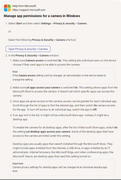
Geoff: If you haven't already solved the camera issue, have you switched on permission to "Let apps access your camera"?
Explanation from Microsoft is attached.


https://i.postimg.cc/DJxFQPpQ/camera-settings.png

8

Re: Video calls

Hi Tom,

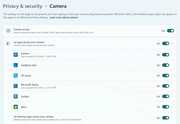
No, I haven't solved the problem yet! And as far as Ican see I've got all the permissions set to allow access.

https://i.postimg.cc/0MKFrgKB/Publication1.jpg

Credendi non mutant facta

Re: Video calls

Sorry, don't have any other suggestions.