Bing has introduced AI power to answer your questions. Maybe that, or something similar is what the Mirror uses.
I have found it to be quite handy, and quite accurate.
An independent forum site for members of the Serif software community
You are not logged in. Please login or register.
Automated signup has been disabled for these forums. If you wish to register, please send an email to admin[at]punster[dot]me stating your preferred username.
Embedded images: Click on the  Add image to post link below the message box. Your photo will be uploaded to the postimage website and then shared here via a thumbnail link. Click on the thumbnail for a larger view.
Private messages: There is no pop-up alert for new PMs on these forums, so you need to look out for the PM link (near the top right-hand corner of any forum page) becoming bold.
Alfred's Serif Users' Forums → Posts by GB
Bing has introduced AI power to answer your questions. Maybe that, or something similar is what the Mirror uses.
I have found it to be quite handy, and quite accurate.
I think you will need the original CD (or original download if that is what you bought) and install from that using the product Key supplied..
I have PagePlus X8 installed and working on Windows 10, so I would expect it would work OK on Windows 11, just as PagePlus X9 does.
I'm glad you've got it sorted. A reset does things a re-installation doesn't, so its always worth a try when the program is misbehaving in puzzling ways.
Check the Arrange tab to ensure Lock Objects is not checked.
You might also try a Reset. Hold Ctrl key while opening PagePlus.
Are you saying that you do? I have never paid any attention to them. They go straight into recycling.
Sorry, I see now you were asking about flowing text in a table. That is not possible in any version.
Perhaps you could use a columned text frame, and place an empty table over it for the column dividing lines. But adding separate vertical lines would be just as easy.
I have just installed X5 to check, so here are your answers.
is there any way to automatically put line dividers between the columns?
No. In X5 you have to add them manually using the Line tool. It was one of the features that was requested, and was eventually added in version X8.
I don't know anyway to flow the text overflow into the next table column.
Try Insert/Break/Column Break. (Or use Ctrl+Enter)
I find it difficult to imagine why one would want to use emojis in a morse code message. Or, like Joe, if they were used, how the transcriber would write/draw them.
I cannot replicate that problem.
However, there is a preset Paragraph Style for a Bullet List. Have you tried using that?
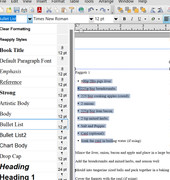
You can of course modify that Style, or create a new one, with a different font or whatever.
Paragraph styles are worth swotting up on!
Geoff
Hi John,
Welcome to the forum.
I assume both images are A4 size, and you want to print them side by side on A3.
Try this:
Open one image in PhotoPlus and Copy it (Ctrl+C)
Open the second image separately in PhotoPlus
Under Image/Canvas Size, double the width of the Canvas
Paste as new layer (Ctrl+L) - a new layer will be created, and will be selected already.
Use the Move tool (4-way arrows) to reposition the new layer as required.
I hope this helps.
Geoff
The edit button only appears after I've sent the reply!
Yes. Click on it. Then you can attach a file to that reply.
.PPP is not an image format, it is a PagePlus publication ( which may, or may not, contain images).
If you click on the Edit button below your message, you will see an option to attach a file. That can be a .ppp file.
The Layers tab will tell you what objects on the page are. And whether they are grouped.
Unless an object is shown as a Text Frame or as Artistic Text, it is not actual text so cannot be edited.
What does your Layers Tab show?
Old Spinning Wheel
How did you "move" it? I think you will have to install it on that drive.
Did you give up on Welsh?
Welcome back, William. We were wondering what had become of you. I trust you are well.
Nice bit of jazz. Thanks.
Geoff
such a lot of work had gone in to the research
That is quite apparent! I hope you can reconstruct the booklet OK.
I used to visit Place Manor in St Anthony in Roseland regularly way back, but it's a bit too far away now I'm out here on the west coast US. Beautiful areas - both!
George,
How many pages are in these potential books? How many copies would want to be printed?
You may still be able to use your PagePlus X7 to produce a PDF file for printing.
Geoff
Just a few comments:
Aware that over time linking photos used tend to get moved on my PC, I have always exported each page as a jpeg
That would make any further editing more difficult. Embedding any pictures would ensure that they remained in the project even if they were deleted from, or moved on, your computer. Saving as a package would also allow the project to be opened intact with PagePlus on a different computer.
a feeling that I should have had a larger gap down alternate pages re the book opening side.
You can set mirrored margins in Booklet mode to enable this.
few pages to see what the end result would look like
Doesn't Print Preview in PagePlus allow this?
pdf attached. Pictures missing as they were not embedded. Also I do not have your fonts, so some reflowing has been necessary.
It can be done using the Transparency tool on the left toolbar, set to ellipse. Add node with 100% opacity near the edge.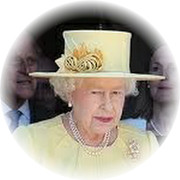
Not sure who this is. Found it on the net. Looks familiar though!
there doesn’t seem to be a Narrow variant in the Tahoma family. A missed opportunity, methinks!
Perhaps there used to be one, but it broke up.
Despite where I live (across the Narrows bridge), I rarely use Tahoma font, but its italic version seems to work just fine for me. Which characters appear wrong for you?
One way would be just to drag them all into a publication, and drag them back to Assets after reinstalling. Or look in Help under Assets/Storing designs.
Why do you need to reinstall?
Alfred's Serif Users' Forums → Posts by GB
Powered by PunBB, supported by Informer Technologies, Inc.