Skip to forum content
Alfred's Serif Users' Forums
An independent forum site for members of the Serif software community
You are not logged in. Please login or register.
Active topics Unanswered topics
Tips and Announcements
Automated signup has been disabled for these forums. If you wish to register, please send an email to admin[at]punster[dot]me stating your preferred username.
Embedded images: Click on the  Add image to post link below the message box. Your photo will be uploaded to the postimage website and then shared here via a thumbnail link. Click on the thumbnail for a larger view.
Private messages: There is no pop-up alert for new PMs on these forums, so you need to look out for the PM link (near the top right-hand corner of any forum page) becoming bold.
HAPPY NEW YEAR!
Search options (Page 5 of 19)
Sorry Peter, I know no way in which codec licenses can be repurchased.
It is often not recommended to use any codec packs with editing programmes as they can sometimes interfere with the editors codecs. But if you haven't any to use then you have not much to lose.
A codec pack frequently mentioned is K Lite https://www.codecguide.com/download_kl.htm If you decide to give it a try please let us know how you get on.
Using my phone was a technical exercise and I learnt a lot.
I'm using it to shoot at 1080 '30'p. But it's VFR (Variable frame rate)and the frame rate variation is horrendous. Whilst my current editor, Vegas pro 21, handles the files okay they can cause problems so I use Shutter Encoder or Handbrake (both free downloads) to convert to 30 fps CFR (Constant frame rate), When adding to a 25 fps project I use VP's "add at project rate" option which puts the clips on the timeline at 25 fps so a one second clip now occupied 30/25 i.e 1.200 secs. Slightly slowed down but the frame structure is preserved as no frames need to be dropped to get from 30 to 25.
My biggest problem is its fierce auto exposure behaviour. But that's another story.
I've just got back from my monthly video group meeting which takes place in the movie room of another retirement village. Videos are projected onto a large screen and I was impressed with my phone quality
Another five minute "garden/park" video https://vimeo.com/1089466515. "In Search Of Nature". Apart from the water shot it's all taken around my retirement village.
Most of the shots were taken with my NZ$400 (UK 200 pounds) Android phone. An interesting exercise. Phone versus Vidcam? Well both have their good points and weak points. The phone appears to over sharpen scenic shots but closeups are great. I was shooting 1080. 720 is so bad on scenic shots it looks like you've tried to convert the image into an oil painting. My phone is usually in my pocket and is quickly in action. Surprisingly steady with closeups where with my camera I'd be using a tripod.
Yes, getting colder tonight. Winter's on its way.
My experience with an external burner not being recognised was my reason for asking the questions. As for the Y connection my query had nothing to do with the power required but the order in which the usb plugs are inserted. The main one needed to go in first to solve a situation I had.
Anyway we await details of Jim's DVD unit.
Jim, what is your DVD plug-in unit? Is it one that has a usb Y connection. By that I mean it has two connections to your pc.
I'm using PhotoPlus X5 on Win 11 okay. No need to invoke compatibility mode. I've not had any problems with software that worked on Win 10 installing and operating on Win11.
GStree wrote:Just a bit of fun. The Blue tits are busy feeding their young at our house at the moment and this is 38 minutes condensed into 90 seconds.
https://youtu.be/h6UZuh1QoVQ
Thanks Gordon. They don't hang around long for your camera and only just fit the hole? What happens when they get fatter?
GStree wrote:Anyway I made a quick 3 minute video today of our local store in Penshurst and got a free drink !! https://youtu.be/cQGsfdu9XMY
Thanks Gordon. A great short vid. I'm a Dad's Army fan. Sadly the last member, Ian Lavender, passed away last year.
Albert Ross wrote:The problem I have with mobile phones in general, is that if you don't touch the screen every 7 or eight seconds, the blooming thing turns itself off, which must make editing videos extremely difficult to say the least..
Check your phone settings. You may be able to adjust the time.
Albert - I don't think mobile phones are one of the reasons for video clubs disappearing.
Years ago a serious video camera user would join a club to learn how to edit, make titles etc. Editing involved scissors and glue or tape. Titles used plastic letters on a coloured background. The evolution of computers and video editing software plus the internet, where answers to problems can be found, has made it unnecessary to join a local club. Plus YouTube etc for posting videos.
Years ago, on behalf of my club, I was involved in arranging exchange programmes with some other clubs by swapping DVDs. Two of the UK clubs I dealt with have since disappeared.
Today was the monthly meeting of my terrestrial video group. Originally we were a registered club but wound it up a few years ago due to declining numbers. We lasted longer than many other larger clubs. We still meet as a group. Our convenor now resides, with his better half, in another retirement village. Their village is part of the same group as my village. We have use of the movie room which has a large screen, overhead projector and gadgets with three remotes. Today we had 11 attending and screened 7 videos, mainly older ones although I took along two short new ones.
Anyway searching through my collection for videos to take along I came across this one. Only 3 minutes and made in 2017 for a 3 minute film competition. You've seen it before. It's very different to my usual. I still have my clockwork cat but rarely put batteries in her nowadays.
https://vimeo.com/198802408
Thanks Albert.
Some beautiful shots. You had a good day with clear blue sky. Jill looks well. That was a sneak shot of the elderly gentleman on a seat playing with his phone. Another recycled teenager?
Hi Alfred, yes my time is appearing correctly. The only place time seems to appear is in posts and I've just checked with a Movie Plus post I've just done.
Thanks Albert. Actually editing was quite a challenge. You wouldn't recognise some of the shots from what came from my camera. I could see from my camera screen that the auto white balance was seeing the lighting very different to my eyes. Also the lighting varied from area to area. A lot of colour balancing and playing with levels to produce what I felt it should look like.
Alfred wrote:Turning that the other way around, if they appear to be one third smaller then their actual size is half as much again as their apparent size.
Yes saying they are actually half as much again would have more impact.
Thanks Paul.
Kelly Tarlton passed away in 1985 shortly after its opening. It's construction was revolutionary at the time and has been used in other aquariums around the world. Some info here https://en.wikipedia.org/wiki/Kelly_Tar … e_Aquarium. I find this comment interesting "Because of the refraction caused by light travelling through water, and the acrylic sheets used in the creation of the tunnel, the fish appear to be one third smaller than they are". That means the sharks etc are actually bigger than they look. Ouch!
Something new and taking us underground - Aquarium Adventure https://vimeo.com/1080163421
Mark
"Gordian Knot" is a new one for me. I don't understand its relevance
You need to export your unlocked codecs codes from MVPX6 on your old computer to a file which you then use to import them into MVPX6 on your new computer. In MVP it's found from the top menus at Tools/Options/ Advanced - Manage Unlock Codes. There you will find Import and Export buttons.
I'll send you a PM shortly.
Jim
1 - What is the "problem" exporting as mp4? What happens, or doesn't happen?
2 - Did you export your codecs from MVPX6 on your old computer to a file which you used to import them into MVPX6 on your new computer? Judging by some of your previous confusing comments I suspect you haven't and that could be the cause of your "problem".
Another one that's playing stretched out (4:3 to 16:9) How do I stop YouTube stretching it?
Jim, the PM link is here

and you click on it to see your PM messages. There should be one there from me giving you a Download link which when you click on it should give you a page containing this.
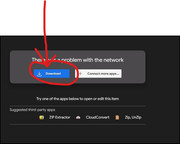
Click on the Download option. Ignore the other messages.
Alfred, I've also sent you a PM.
Eric
Jim, I've sent you a PM with a link for what you need.
Eric
Alfred - Probably but first I need clarification of what exactly he has before taking it further. The comment "I have the export codes, but they will not import onto a new computer or activate the MoviePlus X6" doesn't make sense to me.
Somewhere I have a copy of the X6 disc which I can temporarily upload to Google Drive. When I do I'll also give you the link so you can add it to your library.
Jim, to avoid duplication and confusion please continue with your problem in your own thread https://punster.me/serif/viewtopic.php?id=899 where I've replied.
Posts found: 101 to 125 of 454