126

(3 replies, posted in WebPlus)

I don't have x7 installed but hopefully this method from x8 may do.

On your page right click the search box > HTML Source

On the page that opens, amongst all the code you may see something like this

    $('#site_search_1_input').keypress(function(event) { if ( event.keyCode == 13 ) window.location.href = 'index.html?site_search_results_1='+document.getElementById('site_search_1_input').value+'&depth=0&swr=false'; });

    $('#site_search_1_button').click(function(event) { window.location.href = 'index.html?site_search_results_1='+document.getElementById('site_search_1_input').value+'&depth=0&swr=false'; });


You need to find the search box and button ID's, in this instance they are #site_search_1_input and #site_search_1_button

Copy the following and on your page do Insert > HTML Fragment, click on the page and click "Paste to Head"

<style>
#site_search_1_input, #site_search_1_button{
height: 40px !important;
font-size:24px;
}
</style>

This will make the search bar and button the same height.
Change the ID's to your ID's - DO NOT remove the comma or space after it.
Change the height to what you need
Change the font size to what you need
Reduce the size of the HTML Fragment and park it somewhere on the page.

Joe

127

(132 replies, posted in General Discussion)

I love this one

https://i.postimg.cc/v4rZY7pm/cat2.jpg

One major issue is if your broadband goes down so does the phone. No emergency calls.

Should the broadband go down, BT presently have a Smart Hub2 system that will auto switch the router via a sim to the mobile network to maintain broadband. If that is issued to every broadband installation it would alleviate a lot of issues.

129

(5 replies, posted in WebPlus)

They are saying it's down to the 'Root' folder and my 'home' page isn't down as 'index' but it is.

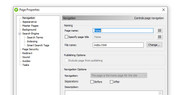
Just checking, but do your home page properties look like this with index.html as the file name?


https://i.postimg.cc/HVW9Njk2/X8.jpg

Came across this a couple of weeks ago when looking to replace our old DECT phones.

https://www.bt.com/broadband/digital-voice

Joe

Hi William,

How would the receiver of the message write the unicode character before passing the complete message to it's intended recipient?

Joe

132

(82 replies, posted in General Discussion)

If it's completely gone, then all that invaluable information and support has been lost, and that makes it an even greater disgrace

Yes it's completely gone. Some or perhaps all of the contributors to the old forums who have transfered to here may still have example/demo files, but you need to ask a specific question to find out.

...just abandoning the software and users without a care and then then closing down the support forum

From memory, the WebPlus software could not be modified to keep pace with other emerging responsive software. It needed to be completely rewritten as a new product line. The demise of Webplus was hastened by the departure of the principal programmer/developer. Serif chose to go in a different direction and dump the Plus range.

Hi Carlo,

The screenshots you listed are showing a system that Nigel (nfc212) wrote and used along with a third party grid system (https://github.com/thisisdallas/simple-grid) which he also tweeked. Sadly Nigel is no longer with us, or his files (unless someone on the forum has copies) and to make it work would require some programming.

There are times when it's better to start from scratch and bite the bullet by learning how to use new software. As Alfred has suggested, WYSIWYG Web Builder is a good program https://www.wysiwygwebbuilder.com/ , I have it and it will do everything you need plus a whole host of other things all out of the box. Yes there is a learning curve but the results are worth the effort.

Joe

134

(2 replies, posted in General Discussion)

The headlight primarily serves to aid in avoiding the Texas nocturnal lawn gnomes.

lol lol lol

135

(2 replies, posted in General Discussion)

Having just bought a used mower which requires some mechanical TLC, in the course of finding out what the levers and switches do, I found a headlamp switch. Now you can call me old fashioned but I have never attempted to cut grass at night, nor do I know of anyone or heard of anyone who does. Do you, or do you know of anybody who does? If indeed it is rare, why do these things have headlights?

Joe

136

(3 replies, posted in WebPlus)

In the Webplus FTP Account details have you tried one at a time or in combination:

1. Check the SFTP box above Account Name
2. Check/uncheck Passive mode box

At the bottom of the Account details you have Advanced settings:
3. Check the encrypt connection box, SSL 3.0 and SSL implied. Note that both TLS1.0 and SSL3.0 are both deprecated but may be worth trying.

Joe

137

(11 replies, posted in General Discussion)

Hopefully not. Most of the posts I've responded to have been inWebplus. William was always the most prolific poster on here with many replies from Jack, but has not posted anything since February. Does anyone know if he is OK?

Joe

138

(1 replies, posted in WebPlus)

You may not need all of the code just to stream the radio.

If you are using a button to tune in to the stream:
Double click button > Hyperlink tab > Internet page > paste

http://boogie.vside-radio.com:8406/stream

in the URL.
In the Target Window tab use Named window > give it a name > Check the javascript popup code box > Set sizes and position.

See attached file and view the entries as described above.

Joe

139

(4 replies, posted in WebPlus)

I use WYSIWYG Web Builder https://www.wysiwygwebbuilder.com/ It's another learning curve but In my view it's a good alternative with a mountain of standard features and lots of available addons.

Joe

140

(1 replies, posted in WebPlus)

Use a panel for the tunein box and place all the items that need to be in tunein on the panel.

Joe

141

(2 replies, posted in WebPlus)

You should have posted this in the Webplus section

To get rid of the code delete the images that the codes refer to.

Joe

142

(4 replies, posted in WebPlus)

tomh is correct. There is a transparent image 960 x 1110px positioned 227px from the top.

See the highlighted line in the image below.


https://i.postimg.cc/YLcSQyJp/Webp.jpg

143

(1 replies, posted in WebPlus)

Registration key is 881887

Joe

This is a summary of your page by Google

https://search.google.com/test/mobile-f … hGHoFl_94w

Joe

i'v been working alot more on my site
but the play/pause buttons work but no sound on mobile device
there's sound on laptop but not mobile. wondering if you could try it out
https://coolvibes-reloaded.com

Play/pause works on my iphone.

Joe

strawbs89 wrote:

also does that script accept mpeg links

this is a fake example: http://elfbar.com/stream

Try it and see.

Joe

strawbs89 wrote:

it plays and pauses on this page

but not on my jj2.wpp

A couple of issues on your page.

1. Staff Schedule fragment -
a. You had included head and body tags with the code and pasted it into Body. I've copied your original fragment and placed it on the pasteboard for reference. The one that's on the page I've separated the head and body coding and moved them to the correct places.
b. The audio still would not work as expected. This was due a conflict between two different versions of Jquery, v3.5.1 in the staff schedule fragment and 1.11.1 which Webplus uses for the show/hide actions of the audio buttons. To remedy I've removed the actions from the buttons and put a small jquery script in the fragment.

File attached.

Joe

also i'm pushing play yes that works but can't pause it i have done what you've said
i've put it on my site

Separate the two buttons and try it again. If it works place the play button on top of the pause button and bring the play button to the front and preview again.

If it fails upload a single page project file with the butons and fragment on it, with your next post.

Joe

To use the codepen script you would also need to download font awesome and include it in your site.

A simpler way is use a play image and a pause image and put one on top of the other, add a couple of actions to each with an onclick line of javascript, and a tiny bit of css. See the attached file, pages Home and Three. Preview in a browser.

If you want to use it, do it the easy way. Slide one image off the other > copy both to your page. Copy the HTML fragment and paste on your page. Preview in a browser. If all OK double click the fragment and enter the names of your audio files.

Joe

I remember posting the same image with a different background in the old forum