Skip to forum content
Alfred's Serif Users' Forums
An independent forum site for members of the Serif software community
You are not logged in. Please login or register.
Active topics Unanswered topics
Tips and Announcements
Automated signup has been disabled for these forums. If you wish to register, please send an email to admin[at]punster[dot]me stating your preferred username.
Embedded images: Click on the  Add image to post link below the message box. Your photo will be uploaded to the postimage website and then shared here via a thumbnail link. Click on the thumbnail for a larger view.
Private messages: There is no pop-up alert for new PMs on these forums, so you need to look out for the PM link (near the top right-hand corner of any forum page) becoming bold.
HAPPY NEW YEAR!
Search options (Page 6 of 87)
Pages Previous 1 … 4 5 6 7 8 … 87 Next
What files and subfolders do you have in the ‘public_html’ folder?
Nicely done! 
Pioneer wrote:It was a work inspired by Mensch Mesch. and V_kyr in the original Serif Forum.
I don’t know whether Norbert (‘Mensch Mesch’) is still around, but sadly it looks as though ‘v_kyr’ is no longer with us.
Alfred wrote:William last posted here two months ago (exactly two months ago yesterday, as it happens) and I replied to that post the very same evening. That was on a Tuesday, and I can see that he visited again on the following Saturday morning but he didn’t post a response.
Update: I see that William visited here at the beginning of this month, but once again he didn’t make a post.
It’s very ‘busy’, but I presume that’s a deliberate stylistic choice!
If you want to make the colours in the top right quadrant less washed out, an easy way to achieve that would be to duplicate that part of the design (or duplicate the entire design and apply a layer mask) and then set the layer blend mode to Multiply.
APoster wrote:That's why I asked the BlueHost Chat tech to recreate the Index file for me. It now works fine in my FireFox browser, but there were too many images for him to add them to the Index. I asked Alfred above, if there is a way to add the images as a group, instead of as 191 separate files. Meanwhile, I can access & open the image files in my FTP client. But that's not as convenient as using my browser.
If you (or BlueHost tech support personnel) have been adding image files to something called ‘Index’, then Index must be a folder rather than a file. If you find it tedious to drag and drop multiple selections, one simple alternative is to compress the selected files to a *.zip archive, add the zip file to the remote folder, and then unzip that copy of the archive so that the individual files are directly accessible once again.
APoster wrote:This is what the Index looks like in my browser, with only one image, and a few smiles. I don't need the smiles anymore.
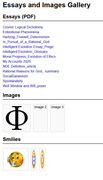
The only image shows a Greek capital letter phi. Can’t you include that as a text character rather than an image?
APoster wrote:This is part of the list of images as displayed on WinSCP, my FTP client :
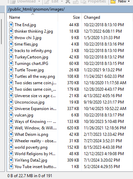
The file ‘Turnings chart’ has a JPG extension instead of a jpg extension: it’s best to be consistent. I suspect that ‘Uinverse’ (in the first filename listed after the Ts) contains a typo.
Is there a particular reason why the ‘images’ folder is a subfolder of the ‘gnomon’ folder?
APoster wrote:[Now I need to know how to add 191 images to the Index, as a group, instead of one by one. I'm still wondering about that.
It looks as though you should be able to select a block of files in the usual way: click on the first one and then Shift-click on the last one. Once selected, effect the transfer by dragging the selected block from the source pane to the destination pane.
https://winscp.net/eng/docs/task_upload
Your hosting provider doesn’t need to support WebPlus specifically. If you use the built-in FTP uploader it should all just work as long as the host supports the FTP variant that you’re trying to use, and there’s always the alternative of publishing to a local folder on your PC and then using a third-party program such as FileZilla to upload the published files.
Please note that ‘index.html’, ‘Index.html’ and ‘Index.HTML’ all refer to different files unless you’re using Windows hosting.
You’re very welcome, Stevie! I’m glad I was able to help.
‘Format > Update Object Default’ will only work for the current session. If you want the change to persist, you need to go to the Tools menu and choose ‘Save Default Settings’.
Ali wrote:The only way to do [text wrap] is manually by eye.
What she said! And as Andrew has pointed out:
TryMeadowWeaver wrote:Text reflows based on screen size, browser, font rendering and user settings, so what you see in the editor is always a best-case preview.
You can’t possibly cover all bases, but at a minimum you should view your web pages in Safari, Firefox, and a Chromium-based browser, so that you can compare the different handling by the main browser engines (WebKit, Gecko, and Blink, respectively). Safari for Windows hasn’t been updated in very many years, so it probably isn’t worth the bother, but Safari is the default browser on Apple devices.
APoster wrote:The BothAnd spelling is an idiosyncrasy of my philosophical blog. The Either-Or and Either/Or discrepancy is a result of two operations separated by an interval of time. The body text was copied and pasted from a separate page.
Since you describe yourself as “sort of perfectionist”, I’d have thought you’d strive for consistency in your terminological choices. If you want to retain the BothAnd style, I would recommend changing both Either-Or and Either/Or to EitherOr.
There are several rendering engines out there, and each one has its idiosyncrasies. This is why any serious web developer needs to test their sites in a range of browsers, allowing them to identify any problems that may occur in, say, a WebKit browser but not in a Chromium browser.
The whole thing is made more complicated by the effects of browser plugins and extensions which can affect the way the browser displays external content such as YouTube videos. If you spot differences between a page viewed in MS Edge on a desktop PC and the same page viewed in MS Edge on your laptop, check that the same addons are installed and enabled in both.
Joe wrote:I view this forum as a two way discussion
Any forum thread should consist of a discussion between two or more parties, unless one person is talking to themselves! Otherwise you might as well not bother posting at all.
The OP is self-described as “an 80 year old dog, not inclined to learn new tricks”, which on the face of it seems to rule out a “think outside the box” approach.
APoster wrote:This is another example of the problem with HTML text and images. I used to automatically flow text around images but I've forgotten how to do that. And WP Help is no help. So, I try to do it manually.
The top image below is what it looks like in WebPlus8. In this case, I simply indented the text on each line individually. I wasn't able to make the text auto-flow around the picture. The bottom image is what it looks like in a browser. Not WYSIWYG.
What am I missing?


I think having the heading centre-aligned with the picture (as in the first example) looks better, but the blank line before ‘I coined the term’ (as in the second example) is also needed.
On a stylistic note, why do you have ‘Either-Or’ in the heading but ‘Either/Or’ in the body text, and why have you used the camel-case form ‘BothAnd’ (instead of ‘Both-And’ or ‘Both/And’ to match one or the other of the above)?
Ali wrote:There never was any flowing text in WebPlus, only in PagePlus.
It was to be expected that the text in the published HTML would be static, but I’ve never understood why WebPlus didn’t have reflowable columns and linked text frames available in Design View.
APoster wrote:Thanks, but I'm an 80 year old dog, not inclined to learn new tricks.
Thanks for the clarification! When you wrote “I’m not in a position to buy” I thought you were referring (solely) to budgetary constraints. Being disinclined to put in time and effort to become familiar with another product is rather different.
APoster wrote:But I still have enough energy to go back and manually insert hyphens to make lines and paragraphs come out right.
Do you also have enough energy to test each page of your site in multiple browsers on both desktop and mobile devices?
Ali wrote:The only way that you can guarantee that a web page will look like a magazine article is to turn the magazine page into a picture and add it to your page, but the text would not be searchable. This is why a lot of people will provide PDFs of things such as menus that they want visitors to see with the correct formatting.
Text in a PDF document should be searchable, but PDF is all about fixed formatting (so we’re back to the problem of viewing the content on a variety of screen shapes and sizes).
APoster wrote:I'm not in a position to buy Affinity or WordPress or other alternatives.
The product from WordPress.org is an open-source publishing platform, and even the commercial site WordPress.com offers a free plan.
Bad_Wolf wrote:Very much success, much happiness and a good health to you Alfred.
From the bottom of my heart, I want to thank you for all the help and advice I received from you. You are a truly kind and helpful person.
Thank you very much, Chris.
Bad_Wolf wrote:My Internet is restored and all the Affinity apps work again as normal.
I’m pleased to hear that! I wish Canva/Serif were more transparent about the connectivity requirements of the Affinity apps.
Alfred wrote:Thanks for your good advice, Geoff!
And apologies to Vicki for going ‘slightly’ off topic!!
That’s a pity! At least you had a good restaurant meal quite recently, even if it was quite expensive.
I don’t think I’ve ever had butter chicken, but I understand that it’s similar to chicken tikka masala. However, it includes fenugreek and (as you might expect!) copious amounts of butter.
Happy New Year from one Alfredo to another! And to everyone else here, of course.
Bad_Wolf wrote:So far I have tried:
Completely uninstalling and reinstalling the applications (EXE/MSI installer)
Running the applications as administrator
Attempting to reset preferences using CTRL on launch
Restarting the system multiple times
Unless you specifically need the MSI/EXE functionality (e.g. for connecting to third-party software) I would try uninstalling that version and then installing the MSIX version instead. I’m sure you don’t need me to tell you that you shouldn’t have to do any of that to get the Affinity apps working on your system!
I hope you manage to sort it out soon.
Best wishes for the year ahead.
Posts found: 126 to 150 of 2,165
Pages Previous 1 … 4 5 6 7 8 … 87 Next